
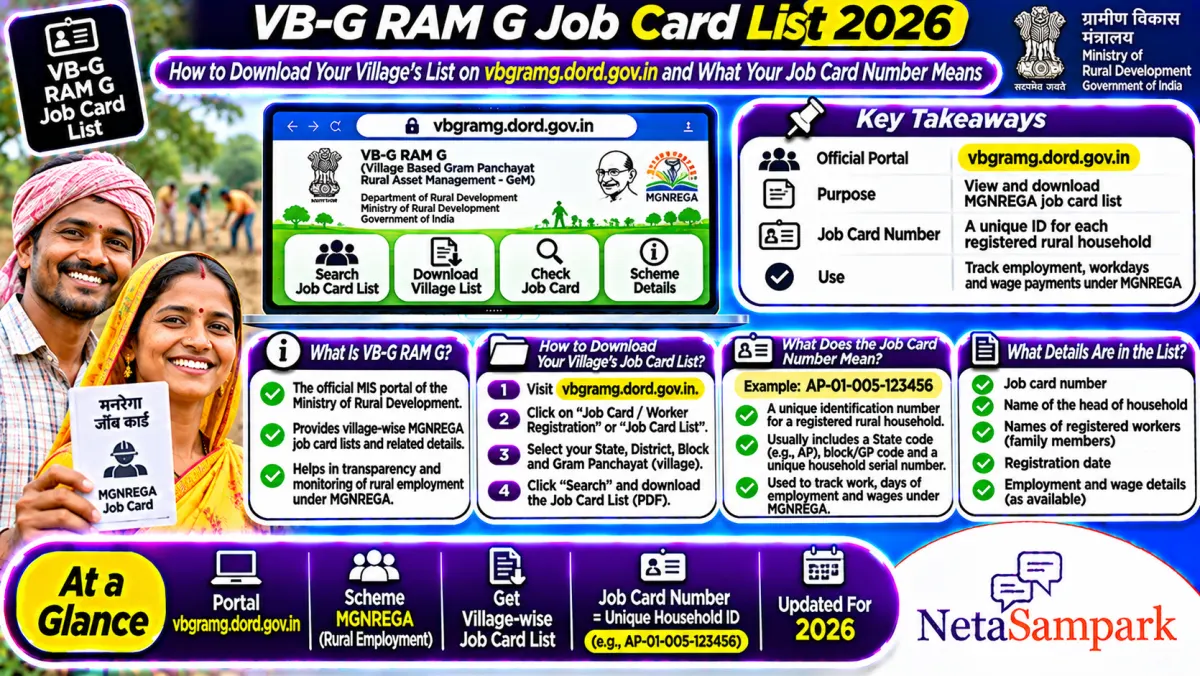
You can see your gram panchayat's full job card list on the official portal vbgramg.dord.gov.in under State Report. Pick your state, district, block and panchayat, then open the Job Card / Employment Register. Old MGNREGA job cards with e-KYC done stay valid until the new Gramin Rozgar Guarantee Cards are issued.
Updated 19 November 2026
Lots of people search for "job card list" with their village name, like a panchayat in Dharmapuri district of Tamil Nadu, or paste a full job card number into a search box hoping it opens their record. This guide shows the actual official path, how to save the list as a PDF on your phone, how to read the long job card number, and what to do if your family isn't on the list.
One thing first. MGNREGA was replaced by the Viksit Bharat Guarantee for Rozgar and Ajeevika Mission (Gramin), or VB-G RAM G, from 1 July 2026. The reports moved to the new portal, but the panchayat-wise job card register works the same way it always did. If you want to check your own card, muster roll and wages, our VB-G RAM G job card check guide covers that.
Quick facts
| Item | Details |
|---|---|
| Official portal | vbgramg.dord.gov.in (Ministry of Rural Development), State Report section |
| Helpline | Your Gram Panchayat secretary or the block Programme Officer. The portal's Grievance Redressal link and your state's VB-G RAM G helpline also work |
| Fee | None. Viewing the list and getting a job card are free |
| Deadline | None for viewing. Work must be given within 15 days of a demand |
| Documents | None to view the list. To register a new household: names, ages and address of adult members, given to the Gram Panchayat |
| Who is on the list | Every registered household in the panchayat, with the job card number and head of household |
| Old MGNREGA cards | Valid till new Gramin Rozgar Guarantee Cards are issued, if e-KYC is done |
| Days of work | 125 days per household per financial year under VB-G RAM G |
How to download your village's job card list, step by step
The official route is the State Report on the VB-G RAM G portal. Menu names can shift a little from state to state, but the flow is the same.
1. Open vbgramg.dord.gov.in. In the top menu, tap "Analytics & Reports" and then "State Report".
2. Pick your state. The page shows a list of states and UTs, for example TAMIL NADU, TELANGANA or UTTAR PRADESH. Tap yours.
3. Choose the financial year if asked. For the current list, pick 2026-27.
4. Choose district, then block, then gram panchayat. For example, Tamil Nadu, then Dharmapuri, then Palacode block, then your panchayat.
5. Open the job card register. Under the job card or registration section (usually marked R1), tap "Job card/Employment Register". In older layouts it's called "Job Card/Employment Register" with a link next to it.
6. Find your family. The list shows each job card number with the head of household's name. Tap your job card number to see the card, members and work days.
How to save it as a PDF
The portal shows the list as a web page, not a ready PDF. To keep a copy:
• On a phone: open the list, tap the browser's three-dot menu, choose Share, then Print, then "Save as PDF".
• On a computer: press Ctrl+P and pick "Save as PDF" as the printer.
Save your own job card page the same way. It helps when you need to show your card number at the panchayat or bank.
What does my job card number mean?
Your job card number isn't random. It's built like an address. Take a made-up sample number like TS-01-002-003-004/5678 (a Telangana-style format). Read it left to right:
| Part | Example | What it stands for |
|---|---|---|
| State code | TS | The state (TN for Tamil Nadu, UP for Uttar Pradesh, and so on) |
| District code | 01 | Your district |
| Block code | 002 | Your block or mandal |
| Panchayat code | 003 | Your gram panchayat |
| Village code | 004 | The village inside the panchayat |
| Household number | 5678 | Your family's registration number |
So when you go to the State Report, the number itself tells you which district, block and panchayat to pick. That's the fastest way to find your record if you only have the number written on an old card.
Searching the full number on Google or on a blog won't open your record. The number only works inside the official portal or your state's VB-G RAM G app.
Who should be on the job card list?
Under VB-G RAM G, every rural household whose adult members are willing to do unskilled manual work can register. The household gets a card, and each adult on it can ask for work.
• Old MGNREGA card holders: your card is still valid if e-KYC is done, according to the Ministry's FAQ dated 11 May 2026. It stays valid until the new Gramin Rozgar Guarantee Card is issued.
• New households: if you never had an MGNREGA card, give the names, ages and address of your adult members to the Gram Panchayat and ask for a Gramin Rozgar Guarantee Card.
• Members who moved out or passed away should be removed at the panchayat, so nobody can mark false work in their name.
What if your name isn't on the list?
Don't panic. A missing name usually has a simple reason.
1. Check the right panchayat and year. If your village was shifted to a new panchayat or block, your card may sit under the new one. Try 2025-26 as well as 2026-27.
2. Check if e-KYC is pending. Cards without e-KYC can get flagged. Ask the panchayat secretary or the field assistant to complete it.
3. Check if your card was deleted. Ask the panchayat for the reason in writing. Deletions are supposed to follow a proper check, not happen quietly.
4. Apply again if needed. Submit your household details to the Gram Panchayat for a Gramin Rozgar Guarantee Card. Keep a dated receipt.
5. Complain if nothing moves. Use the Grievance Redressal link on the portal or your state's helpline. Our guide on VB-G RAM G grievance rules explains the 7-day enquiry and 15-day deadline.
What else the list helps you catch
The panchayat list isn't just for finding your number. It's also a good way to spot problems.
• Names you don't recognise. If you see a "household" in your village that doesn't exist, that's a red flag for fake entries.
• Work days you didn't do. Tap your card and check the days and wages shown. If attendance is shown for days you didn't work, raise it at the next Gram Sabha or social audit.
• Wages not paid. Wages should come weekly, or within a fortnight of the muster roll closing. If they're late past 15 days, you're owed delay compensation of 0.05% of the unpaid wages per day, as per the Ministry's FAQ.
Attendance is now taken by face authentication. If you're having trouble with it, our VB-G RAM G face attendance guide explains the exceptions for no network or device problems.
Documents checklist
☐ Your job card number (or old MGNREGA card)
☐ Aadhaar of each adult member, for e-KYC
☐ Bank or post office account linked for DBT
☐ Mobile number for updates
☐ A dated receipt for any new application or complaint
Frequently asked questions
How do I download the VB-G RAM G job card list for my village?
Go to vbgramg.dord.gov.in, open Analytics & Reports, then State Report. Pick your state, district, block and gram panchayat, and open the Job card/Employment Register. Use your browser's Print option to save it as a PDF.
Is my old MGNREGA job card still valid in 2026?
Yes, if e-KYC is done. The Ministry of Rural Development's FAQ dated 11 May 2026 says old cards stay valid till new Gramin Rozgar Guarantee Cards are issued under VB-G RAM G.
What does the number on my job card mean?
It's state code, district, block, panchayat and village codes, then your household number. For example, in a sample number like TS-01-002-003-004/5678, TS is the state code and 5678 is the household number.
Can I search my job card by Aadhaar or name online?
The national portal lists cards panchayat by panchayat, with the head of household's name. Some states also have their own apps. If you can't find it, the Gram Panchayat secretary can look it up by name.
How many days of work do I get under VB-G RAM G?
125 days per household in a financial year, up from 100 days under MGNREGA. Work has to be given within 15 days of asking, or you can claim unemployment allowance. Our 125 days explainer has more.
Final reminder
Find your panchayat's list on vbgramg.dord.gov.in, save your own page as a PDF, and check that the names and work days are right. If something's off, raise it at the panchayat in writing. And if the panchayat doesn't act, take it to the people you elected. Find your MLA and MP on NetaSampark and see who represents your area when local fixes don't work.
Sources
• VB-G RAM G official portal, Ministry of Rural Development
• VB-G RAM G: State Report (state, district, block and panchayat reports)
• Ministry of Rural Development: VB-G RAM G FAQ, 11 May 2026 (PDF)