
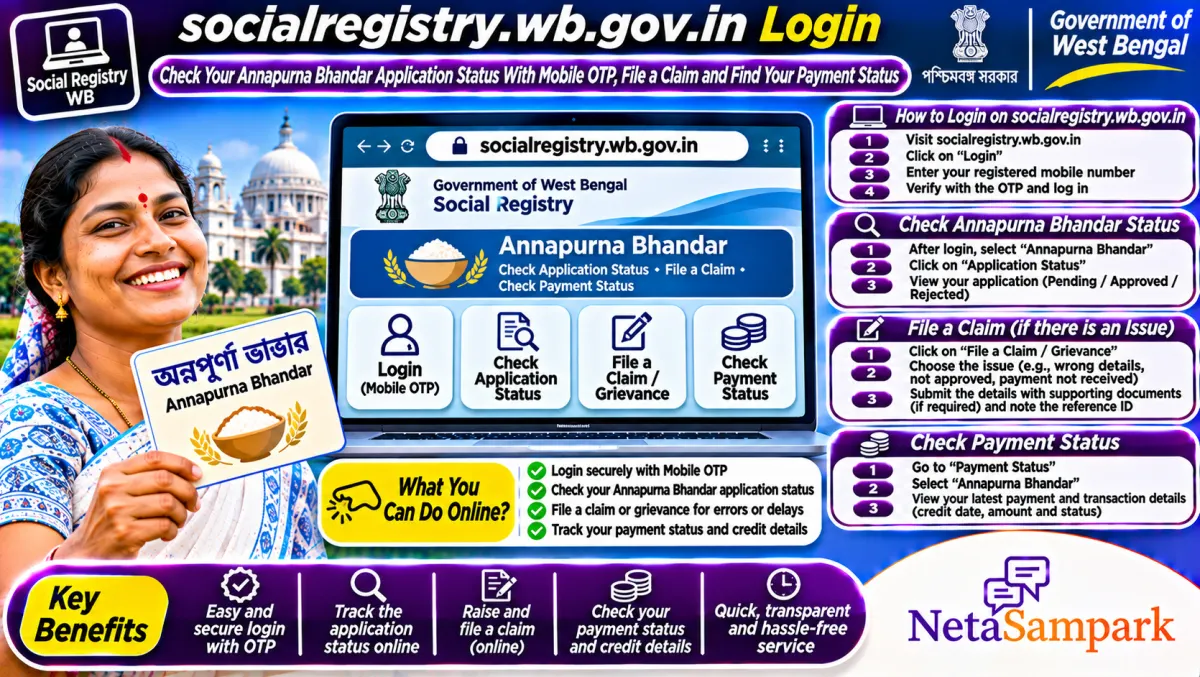
Check your status at socialregistry.wb.gov.in: tap Citizen / Family Login, choose your district, enter the mobile number you applied with and type the OTP. Your application status shows on the dashboard. For money actually paid, your bank passbook or statement is the proof.
Updated 13 November 2026
Lots of women in West Bengal type "social registry wb gov in" into Google, land on a page with two login boxes and get stuck. Which one is yours? What does "Pending at BDO" mean? And why does the portal say approved when the ₹3,000 hasn't come?
This guide walks you through the official West Bengal Family Level Data Collection portal, the one at socialregistry.wb.gov.in, step by step. It also tells you where to look for money already paid, because this portal isn't a bank statement.
Quick facts
| Item | Details |
|---|---|
| Official portal | socialregistry.wb.gov.in (Family Level Data Collection Portal, Govt. of West Bengal) |
| Helpline | Your BDO office (rural) or municipality ward office (urban). The portal home page doesn't list a helpline number |
| Fee | Free. Nobody should charge you to log in, check status or file a claim |
| Deadline | No deadline to check status. Fix bank or Aadhaar problems before the next monthly instalment |
| Documents | The mobile number you applied with, Aadhaar, voter ID (EPIC), bank passbook, application ID if you have it |
| What the portal does | Application status and claim grievances, using your applied mobile number and OTP |
| Scheme amount | Annapurna Bhandar: ₹3,000 a month for eligible women, as per news reports |
What is socialregistry.wb.gov.in?
It's the West Bengal government's Family Level Data Collection Portal. The home page says citizens can check their application status and file claim grievances by logging in with the mobile number they applied with and an OTP. There's a separate Department Officer Login, which is only for officials. Don't use that one.
This is the portal families used to register for Annapurna Bhandar (also called Annapurna Yojana), the ₹3,000 a month scheme for women that replaced Lakshmir Bhandar from 1 June 2026, according to news reports. If you were an old Lakshmir Bhandar beneficiary, your record should have been moved to the new scheme.
How to log in to socialregistry.wb.gov.in step by step
1. Type the address yourself. Open your browser and type socialregistry.wb.gov.in. Check that the address ends in .wb.gov.in. Don't click sponsored links or copycat sites with names like "socialregistry wb com".
2. Pick Citizen / Family Login. Ignore the Department Officer Login box.
3. Select your district. This comes first. If you pick the wrong district, your record won't show.
4. Enter your mobile number. Use the exact number you gave in the application. A different number, even your husband's or son's, won't open your record unless that's the one you applied with.
5. Solve the captcha and request the OTP. If the captcha is hard to read, refresh it.
6. Type the OTP. It comes by SMS within a minute or two. If it doesn't, wait two minutes and try again. Don't hit the button ten times.
7. See your dashboard. Your application and its current status show here.
Never share this OTP with anyone who calls you, even if they say they're from the BDO office or the bank. Officials don't need your OTP.
What does your application status mean?
The Indian Express explained the common status messages in an August 2026 report. Here's what each one means and what to do.
| Status | What it means | What you should do |
|---|---|---|
| Approved | Your application passed verification | Wait for the credit, then check your passbook |
| Pending at BDO | Verification isn't finished yet | Check again after 15 to 30 days, or visit the BDO office |
| Rejected | You've been found ineligible | Ask the BDO office for the reason and file a claim or appeal |
| Bank account invalid | Your bank details don't match your Aadhaar record | Give a copy of your passbook at the BDO office and get Aadhaar seeding checked at your bank |
| Payment pending | Approved but money not released yet | Wait for the next payment cycle, then check again |
Where do you check whether the money was actually paid?
This is where most people get confused. The social registry shows your application status. It isn't a bank statement.
• The old social security address. Many guides still send you to a "Track Applicant" page on socialsecurity.wb.gov.in. When we checked on 13 November 2026, socialsecurity.wb.gov.in opened the same Family Level Data Collection portal, and the old Track Applicant page didn't load. So just use the citizen login described above.
• Your bank passbook. This is the real proof. Get it updated at the branch or a kiosk, or ask for a statement. SMS alerts sometimes don't come even when the money is in.
A Times Now Bangla report on 9 November 2026 said the November 2026 instalment started reaching accounts from 6 November 2026, earlier than the usual mid-month date. Credits go out in batches, so a few days' gap between neighbours is normal.
How to file a claim or grievance on the portal
If your application was rejected, or your details are wrong, the same login is where you raise a claim.
1. Log in with your district, mobile number and OTP.
2. Open your application from the dashboard.
3. Look for the claim or grievance option and write clearly what's wrong. For example, "Name spelling differs from Aadhaar" or "Rejected though I'm 34 and not a taxpayer".
4. Upload any supporting document it asks for, like your Aadhaar or passbook.
5. Note down the reference number and the date.
6. Follow up at the BDO or ward office after a week or two if the status doesn't change.
Why does it say approved but the money hasn't come?
Usually it's a bank problem, not a government one. Check these:
• Aadhaar seeding for DBT. Your account must be the one mapped to your Aadhaar for direct benefit transfer. Linking Aadhaar to an account isn't always the same as seeding it for DBT. Ask the bank to check.
• Name mismatch. If your name on Aadhaar and in the bank differs, the payment can fail.
• Dormant or closed account. An account you haven't used in years may be frozen.
• Wrong account. If you opened a new account recently, the money may be going to the old one.
Our detailed Annapurna Bhandar payment not credited guide walks through each fix, including how to complain if nothing works.
Documents to keep ready
☐ The mobile number used in your application, switched on, for the OTP
☐ Aadhaar card
☐ Voter ID (EPIC)
☐ Bank passbook of the account seeded with Aadhaar
☐ Application ID or acknowledgement slip, if you have it
☐ Swasthya Sathi card, if you have one
Frequently asked questions
How do I log in to socialregistry.wb.gov.in?
Open socialregistry.wb.gov.in, choose Citizen / Family Login, select your district, enter the mobile number you applied with, solve the captcha and type the OTP. Your status shows on the dashboard.
I forgot which mobile number I used. What now?
Try every number your family used during the camp. If none works, go to your BDO or ward office with your Aadhaar and EPIC. They can look up your record and tell you which number it's linked to.
Can I see Annapurna Bhandar payment history on socialregistry.wb.gov.in?
The portal is for application status and claims. For payments, update your bank passbook or get a statement. The passbook is the final proof. The old socialsecurity.wb.gov.in address now opens the same portal.
Is socialregistry.wb.gov.in the official site?
Yes. It's the West Bengal government's Family Level Data Collection Portal. Always check that the address ends in .wb.gov.in before you type your number or OTP.
My status says rejected. Can I apply again?
File a claim through the same login and visit your BDO or ward office to ask the reason. Don't submit a fresh application on your own, since a duplicate can cause more delay.
Final reminder
Log in at socialregistry.wb.gov.in with the mobile number you applied with, note your exact status, and if it's approved but unpaid, get your Aadhaar seeding checked at your bank before the next instalment. If the BDO office keeps sending you back without an answer, find your MLA on NetaSampark's West Bengal page and take it to their office. West Bengal readers waiting on housing money can also check our Paschim Banga Awas second instalment guide, and land owners can see our Banglar Bhumi khatian guide.
Sources
• Family Level Data Collection Portal, Govt. of West Bengal
• socialsecurity.wb.gov.in (now opens the same Family Level Data Collection portal)
• The Indian Express on Annapurna Yojana status messages, August 2026 (news report)
• CNBC TV18 on checking Annapurna Yojana beneficiary status (news report)
• Times Now Bangla on the November 2026 instalment, 9 November 2026 (news report, Bengali)