
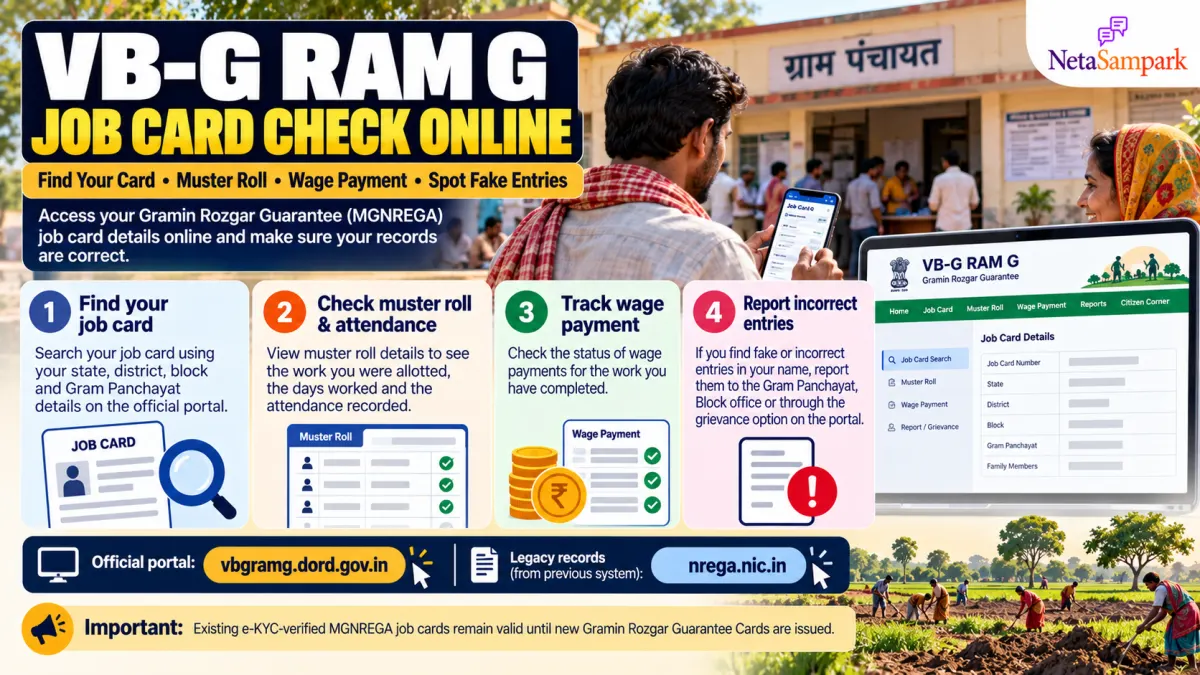
If you work under India's rural employment guarantee programme, checking your job card, attendance and wage payments online can help you catch errors before they become bigger problems.
The programme has transitioned from MGNREGA to Viksit Bharat – Guarantee for Rozgar and Ajeevika Mission (Gramin), or VB-G RAM G, with nationwide implementation from 1 July 2026. Existing e-KYC-verified MGNREGA job cards remain valid until new Gramin Rozgar Guarantee Cards are issued. Workers should not be denied employment merely because their e-KYC is pending. Official government announcement.
This guide explains how to check your job card, inspect muster-roll entries, track wage payments and report suspicious records.
Where to check your VB-G RAM G job card online
Use the official government portal to access available job-card, work and payment records.
- VB-G RAM G portal: vbgramg.dord.gov.in
- Legacy NREGA portal: nrega.nic.in
- Government information and scheme FAQs: Press Information Bureau — VB-G RAM G
The new portal and legacy systems may display different records during the transition. Use the relevant official portal for the financial year and record you need to check.
How to find your job card online
Follow these steps to locate your household's record.
Step 1: Open the official portal
Visit the VB-G RAM G website.
Step 2: Select your location
Look for the job-card or beneficiary information section. Depending on the available report, you may need to select:
- State or Union Territory
- District
- Block
- Gram Panchayat
- Financial year
Step 3: Find your household
Search the displayed list for your job-card number, household name or worker details, wherever the portal supports these options.
Step 4: Check every listed family member
Confirm that the names of registered adult workers are correct. Check spelling, household details and any available card status or verification information.
Step 5: Save a copy
If the portal offers a download or print option, save your job card or relevant record. Keep a copy of the number for future wage and attendance enquiries.
If you cannot find your record online, visit your Gram Panchayat or contact the relevant block-level programme office. A missing online entry does not, by itself, establish that your registration has been cancelled.
How to check your muster roll and attendance
A muster roll is the official attendance record for workers assigned to a particular work. It helps determine how many days of work were recorded for wage calculation.
After opening the relevant work or muster-roll report on the official portal, check the following:
| What to check | Why it matters |
|---|---|
| Your name | Confirms that the record relates to you |
| Work or project name | Identifies the work against which attendance was recorded |
| Muster-roll number | Helps locate the official attendance record |
| Attendance dates | Shows the days recorded as worked |
| Days worked | Helps you compare the record with your own attendance |
| Wage amount | Helps identify a possible calculation or payment discrepancy |
What if attendance is shown for a day you did not work?
Do not ignore the entry. Record the work name, muster-roll number, date and the number of days shown.
Compare the entry with your own records and, if possible, speak to other workers who were present at the worksite. Submit a written complaint to your Gram Panchayat or the relevant programme officer and request verification of the attendance record.
Do not accuse a person publicly based on a single unexplained entry. Ask the authorities to investigate the discrepancy.
How to check your wage payment status
Under VB-G RAM G, wages are transferred directly to workers' bank or post office accounts through Direct Benefit Transfer (DBT).
The government states that wages should be paid weekly or no later than 15 days after the muster roll closes. Eligible workers may be entitled to delay compensation if payment is late. Read the official FAQs.
To check your payment:
- Open the official VB-G RAM G portal or the relevant legacy report.
- Select your location, financial year and work details, where required.
- Look for wage-payment, Fund Transfer Order (FTO) or transaction-status information.
- Compare the amount shown with your recorded attendance and expected wages.
- Check your bank or post office statement for the actual credit.
A payment entry in a government report does not always mean the money has reached your account. If the status and bank statement do not match, ask the Gram Panchayat or programme office to trace the transaction.
Never share your ATM PIN, UPI PIN, password or OTP with anyone claiming to help release your wages.
How to spot fake or incorrect job-card entries
Regular checks can help you identify possible errors or misuse of your identity.
Look out for these warning signs:
- Fake attendance: Workdays are recorded when you were not present.
- Incorrect work allocation: A project appears against your name that you did not join.
- Wrong number of days: The recorded attendance differs from the days you actually worked.
- Missing wages: The muster roll records work, but the expected payment is not reflected in your account.
- Incorrect family details: An unknown person appears on your household job card.
- Unexplained changes: Your card details or status change without your knowledge.
An error can have several causes, including data-entry mistakes or delayed updates. Verify the details before concluding that fraud has occurred.
What to do if someone has used your name
If you find suspicious attendance, work allocation or payment records, act promptly.
1. Save the evidence
Keep screenshots or printed copies of the relevant job card, muster roll, work details and payment status. Note the dates, work name and muster-roll number.
2. Submit a written complaint
Approach your Gram Panchayat and the relevant block-level programme officer. Clearly state which entries are incorrect and ask for a formal verification.
Include your job-card number and supporting records. Obtain an acknowledgement or complaint reference number.
3. Escalate if the issue is unresolved
If the discrepancy is not corrected, escalate the complaint to the district programme coordinator or the designated grievance authority under your state's applicable procedures.
You can also consult your State Rural Development Department's official website for current grievance channels and contact details.
4. Ask for a correction and payment review
Request that the authorities verify the original attendance and payment records, correct any confirmed errors and review any wages or other amounts due to you.
Keep copies of all correspondence until the issue is resolved.
What if you do not have a job card?
A rural household that does not have a job card can apply for registration through its Gram Panchayat.
The government FAQ says that an adult household member can submit the household members' names, ages and address details to the concerned Gram Panchayat for issuance of a Gramin Rozgar Guarantee Card. Check the official registration guidance.
If you already have an MGNREGA job card, ask the Panchayat about its current validity and any steps required for transition to the new card. Existing e-KYC-verified cards remain valid until new cards are issued.
Important facts about VB-G RAM G
| Question | Answer |
|---|---|
| When did the new framework begin? | 1 July 2026 |
| How many days of employment are guaranteed? | Up to 125 days per eligible rural household per financial year, subject to the Act |
| Are existing e-KYC-verified MGNREGA cards still valid? | Yes, until new Gramin Rozgar Guarantee Cards are issued |
| How are wages paid? | Directly into workers' bank or post office accounts |
| What if employment is not provided within 15 days of a valid demand? | Unemployment allowance may be payable under the applicable provisions |
| Where can you report incorrect entries? | Gram Panchayat, block-level programme office and the designated grievance authority |
Source: Ministry of Rural Development information published by PIB.
Official links for workers
- VB-G RAM G portal: https://vbgramg.dord.gov.in/vbgramg/home.aspx
- Legacy NREGA portal: https://nrega.nic.in/
- Government FAQs: https://www.pib.gov.in/FaqDetails.aspx?ModuleId=4&NoteId=158511&id=158511&lang=2®=48
- Ministry of Rural Development: https://rural.gov.in/
Always use official government portals for records and payment checks. If you need help, visit your Gram Panchayat or the relevant programme office rather than paying an unauthorised agent.
Final takeaway
Your job card, muster roll and wage-payment record are important documents. Checking them regularly can help you identify incorrect attendance, missing payments and errors in household details.
Find your card, verify every workday, track your wages and report suspicious entries in writing. Keep the evidence and complaint acknowledgement so you can follow up until the records are corrected.