
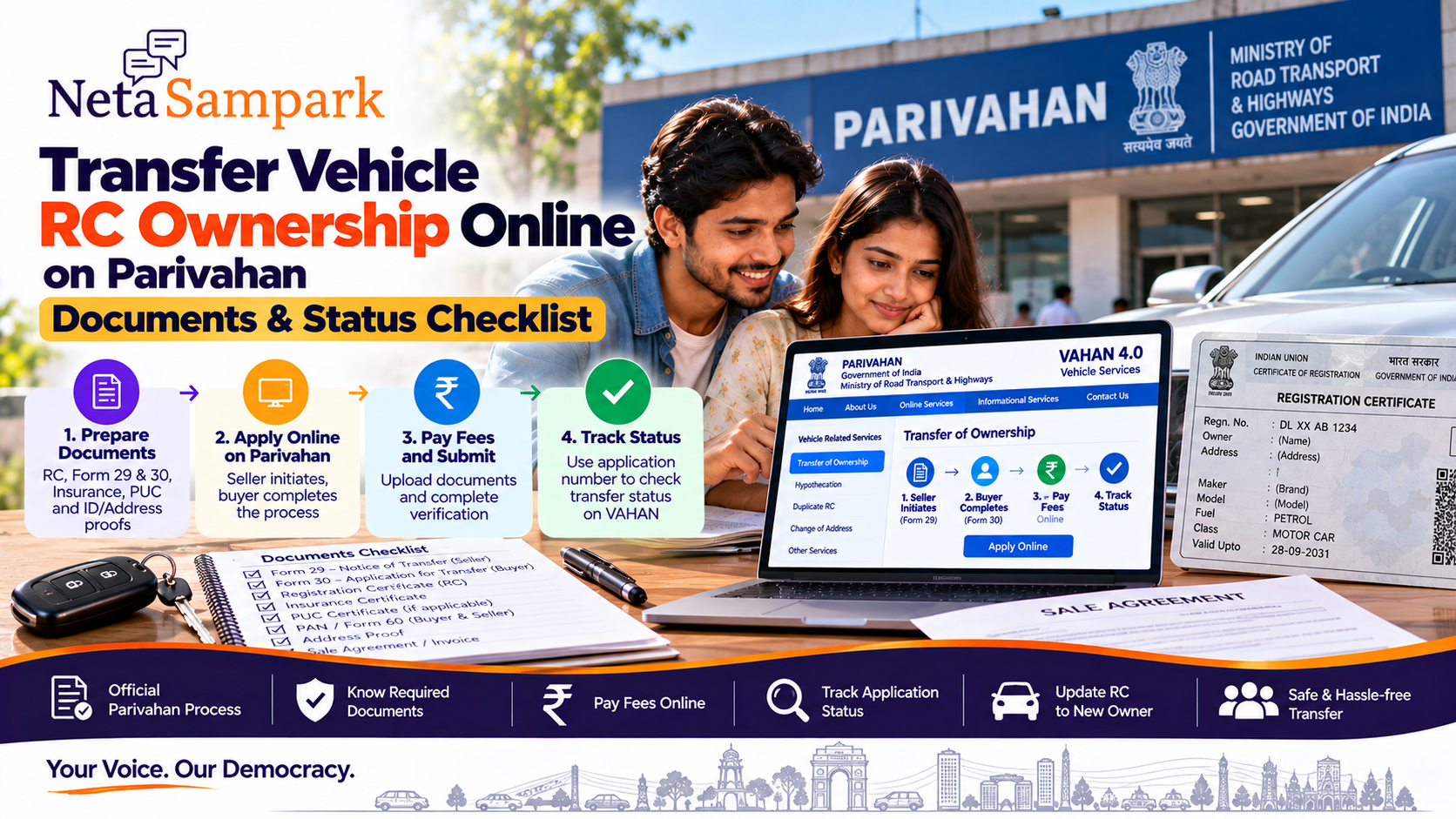
Selling or buying a used vehicle does not end with handing over the keys and RC.
The registered owner needs to complete the Transfer of Ownership process so that the Registration Certificate (RC) records the new owner.
The Ministry of Road Transport & Highways' VAHAN system provides an online Transfer of Ownership service. The current VAHAN instructions state that the seller initiates the transfer using the TO option, after which the buyer completes the process. (Parivahan Sewa)
What is RC ownership transfer?
The RC is the official registration record for the vehicle.
When a vehicle is sold:
Seller / Transferor
→ reports the sale
→ Buyer / Transferee
→ completes the ownership-transfer process
→ RTO/VAHAN records the new owner
→ updated RC reflects the transfer.
The prescribed forms are Form 29 and Form 30 for a normal sale/transfer. (Parivahan)
Before you startKeep these details ready:
☐ Vehicle registration number
☐ Chassis number
☐ Seller's registered mobile number
☐ Buyer mobile number
☐ RC
☐ Insurance certificate
☐ PUC certificate, where applicable
☐ Buyer address/identity documents
☐ PAN/Form 60, where applicable
☐ Applicable payment method
The exact documents shown for upload can vary according to the vehicle, transaction and RTO.
VAHAN itself provides a "Documents to be uploaded" facility for services, so check the document list displayed for your particular application before submitting. (Parivahan Sewa)
The two important formsForm 29
Notice of Transfer of Ownership
This is the seller/transferor's notice of the vehicle sale and transfer. The official Form 29 records details including the vehicle, buyer and transferor. (Parivahan)
Form 30
Application for Intimation and Transfer of Ownership
This is the formal application for recording the transfer of ownership. (Parivahan)
For a normal sale, these are the key statutory forms associated with the ownership-transfer process.
How to transfer ownership onlineStart with the official VAHAN service:
VAHAN 4.0 — Vehicle Services
The current VAHAN workflow is broadly:
Login
↓
Online Services
↓
Vehicle Related Services
↓
Enter Registration Number
↓
Enter required chassis details
↓
Generate OTP
↓
Select Transfer of Ownership
↓
Enter transfer details
↓
Enter insurance details
↓
Upload documents
↓
Pay applicable fees/tax
↓
Submit
The official VAHAN user manual documents this sequence. (Parivahan Sewa)
Important: Seller starts the processThis is an easy step to miss.
The current VAHAN service displays this instruction:
Transfer of Ownership application has to be initiated by the seller using the TO option.
The buyer then continues the process. (Parivahan Sewa)
So don't assume that the buyer can independently create the entire transaction from the beginning.
Simple workflow
Seller
→ Initiates TO application
↓
Buyer
→ Completes required details/process
↓
Documents + payment
↓
RTO/VAHAN processing
↓
Ownership updated
Step 1 — Seller logs inThe VAHAN service requires user registration/login for the online service.
The official service manual says users can register once and then use the online vehicle services. (Parivahan Sewa)
Keep the mobile number available because OTP authentication is part of the process.
Step 2 — Select Transfer of OwnershipAfter entering the vehicle details:
Vehicle Related Services
→ Transfer of Ownership
The service may require the registration number and chassis information before the available services are displayed. (Parivahan Sewa)
Step 3 — Enter transfer detailsYou'll need information about:
- Transferor/seller
- Transferee/buyer
- Sale/transfer
- Buyer address
- Vehicle
- Insurance
Enter names and addresses carefully.
A mismatch between the application and supporting documents can cause processing problems.
Step 4 — Insurance detailsThe VAHAN workflow includes a separate Insurance Details section before document upload. (Parivahan Sewa)
Keep the current insurance certificate/policy details ready.
Don't enter an expired or incorrect policy simply to get through the form.
Step 5 — Upload documentsThe Parivahan transfer-of-ownership document list includes:
- Form 29
- Form 30
- Certificate of Registration
- Certificate of Insurance
- Pollution Under Control certificate, where applicable
- PAN card of seller and purchaser or Form 60
- Proof of address
- Purchaser's undertaking
- Passport-size photograph
- Other documents depending on the circumstances
The official Parivahan list also identifies additional documents for cases involving an NOC or other special circumstances. (Parivahan Sewa)
Important
Not every vehicle-transfer application will require every document listed on the general page.
Use the document-upload list generated by VAHAN for your specific application.
Step 6 — Pay the applicable feeAfter document submission, go to:
Fee Details
→ Make Payment
→ Select payment gateway
→ Complete payment
The official VAHAN workflow includes online payment of the required amount. (Parivahan Sewa)
Save the payment receipt.
Step 7 — Save the application numberThis is one of the most important things to retain.
Keep:
Application number
Payment receipt
Transaction reference
Submitted documents
Screenshots
The VAHAN system provides an Application Status facility using the application number and vehicle registration number. (Parivahan Sewa)
How to check RC transfer statusUse the official VAHAN service:
VAHAN Application Status
The current status page asks for:
- Application number
- Vehicle registration number
- CAPTCHA
and then allows you to check the application status. (Parivahan Sewa)
What if payment was deducted but the application is not complete?Don't immediately make another payment.
VAHAN displays warnings for transactions where the last transaction is pending at the bank side and provides a mechanism to clear/reverify the transaction before starting another application/payment. (Parivahan Sewa)
First:
- Check transaction status.
- Keep the bank reference/payment ID.
- Check the application status.
- Use the payment/transaction verification option where provided.
- Only make another payment if the official system confirms that it is necessary.
The Parivahan payment system provides transaction lookup options using identifiers such as:
- Transaction ID
- Payment ID
- Bank reference number
- Registration number
- Application number
(Parivahan Sewa)
This can be useful when money has left your bank account but the application screen doesn't clearly show whether payment succeeded.
What if the buyer's mobile number needs updating?The current VAHAN service provides a buyer mobile-number update workflow using:
- Application number
- Registration number
- Last five characters of chassis number
- OTP
(Parivahan Sewa)
So a mobile-number issue doesn't necessarily mean you need to abandon the transfer application and start again.
What if the vehicle has a loan?This requires extra attention.
If the RC contains a hypothecation in favour of a bank/financier, ownership transfer may need to be handled together with the relevant hypothecation process.
VAHAN supports combinations involving Hypothecation Continuation and Transfer of Ownership. (Parivahan Sewa)
If the loan has already been fully repaid, you may need the appropriate hypothecation termination process rather than simply ignoring the financier's entry on the RC.
What if you're buying a used vehicle?Don't just verify the seller's physical RC.
Before completing the transaction, check:
☐ Registration number
☐ Chassis/vehicle details
☐ Registered owner
☐ Insurance
☐ PUC status, where applicable
☐ Hypothecation/loan status
☐ Pending transfer/application status
☐ Applicable tax/dues
Then make sure the ownership-transfer application is actually initiated.
Buyer checklistBefore taking responsibility for the vehicle:
☐ Seller's identity matches the registered owner
☐ RC details match the vehicle
☐ Insurance details checked
☐ Required documents received
☐ Transfer initiated on VAHAN
☐ Buyer details entered correctly
☐ Applicable fee paid
☐ Application number saved
☐ Transfer status checked
☐ Updated RC confirmed
Seller checklistAfter selling:
☐ Form 29/transfer process completed
☐ Buyer details recorded correctly
☐ VAHAN transfer initiated
☐ Application number saved
☐ Payment/transaction receipt saved
☐ Proof of sale retained
☐ Transfer status monitored
☐ Updated ownership confirmed
Don't simply hand over the vehicle and assume the buyer will complete everything later.
Why timely transfer mattersUntil the official registration record is updated, the vehicle may continue to be associated with the previous registered owner in government records.
That is why the seller should retain evidence of:
- Sale
- Delivery
- Transfer application
- Buyer details
- Acknowledgement/application number
The objective is not just to physically hand over the RC.
The government registration record needs to reflect the ownership change.
What if the application gets stuck?First check the VAHAN status.
Possible next steps depend on what the status says.
If documents are pending
Check the Upload Pending Documents facility.
If payment is pending
Check the transaction status/reverification facility.
If the application requires an RTO step
Follow the appointment/office instructions shown by VAHAN.
If details are wrong
Use the correction/relevant service route rather than creating duplicate applications.
VAHAN currently provides facilities including Upload Pending Documents, Modify Uploaded Documents, Re-verify Payment Transactions, Reprint Receipt and View Uploaded Documents. (Parivahan Sewa)
Special casesA normal sale isn't the only type of ownership transfer.
Parivahan separately provides procedures for cases such as:
Transfer after death
This can involve Form 31, death certificate, succession-related documents and other supporting documents. (Parivahan Sewa)
Vehicle purchased at public auction
This uses a different process, including Form 32 and auction-related documents. (Parivahan Sewa)
So don't use the normal sale workflow if the vehicle was inherited or acquired through an auction.
Don't confuse these servicesSituationRelevant serviceSold vehicleTransfer of OwnershipChanged residenceChange of AddressLost/damaged RCDuplicate RCLoan addedHypothecation AdditionLoan continuedHypothecation ContinuationLoan repaidHypothecation TerminationMoving vehicle to another stateNOC / applicable transfer process
VAHAN lists these as separate vehicle-related services. (Parivahan Sewa)
10-minute RC transfer checklistBefore submitting:
☐ Seller has initiated TO
☐ Buyer details are correct
☐ Vehicle number is correct
☐ Chassis details are correct
☐ Insurance details are current
☐ RC details match
☐ Required documents uploaded
☐ Form 29/30 details correct
☐ Applicable fee paid
☐ Application number saved
☐ Payment receipt saved
After submitting:
☐ Check application status
☐ Resolve pending documents
☐ Resolve payment issues
☐ Complete any RTO/appointment requirement
☐ Confirm ownership is updated
One important rule for buyers and sellersDon't treat "vehicle delivered" as "RC transferred."
The physical vehicle can change hands in one day.
The government registration record is a separate process.
The clean workflow is:
Sale agreement
↓
Seller initiates Transfer of Ownership
↓
Buyer completes VAHAN process
↓
Documents + fee
↓
Application number
↓
Track status
↓
Updated RC
Official Parivahan starting point
Parivahan — VAHAN Vehicle Services
For application tracking:
VAHAN — Know Your Application Status
NetaSampark: making everyday government and public-service processes easier to understand, one checklist at a time.
The exact documents, fee, appointment requirement and online availability can vary by vehicle, RTO and transaction type. Use the document list and instructions generated by the official VAHAN service for your particular application.
Related reading
- Pay or Contest an e-Challan: mParivahan and echallan.parivahan.gov.in Checklist
- Permanent Driving Licence After Learner Licence: Sarathi Slot, Documents and Test Day
- LPG Aadhaar Biometric e-KYC by 1 Oct 2026: Keep Your Subsidised Refill
- Learner Licence Online on Sarathi: Apply, Test, 6-Month Validity, Then DL