
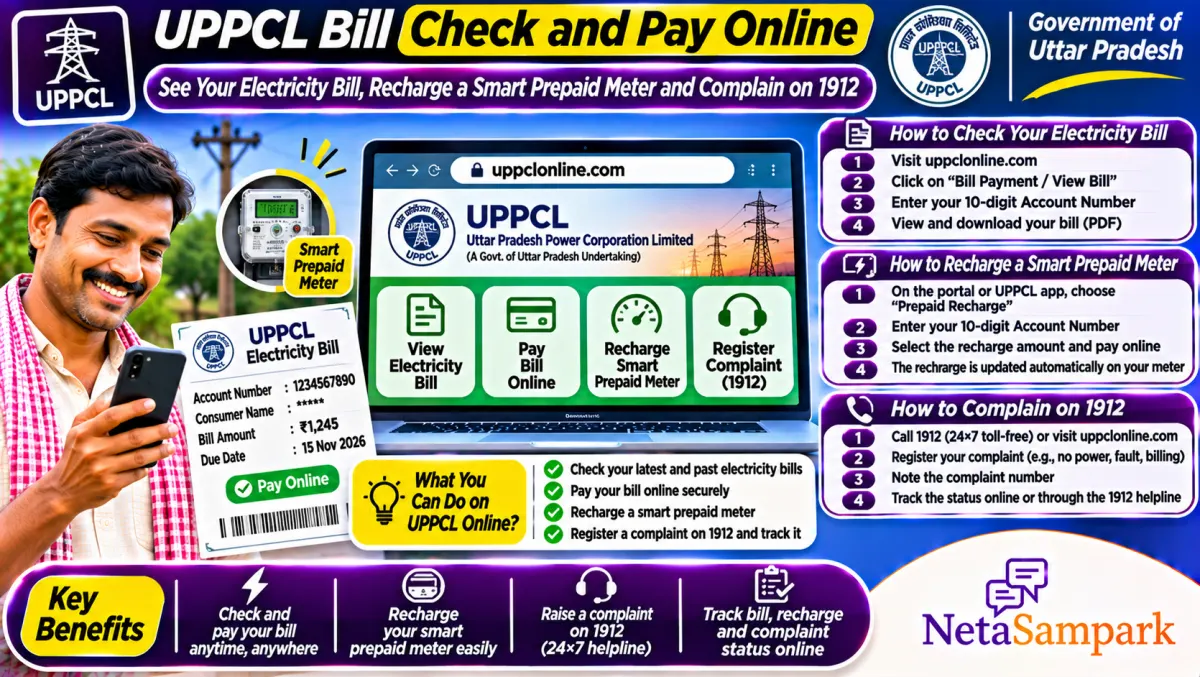
To check your UPPCL electricity bill, open the consumer portal on uppcl.org or the UPPCL app, pick your discom, enter your 10-digit account number and view or pay the bill. You can also pay on any Bharat BillPay app. For a wrong bill, no power or a meter problem, call the 1912 helpline and note the complaint number.
Updated 11 November 2026
If you live in Uttar Pradesh, your electricity comes from one of the UPPCL discoms: Paschimanchal, Madhyanchal, Purvanchal, Dakshinanchal or KESCo in Kanpur. Most people only think about the bill when it's due or when it looks shockingly high. With smart prepaid meters now being fitted in many areas, a lot of families are also asking how to recharge and why their power got cut.
Here's a practical guide to checking and paying the bill, handling smart meters, and getting a wrong bill corrected.
Quick facts: UPPCL bills
| Item | Details |
|---|---|
| Official portal | uppcl.org and the UPPCL consumer portal (consumer.uppcl.org) |
| Helpline | 1912 (UPPCL power complaints) |
| Fee | No extra fee to pay online through the portal; some apps may add charges |
| Deadline | Due date printed on your bill; late payment can attract a surcharge as per tariff rules |
| Documents | 10-digit account number; for name change or new connection, ID and property papers |
| Discoms | PVVNL, MVVNL, PuVVNL, DVVNL, KESCo |
| Other ways to pay | Bharat BillPay apps, bank apps, UPPCL cash counters and Jan Seva Kendras |
| Smart meters | Prepaid recharge through the UPPCL app and other authorised channels |
Find your 10-digit account number
Your account number is printed on the top of every bill. It's 10 digits for UPPCL. If you've lost the bill, call 1912 with your name, address and old meter number, or check an old payment SMS. Save it on your phone. Everything starts with this number.
How to check and pay the bill online
1. Open uppcl.org and go to the consumer portal, or install the UPPCL app.
2. Choose your discom, or let it pick based on your account.
3. Enter the 10-digit account number and captcha.
4. View the current bill, past bills and payment history.
5. Pay with UPI, card or net banking.
6. Download the receipt and save it.
Paying through Bharat BillPay
On any Bharat BillPay app, choose Electricity, pick your UPPCL discom and enter the account number. The bill is fetched automatically. Pay, then save the BBPS reference number. If the payment fails or doesn't reflect, that reference helps you raise a complaint. Our Bharat BillPay guide explains how it works.
Smart prepaid meters: what you need to know
If a smart meter has been installed, your connection may be on prepaid mode. You recharge first and use electricity after.
• Check balance: on the UPPCL app with your account number.
• Recharge: through the app or other authorised channels. Keep the receipt.
• Low balance alerts: come by SMS to your registered mobile, so keep the number updated.
• Power cut for zero balance: recharge and supply usually returns within a short time. If it doesn't, call 1912.
If you think the smart meter is running fast, ask for a check meter test through 1912 or the sub-division office.
Wrong bill? How to get it corrected
High bills usually come from an estimated reading (meter not read), a wrong reading, or an old arrear added.
1. Compare the bill's reading with your meter's actual reading. Take a dated photo of the meter.
2. Check whether the bill says "assessed" or "estimated".
3. Call 1912 and raise a billing complaint. Note the complaint number.
4. If it isn't fixed, give a written application at the sub-division office (SDO) with the photo and bill copy.
5. Ask for a revised bill before paying, or pay the undisputed part if advised.
Common problems and fixes
| Problem | Likely reason | What to do |
|---|---|---|
| Very high bill | Estimated or wrong reading | Photo of meter; complaint on 1912; SDO |
| Payment not reflecting | Gateway or BBPS delay | Wait, then complain with the transaction reference |
| Smart meter cut supply | Zero balance | Recharge; call 1912 if supply doesn't return |
| Name on bill is old owner | Name change not done | Apply for name change with ID and property papers |
| Frequent power cuts | Local fault | Complain on 1912 for each outage |
A real-life example
Rakesh in Lucknow got a bill of nearly four times his usual amount. The bill said "assessed", meaning no actual reading. He took a dated photo of his meter, called 1912 and got a complaint number. When nothing changed in a week, he went to the SDO with the photo and bill. The bill was revised on the actual reading, and he paid the corrected amount.
Documents checklist
☐ 10-digit account number
☐ Latest bill and receipts
☐ Dated photo of the meter reading, for disputes
☐ ID and property papers, for name change
☐ Registered mobile number for SMS alerts
Look out for one-time settlement schemes
UPPCL announces one-time settlement (OTS) schemes from time to time that waive surcharge on old arrears. If you have dues, watch official notices on uppcl.org and confirm terms at the SDO office before paying. Don't trust WhatsApp forwards about "bill maafi".
Beware of fake disconnection messages
Fraudsters send SMS saying "your power will be cut in a few hours, call this number". UPPCL doesn't ask you to call personal numbers or install apps for payment. Pay only through the official app, portal or BBPS apps. If you lose money, call 1930. Our UPI fraud guide has the steps.
Where to escalate
If 1912 and the SDO don't solve it, take it to the executive engineer of your division, and then to the Consumer Grievance Redressal Forum of your discom. You can also use UP Jansunwai; see our Jansunwai guide. Your MLA can raise repeated outages in your area. Find them on NetaSampark's UP page.
Load increase, name change and new connection
Many UPPCL services that used to need office visits are now online through the consumer portal: name change after buying a house, load increase or decrease, and new connections. Keep your ID, property papers or rent agreement, and the old bill ready. After you apply, note the application number and check its status on the portal. If the request isn't processed in the time shown, follow up at the sub-division office with the number.
Reading your bill line by line
Your bill shows the previous and current readings, units consumed, fixed charge (based on your sanctioned load), energy charge, electricity duty, any arrears and surcharge. If the fixed charge looks high, check the sanctioned load printed on the bill. Families sometimes pay for a higher load than they use. Ask for a load reduction if your actual use is lower.
Keep your mobile updated with UPPCL
Bill alerts, smart meter balance warnings and complaint updates all go to the mobile registered with your account. Update it through the consumer portal or 1912 if you've changed numbers.
Final reminder
Save your 10-digit account number, check each bill against your meter, and complain on 1912 the moment something looks wrong. A dated photo of the meter is your best proof.
Frequently asked questions
How do I check my UPPCL bill online?
Open the consumer portal on uppcl.org or the UPPCL app, enter your 10-digit account number and view the bill.
What is the UPPCL helpline number?
1912, for power cuts, billing and meter complaints.
Can I pay my UPPCL bill on PhonePe or Google Pay?
Yes, through Bharat BillPay on most UPI apps. Choose your discom and enter the account number.
How do I recharge a UPPCL smart prepaid meter?
Use the UPPCL app with your account number, or another authorised recharge channel.
My bill is too high. What should I do?
Check if it's an estimated reading, take a dated photo of the meter, and complain on 1912 and at the SDO office.