
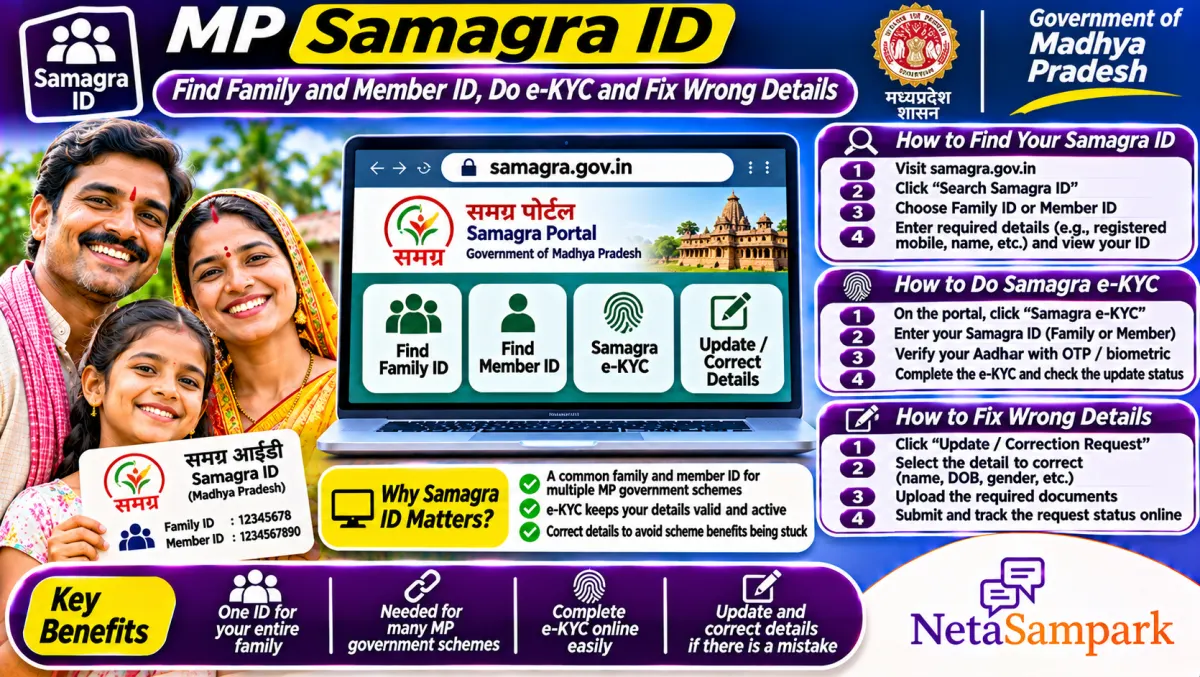
Your Samagra ID is the family and member ID that almost every Madhya Pradesh scheme uses. Find it on samagra.gov.in by searching with your name, district and area, or with your registered mobile. The family ID has 8 digits and each member ID has 9. Do Samagra e-KYC with Aadhaar on the same portal so payments and scholarships don't stop.
Updated 11 November 2026
In MP, the Samagra ID quietly runs your life with the government. Ladli Behna, scholarships, the ration slip, pensions, Sambal, farmer schemes: they all pull your name, age, family and bank details from Samagra. When something is wrong in Samagra, the scheme fails, and the office tells you to "Samagra theek karwao".
Here's how to find your ID, complete e-KYC, and fix the most common mistakes yourself.
Quick facts: Samagra ID
| Item | Details |
|---|---|
| Official portal | samagra.gov.in (Samagra Samajik Suraksha Mission, Government of MP) |
| Helpline | Gram panchayat or ward office (Samagra update authority); MP CM Helpline 181 for complaints |
| Fee | Free on the portal; a kiosk may charge a small service fee |
| Deadline | None, but do e-KYC before scheme deadlines |
| Documents | Aadhaar, mobile number linked to Aadhaar, birth or marriage certificate for changes |
| Family ID | 8 digits |
| Member ID | 9 digits |
| e-KYC | Aadhaar OTP-based, on samagra.gov.in |
Why Samagra matters so much
Think of Samagra as MP's master list of families. Each family gets one ID, and each person a member ID. When you apply for a scheme, the department fetches your details from Samagra instead of asking for papers again. If Samagra shows the wrong age, missing member or an unlinked Aadhaar, the scheme rejects you automatically.
How to find your Samagra ID
By name:
1. Open samagra.gov.in.
2. Choose the option to know your Samagra ID (search by name).
3. Pick district, then local body (janpad panchayat or urban body), then gram panchayat or ward.
4. Enter the name and gender, and the captcha.
5. Find your name in the list and note the family and member IDs.
By mobile number: if your mobile is registered in Samagra, choose the search by mobile option, enter the number and verify with OTP. Your IDs are shown or sent by SMS.
How to download your Samagra family card
1. On samagra.gov.in, open the option to print or download the family or member details.
2. Enter the family ID and captcha.
3. Download the PDF with all members' names and IDs.
Keep this PDF. Schools, banks and scheme offices often ask for it.
How to do Samagra e-KYC
1. Open samagra.gov.in and choose e-KYC.
2. Enter your member ID and the OTP on your Samagra-registered mobile.
3. Enter your Aadhaar number and verify with the OTP sent to the Aadhaar-linked mobile.
4. Check that the name, gender and date of birth from Aadhaar match Samagra. Accept to update.
5. Submit. Your Samagra record now shows e-KYC done.
If the details don't match, the update request goes to the local authority for approval.
How to fix wrong details
| What's wrong | Where to fix it |
|---|---|
| Wrong name or age | Samagra e-KYC with Aadhaar; or apply at the gram panchayat or ward office |
| Member missing | Add member request at the panchayat or ward office, with birth or marriage proof |
| Member who died or moved | Remove member request with a death certificate or marriage proof |
| Wrong address or family split | Apply at the panchayat or ward office |
| Mobile not updated | Update mobile through the portal or the local office |
The update authority is the gram panchayat secretary in villages and the ward office in towns. Ask for a receipt for every request.
Common problems and fixes
• "Samagra not found": you may be listed under a different spelling. Search with variations or by mobile.
• New bride not added: her name must be removed from her parents' Samagra and added to yours. Both requests move together if you give the marriage certificate.
• Ladli Behna rejected for age: the age in Samagra decides it. Fix it through Aadhaar e-KYC first.
• Scholarship shows Samagra mismatch: name in Samagra and school records differ. Fix Samagra or the school record.
A real-life example
Priya in Jabalpur married in 2025 and moved to her husband's home. Her Ladli Behna application was rejected because she was still in her parents' Samagra. Her husband went to the ward office with the marriage certificate, and they moved her into his family's Samagra. After e-KYC, she reapplied in the next window.
Documents checklist
☐ Aadhaar of every member
☐ Mobile number linked to Aadhaar
☐ Birth certificate for a newborn
☐ Marriage certificate for a bride
☐ Death certificate to remove a member
☐ Old family ID if you have it
Schemes that depend on Samagra
Your Samagra decides a long list of benefits: Ladli Behna, the MP ration slip (patra parchi), scholarships, pensions, Sambal and farmer schemes like Bhavantar. A clean Samagra means fewer surprises.
Bank account and DBT
Many MP schemes now pay through Aadhaar-based DBT. Even with a perfect Samagra, if your bank account isn't seeded with Aadhaar on NPCI, the money may not land. Ask your bank to seed Aadhaar for DBT, not just to "link" it.
Where to complain
If the panchayat or ward office doesn't act, file on MP CM Helpline 181. Our 181 guide explains how. You can also take it to your MLA. Find yours in the MP MLAs list or on NetaSampark's Madhya Pradesh page.
Splitting a family in Samagra
When a married son sets up his own household, or brothers live separately, it often makes sense to split into separate Samagra families. Many schemes look at family income, size and assets. A large joint family on one ID can push the whole group out of eligibility, or cut a member's share. Apply at the panchayat or ward office to create a new family ID and move the right members into it. Each new family then gets its own 8-digit ID, while member IDs stay the same.
Samagra for newborns and children
Add a baby to Samagra soon after the birth certificate comes. Children need a member ID for school admission, scholarships, Ladli Laxmi and nutrition schemes. Once the child gets Aadhaar, do e-KYC for the child too, so the name and date of birth match across records. Schools increasingly fill scholarship forms straight from Samagra, so a missing child ID can delay money for years.
Check Samagra before every scheme window
Many MP schemes open for short windows. Before each one, log in, check that every member's name, age and Aadhaar status is correct, and look at the e-KYC flag. Fixing a Samagra record can take a few days to a few weeks after you apply, so don't leave it to the last day.
Samagra and voter details are different
Samagra isn't your voter ID. Fixing your name in Samagra doesn't change the electoral roll, and vice versa. For voter list corrections, use Form 8 on the ECI portal.
Final reminder
Find your Samagra ID, download the family PDF, and finish e-KYC for every member now. Fix missing or wrong members before the next scheme window opens.
Frequently asked questions
How do I find my Samagra ID?
Search by name on samagra.gov.in with district and area, or by your registered mobile with OTP.
How many digits is a Samagra ID?
The family ID has 8 digits and each member ID has 9.
How do I do Samagra e-KYC?
On samagra.gov.in, choose e-KYC, enter the member ID, verify with OTP, then verify Aadhaar with its OTP.
Who updates Samagra details?
The gram panchayat in villages and the ward office in towns, after you apply with proof.
Is Samagra ID needed for Ladli Behna?
Yes. Ladli Behna and most MP schemes use Samagra details and e-KYC.
Sources
• Samagra portal, Government of Madhya Pradesh
• UIDAI