
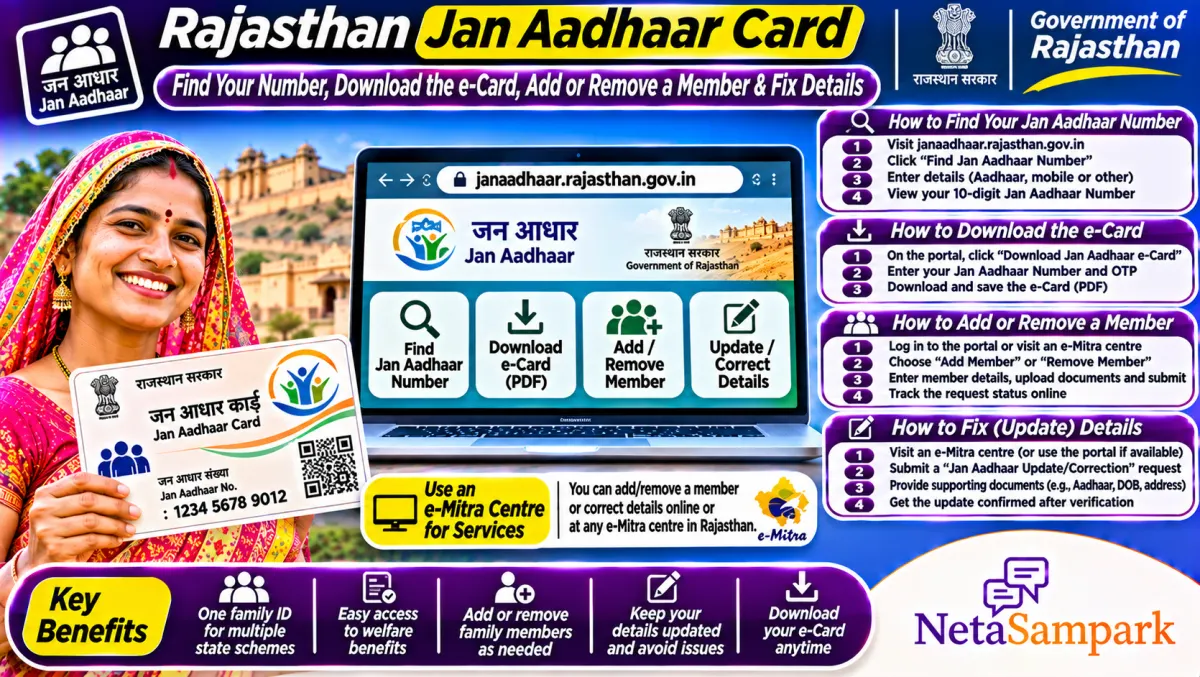
Jan Aadhaar is Rajasthan's family card, with one 10-digit number for the whole family and the woman as head. To download it, go to janaadhaar.rajasthan.gov.in or the Jan Aadhaar app, search with your Jan Aadhaar or enrolment number, verify with OTP and save the e-card. Adding members or fixing details is done at e-Mitra or through SSO.
Updated 11 November 2026
Almost every Rajasthan scheme now starts with one question: "Jan Aadhaar number kya hai?" Pensions, the state health insurance, scholarships, ration, Palanhar, farmer support and even many recruitment forms pull family details from Jan Aadhaar. If a member is missing or the bank account is wrong, benefits stop.
Here's how to get your number, download the card, update it, and fix the common issues.
Quick facts: Jan Aadhaar
| Item | Details |
|---|---|
| Official portal | janaadhaar.rajasthan.gov.in (Department of Planning, Government of Rajasthan) |
| App | Jan Aadhaar app on Android |
| Helpline | e-Mitra kiosk; Rajasthan Sampark 181 for complaints |
| Fee | Enrolment is free; e-Mitra may charge a notified fee for updates or printing |
| Deadline | None |
| Documents | Aadhaar of all members, bank passbook, mobile, proof for changes (birth, marriage, death certificates) |
| Family number | 10 digits; each member also gets an individual ID |
| Head of family | A woman aged 18 or above, where there is one |
Why Jan Aadhaar matters
Jan Aadhaar is a family database. Each family has one number, linked to every member's Aadhaar and the family's bank account. When you apply for a scheme, the department fetches your family details, income category and bank account from Jan Aadhaar. Getting it right once saves you from submitting papers again and again.
How to find your Jan Aadhaar number
1. Open janaadhaar.rajasthan.gov.in.
2. Choose the option to know your Jan Aadhaar or enrolment number.
3. Enter your Aadhaar number or registered mobile, as asked.
4. Verify with the OTP.
5. Your Jan Aadhaar number or enrolment number appears.
If you enrolled but never got the card, the enrolment number is what you'll see first.
How to download the Jan Aadhaar e-card
1. On janaadhaar.rajasthan.gov.in, open the e-card download option, or open the Jan Aadhaar app.
2. Enter the Jan Aadhaar number or enrolment number.
3. Choose the member whose mobile will get the OTP.
4. Enter the OTP and download the e-card PDF.
Save it on your phone. Most offices accept the printed e-card.
How to enrol a new family
1. Go to an e-Mitra kiosk with Aadhaar of all members, bank passbook and mobile.
2. The operator fills the Jan Aadhaar enrolment form online.
3. Members verify through Aadhaar.
4. You get an enrolment number.
5. After verification, the 10-digit Jan Aadhaar number is issued and the card can be downloaded.
You can also enrol yourself through your SSO ID on sso.rajasthan.gov.in using the Jan Aadhaar service.
How to add or remove a member
1. Visit e-Mitra or log in with SSO.
2. Choose Jan Aadhaar update.
3. To add a newborn, upload the birth certificate. To add a bride, give the marriage certificate and make sure she's removed from her parents' Jan Aadhaar.
4. To remove a member, upload a death certificate or proof of moving out.
5. Submit and note the request number.
How to update the bank account
Benefits are paid into the bank account in Jan Aadhaar. If your account changed, update it through e-Mitra with the new passbook. Make sure the account is seeded with Aadhaar for DBT, or payments can still bounce.
Common problems and fixes
| Problem | Likely reason | Fix |
|---|---|---|
| Scheme says member not found | Member not in Jan Aadhaar | Add the member with proof |
| Pension or scholarship stuck | Wrong bank account | Update the account through e-Mitra |
| Name mismatch | Jan Aadhaar differs from Aadhaar | Update via Aadhaar-based correction |
| OTP not received | Old mobile registered | Update the mobile at e-Mitra |
| Two Jan Aadhaar for one person | Duplicate enrolment | Ask e-Mitra to remove the person from one |
A real-life example
Sunita in Bikaner had her baby in 2025, but her Palanhar and health insurance claims showed only three family members. Her baby wasn't in Jan Aadhaar. At e-Mitra, she uploaded the birth certificate and added the child. A few days later, the e-card showed four members, and the scheme office could process the child's benefits.
Documents checklist
☐ Aadhaar of every member
☐ Bank passbook (Aadhaar-seeded account)
☐ Mobile number
☐ Birth certificate, marriage certificate or death certificate for changes
☐ Old Bhamashah or ration card details, if asked
Schemes that use Jan Aadhaar
Rajasthan's health insurance, social security pensions, Palanhar, scholarships, ration under NFSA and many farmer schemes use Jan Aadhaar. For ration, see our Rajasthan ration card guide. For complaints, our Rajasthan Sampark 181 guide has the steps.
Splitting a joint family
If married sons live separately, it often helps to make separate Jan Aadhaar families. Some benefits depend on family size or income. A big joint family on one card can make everyone look ineligible. Ask at e-Mitra to create a new family with its own head and move the right members into it.
Women as head of the family
Jan Aadhaar makes the eldest woman aged 18 or above the head of the family, where possible. Some benefits are paid into the head's account. If the head has died or moved, update it so the next eligible woman becomes head and payments don't stop.
Who to approach when it's stuck
Start at e-Mitra and the block or municipal office. If nothing moves, file on Rajasthan Sampark or call 181. Your MLA can also help. Find yours in the Rajasthan MLAs list or on NetaSampark's Rajasthan page.
Jan Aadhaar for people who moved to Rajasthan
If your family moved to Rajasthan from another state, you can still enrol once you have Aadhaar with a Rajasthan address and a local bank account. Update your Aadhaar address first through UIDAI, then enrol at e-Mitra. Without a Rajasthan address on Aadhaar, the enrolment may get stuck at verification.
Income category and what it decides
Jan Aadhaar records the family's income category, such as NFSA or BPL status and income level. Many schemes, from health insurance to pensions, check this category automatically. If your family's situation has changed, for example the earning member has died or lost work, update the income details with proof so the right benefits open up.
Checking which schemes you're getting
The Jan Aadhaar portal and app show the benefits your family has received under linked schemes. Log in and check the benefit history now and then. If a pension or scholarship shows as paid but you didn't get it, take a screenshot to your bank and the scheme office.
Keep the card safe
Your Jan Aadhaar card carries family and bank details. Don't hand copies to strangers or post it online. Share it only with government offices, banks and e-Mitra operators who need it.
Final reminder
Download your Jan Aadhaar e-card, check every member and the bank account, and fix anything wrong at e-Mitra now. One clean record keeps every scheme moving.
Frequently asked questions
How do I find my Jan Aadhaar number?
Use the know-your-number option on janaadhaar.rajasthan.gov.in with Aadhaar or mobile, then verify with OTP.
How can I download the Jan Aadhaar card?
Use the e-card option on the portal or the Jan Aadhaar app with your Jan Aadhaar or enrolment number and OTP.
Is Jan Aadhaar enrolment free?
Yes. e-Mitra may charge a notified fee for some updates or printing.
How do I add my child to Jan Aadhaar?
At e-Mitra or through SSO, apply for a member addition with the birth certificate.
Who is the head of family in Jan Aadhaar?
A woman aged 18 or above, where there is one in the family.