
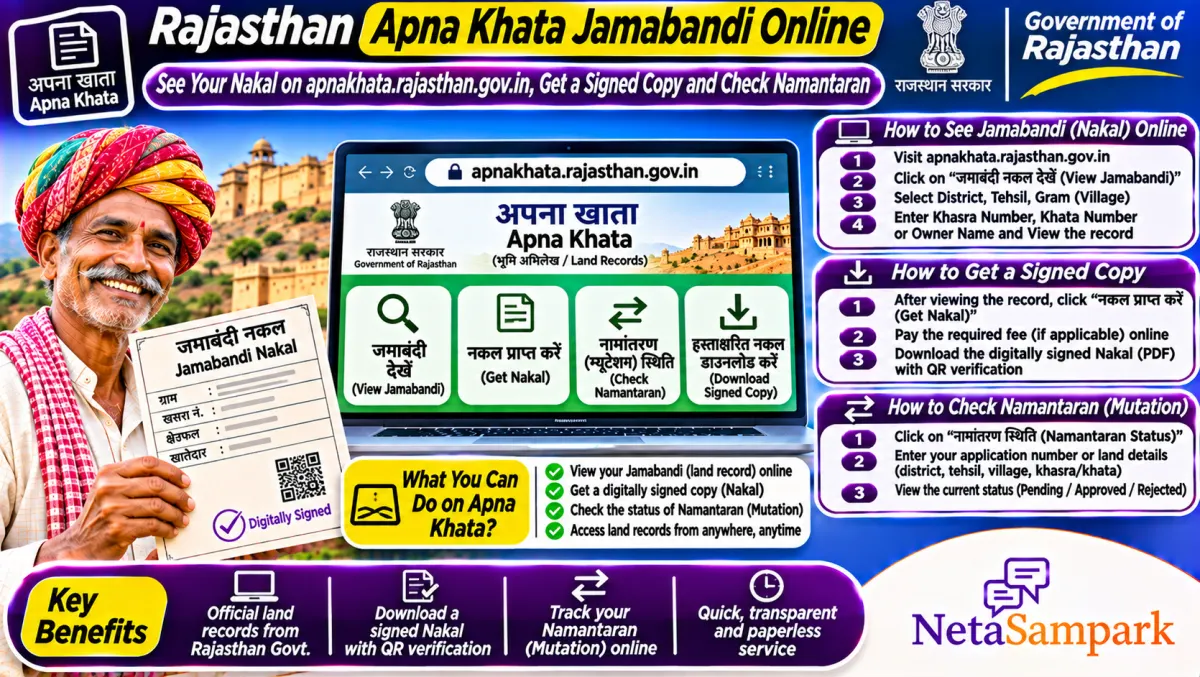
To see your land record in Rajasthan, open apnakhata.rajasthan.gov.in, pick your district, tehsil and village on the map, and search the jamabandi by khata number, khasra number or name. The view-only nakal is free. A digitally signed copy, accepted by banks and offices, is available through e-Mitra or by logging in with your SSO ID for a small fee.
Updated 11 November 2026
Rajasthan has some of the largest landholdings in the country, and land papers decide a lot here: crop loans, PM-Kisan, compensation for crop loss and every sale. The Revenue Department's Apna Khata portal puts the jamabandi nakal of every village online, along with namantaran (mutation) details and the land map.
Here's how to use it, how to get a copy that offices accept, and what to do when your name or area is wrong.
Quick facts: Apna Khata Rajasthan
| Item | Details |
|---|---|
| Official portal | apnakhata.rajasthan.gov.in (Revenue Department, Rajasthan) |
| Helpline | Patwari and Tehsil office; Rajasthan Sampark 181 for complaints |
| Fee | Free view-only nakal; signed copy for a small fee via e-Mitra or SSO login |
| Deadline | None |
| Documents | Khata or khasra number; SSO ID for online signed copy |
| Records available | Jamabandi nakal, namantaran details, khasra map (Bhu-Naksha) |
| Mutation | Namantaran through the tehsil, online application via e-Dharti / SSO services |
| Related | Girdawari (crop record) by the patwari |
Jamabandi, khata and khasra, simply put
• Jamabandi: the record of rights for a village, listing each khatedar with their land.
• Khata: the account of a khatedar or family.
• Khasra: the plot number on the map.
• Nakal: a copy of the record.
When a bank asks for the "jamabandi nakal", they want the copy of your khata from the jamabandi.
How to see your jamabandi nakal online
1. Open apnakhata.rajasthan.gov.in.
2. Click your district on the Rajasthan map, then your tehsil, then type or select your village.
3. Choose to view the jamabandi nakal.
4. Search by khata number, khasra number, name or UPIN (unique parcel ID) where available.
5. Pick your record. The nakal opens with names, shares, khasra numbers, area and land type.
6. Print it or save as PDF.
The view-only copy says it's for information. For loans, use a signed copy.
How to get a digitally signed nakal
Through e-Mitra: visit any e-Mitra kiosk with your district, tehsil, village and khata number. The operator downloads the signed copy and prints it. Pay the fixed fee and take the receipt.
Online with SSO: log in at sso.rajasthan.gov.in, open the land records or e-Dharti service, search your khata and pay to download the signed copy.
How to check namantaran (mutation) details
1. On Apna Khata, pick district, tehsil and village.
2. Choose the namantaran option.
3. Search by namantaran number or khata.
4. See the entry: type (sale, inheritance, gift), date and whether it's approved.
If your sale isn't showing, the namantaran may still be pending with the tehsil. Mutation in Rajasthan is opened by the patwari after registration and approved by the revenue officer after notice.
Check the map
Apna Khata links to the Bhu-Naksha map. Open it, choose your village and click the khasra to see its shape, area and neighbours. Useful for boundary questions and before buying.
Common problems and fixes
| Problem | Likely reason | What to do |
|---|---|---|
| Old owner still showing | Namantaran pending | Check namantaran details; meet the patwari |
| Area doesn't match registry | Partition or entry error | Apply to the Tehsildar for correction |
| Village not found | Spelling or new tehsil | Try another spelling or the new tehsil |
| Signed copy not downloading | Payment or server issue | Retry from your SSO history or use e-Mitra |
| Crop entry wrong | Girdawari error | Ask the patwari to correct before the season closes |
A real-life example
Bhanwar Lal in Nagaur bought land in 2025 and assumed the registry was enough. In 2026, when applying for a crop loan, he checked Apna Khata. The seller was still the khatedar. The patwari told him the namantaran had been opened but never approved because one co-owner hadn't been served notice. Once the notice was served and no objection came, the namantaran was approved and his name appeared in the jamabandi.
Documents checklist
☐ Khata and khasra numbers
☐ Jan Aadhaar or Aadhaar card
☐ SSO ID for online services
☐ Registry, gift deed or death certificate for namantaran
☐ Mobile number for updates
Before you buy land in Rajasthan
Pull the jamabandi nakal for the exact khasra, match the khatedar names with the seller, check the land type (some land can't be sold freely), look for loan entries, and check namantaran details for pending cases. Also open the map to confirm road access and boundaries.
Where to complain
If your namantaran or correction is stuck, file on Rajasthan Sampark or call 181. Our Rajasthan Sampark guide shows how to file, track and reopen a complaint. Your MLA can also push the tehsil. Find yours in the Rajasthan MLAs list or on NetaSampark's Rajasthan page.
What the land type column tells you
Each khasra in the jamabandi carries a land type: irrigated, unirrigated, banjar (barren) and so on, along with whether the land is khatedari. Khatedari land carries transferable rights. If the land is recorded as government land, charagah (pasture) or allotted under a special scheme, sale may be restricted or barred. Buyers in Rajasthan have lost money on charagah land sold through agreements. Always check this column before paying anything.
Joint khata and shares
A lot of Rajasthan families hold land in one joint khata. The jamabandi shows each khatedar's share as a fraction. If you're buying from one brother, you're only buying his share, not a specific plot, unless a partition (batwara) has been done and recorded. For a clean deal, ask for a recorded batwara first. For a family, recording the batwara also prevents fights later and makes crop loans easier, since banks lend against a clear share.
Girdawari and crop compensation
The patwari records the crop in each khasra every season through girdawari. When hail, frost or locusts damage crops, compensation and insurance claims often check this record. If your crop wasn't recorded, or the wrong crop was entered, tell the patwari during the season and keep a written request. A correct girdawari can make the difference between getting a claim and not.
Using Jan Aadhaar for land services
Many Rajasthan land and farmer services now work through your SSO ID linked to Jan Aadhaar. Keep the family's Jan Aadhaar updated with the right members and bank details, because schemes like crop insurance and state farmer support can pull your details from it.
Final reminder
Open Apna Khata, check your jamabandi nakal and save a copy. If anything is wrong or a namantaran is pending, talk to the patwari now, before a loan or sale depends on it.
Frequently asked questions
Is Apna Khata free?
Yes, viewing the jamabandi nakal is free. A digitally signed copy costs a small fee through e-Mitra or SSO.
Can I use the online nakal for a bank loan?
Most banks want the digitally signed copy. Get it from e-Mitra or by logging in with your SSO ID.
How do I check namantaran status in Rajasthan?
Use the namantaran option on apnakhata.rajasthan.gov.in with the namantaran number or khata.
What is UPIN in Rajasthan land records?
It's the unique parcel ID for a plot, used to search and identify land without confusion.
Who corrects wrong entries in the jamabandi?
Apply to the Tehsildar with your documents. The patwari prepares a report before the correction.
Can I see who owns the neighbouring plot?
Yes. The jamabandi is a public record. Search the neighbour's khasra number on Apna Khata to see the recorded khatedar, which helps in boundary talks and before buying land next to yours.