
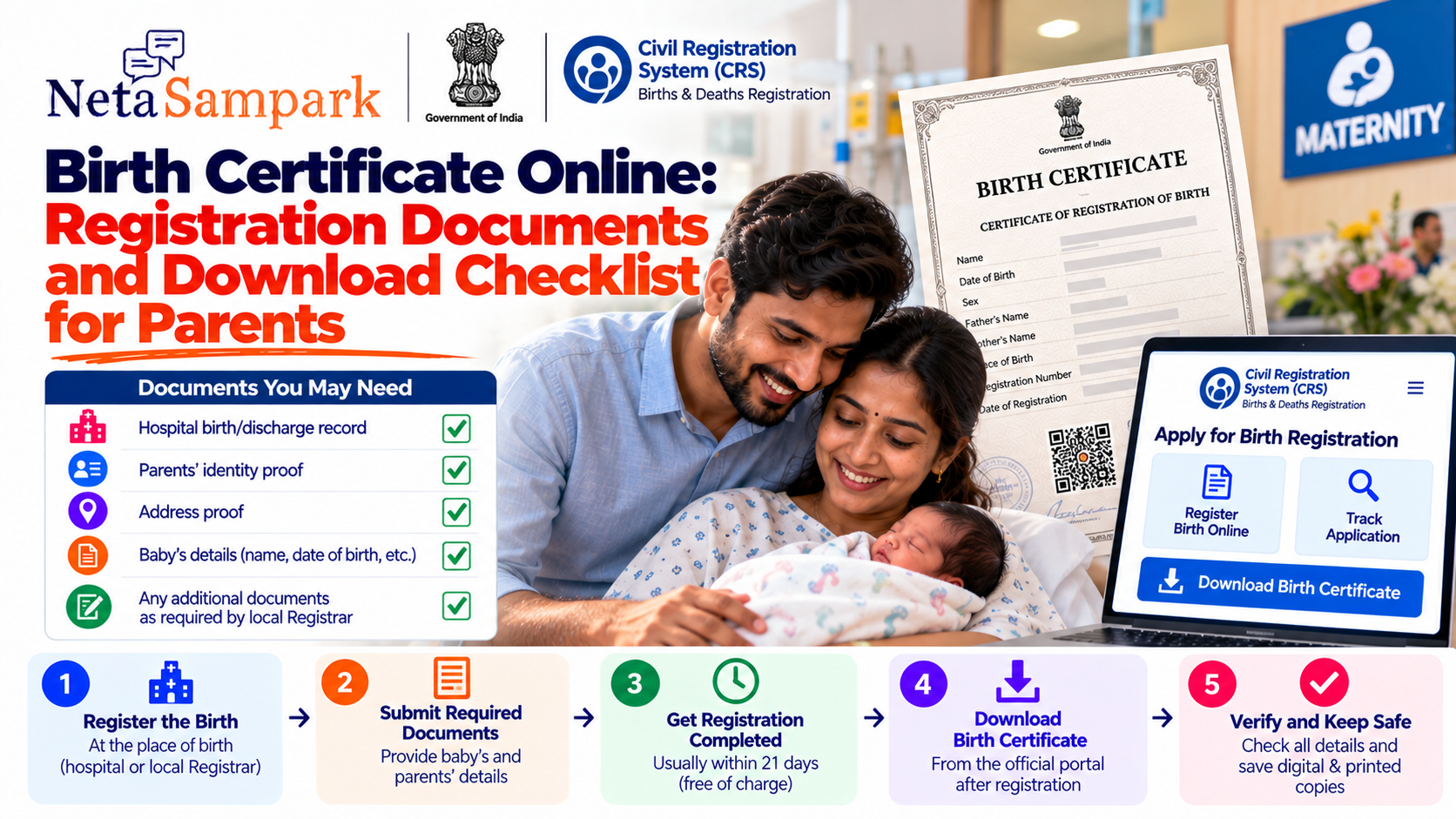
A birth certificate is one of the first official records your child receives. It records the child's date and place of birth, name, parents' details and registration information, and can later be needed for school admission, passport applications and several other official services.
In India, birth registration is compulsory under the Registration of Births and Deaths Act, 1969. The Civil Registration System (CRS) says births should normally be reported within 21 days of occurrence. (Civil Registration System)
For parents, the easiest approach is to understand where the birth is registered, what information is required, when to apply and how to obtain the certificate after registration.
What is a birth certificate?
A birth certificate is the official certificate issued after a child's birth has been registered with the appropriate Registrar of Births and Deaths.
The standard CRS birth-report form captures information such as:
- Child's date of birth
- Sex
- Child's name, if already named
- Father's name
- Mother's name
- Parents' address at the time of birth
- Permanent address
- Place of birth
- Informant's details
The official Form 1 also allows the child's name to be left blank if the child has not yet been named. (Civil Registration System)
Where is a birth registered?A key rule is:
Births are registered at the place where the birth occurred.
The CRS explains that births and deaths are registered only at the place of occurrence. (Civil Registration System)
For example:
Baby born in a Bengaluru hospital
→ Registration is handled through the applicable registration authority for that place of occurrence.
Baby born at home
→ The household/informant has responsibility to report the birth to the Registrar of the concerned area. (Civil Registration System)
If the baby was born in a hospitalFor institutional births, parents generally do not have to independently report the birth in the same way as a home birth.
The CRS states that the officer in charge or an authorised person at a hospital, nursing home or health centre is responsible for reporting births to the Registrar of Births and Deaths. (Civil Registration System)
The hospital may collect the parents' information and submit the birth report.
Parents should still verify:
☐ Baby's date of birth
☐ Baby's sex
☐ Father's name
☐ Mother's name
☐ Spelling of names
☐ Address
☐ Place of birth
☐ Contact details
An error in the initial record can create unnecessary correction work later.
If the baby was born at homeFor a home birth, the head of the household is responsible for reporting the birth to the Registrar of Births and Deaths for the relevant area. (Civil Registration System)
The birth should normally be reported within 21 days.
The 21-day ruleThis is the deadline parents should remember.
Birth reported within 21 days
The CRS states that births reported within 21 days are registered within the prescribed period and the certificate is issued free of charge by the concerned Registrar. (Civil Registration System)
After 21 days but within 30 days
The birth can still be registered, but the prescribed fee applies. (Civil Registration System)
After 30 days but within one year
Additional requirements apply, including written permission from the prescribed authority, the required document/affidavit and prescribed fee. (Civil Registration System)
After one year
The CRS states that registration requires an order from a Magistrate of the First Class, after verification and payment of the prescribed fee. (Civil Registration System)
So the simple rule is:
Register as early as possible — ideally within 21 days.What documents do parents need?
The exact supporting-document list can vary by state, local registrar and circumstances.
For a normal hospital birth, parents should keep the following information/documents ready:
Basic information
☐ Child's date of birth
☐ Child's sex
☐ Child's name, if decided
☐ Father's full name
☐ Mother's full name
☐ Address at the time of birth
☐ Permanent address
☐ Hospital/institution details
The national CRS birth-report form specifically asks for these details. (Civil Registration System)
Keep these records available
☐ Hospital birth/discharge record
☐ Parents' identity details
☐ Address proof where required
☐ Hospital/institution registration details
☐ Application/acknowledgement number
☐ Any documents requested by the local Registrar
Important: Do not assume that every state requires exactly the same supporting documents. Follow the instructions of the registration authority handling the birth.
What if the baby's name has not been decided?Parents do not necessarily have to wait to register the birth simply because the child's name hasn't been finalised.
The standard CRS Form 1 explicitly provides:
"Name, if any"
and says that if the child is not named, the field can be left blank. (Civil Registration System)
This means parents should distinguish between:
Birth registration
and
Adding the child's name to the birth record.
The applicable procedure and time limit for later name insertion should be checked with the local Registrar.
What information should parents double-check?Before submitting or confirming the registration, carefully check spelling.
Child
- First name
- Middle name
- Surname
- Date of birth
- Sex
Mother
- Full legal name
- Spelling
- Aadhaar number, if applicable/available in the form
Father
- Full legal name
- Spelling
- Aadhaar number, if applicable/available in the form
Address
- House/flat number
- Locality
- Town/village
- District
- State
- PIN code
The official CRS form separately asks for the parents' address at the time of birth and their permanent address. (Civil Registration System)
Can birth registration be done online?In many places, yes.
The Government of India's Civil Registration System (CRS) provides an online birth/death registration facility for specified States and Union Territories.
The current CRS portal lists online registration for locations including Maharashtra, Andhra Pradesh, Telangana (GHMC), Delhi Cantonment Board, Gujarat, Haryana, Bihar, Uttar Pradesh, Karnataka-related services through applicable systems, and several other States/UTs—but the exact online route depends on the jurisdiction. (Civil Registration System)
Important
There is not one identical online workflow for every locality in India.
Some births are handled through:
- CRS
- State government portals
- Municipal corporation portals
- Nagar Palika/Nagar Parishad systems
- Gram Panchayat/local registration systems
- Hospital-linked registration systems
So parents should first identify the Registrar for the place where the birth occurred.
How to apply onlineWhere online registration is available through the applicable government portal, the process generally follows this pattern:
Step 1 — Identify the registration authority
Use the authority responsible for the place where the child was born.
Step 2 — Open the official portal
Use the Government/State/municipal portal rather than a private website.
Step 3 — Enter birth details
Provide:
- Date of birth
- Place of birth
- Child's details
- Parents' details
- Address
- Informant details
These fields correspond closely to the national birth-report format. (Civil Registration System)
Step 4 — Upload documents if requested
The required documents depend on the registration authority and circumstances.
Step 5 — Submit
Save the:
- Application number
- Registration number
- Acknowledgement
- Receipt
Step 6 — Track the application
Use the official portal's status facility where available.
Step 7 — Download the certificate
Once registration is completed and the certificate is available electronically, download and save the PDF.
What does the birth certificate contain?A registered birth record contains information such as:
- Registration number
- Child's name
- Sex
- Date of birth
- Place of birth
- Mother's name
- Father's name
- Registration date
- Registration unit
Examples published through the official CRS certificate-verification system show these fields on registered certificates. (Civil Registration System)
How to download the birth certificateThe exact download process depends on the portal used by your local registration authority.
Typically:
Login/search
↓
Select Birth Certificate
↓
Enter registration/application details
↓
Verify details
↓
Download certificate
Keep both:
Digital copy
Save the PDF to your phone/cloud storage.
Physical copy
Keep at least one printed copy with your important family documents.
Verify the certificate after downloadingDon't just download the PDF and forget about it.
Check:
☐ Child's name
☐ Date of birth
☐ Sex
☐ Mother's name
☐ Father's name
☐ Place of birth
☐ Registration number
☐ Registration date
The national CRS system also provides certificate-validation facilities for registered birth certificates. (Civil Registration System)
What if there is a mistake?Don't create a new birth registration simply because something is incorrect.
The CRS FAQ states that corrections or cancellations are permitted under Section 15 of the Registration of Births and Deaths Act and the corresponding State Rules. (Civil Registration System)
Contact the Registrar/registration authority that holds the original record and follow its correction procedure.
Examples
Mother's name misspelled
→ Request correction through the applicable process.
Wrong date of birth
→ Contact the Registrar and follow the evidence/document requirements.
Address incorrect
→ Ask whether correction is permitted and what supporting documents are required.
What if the birth was registered but the child wasn't named?This is different from an unregistered birth.
If the birth itself has already been registered, parents should ask the concerned Registrar about the name-insertion procedure rather than starting another birth registration.
The CRS portal currently carries an official update concerning the period for insertion of a name in a birth record. (Civil Registration System)
What if the birth happened more than 21 days ago?Don't assume that you cannot obtain a birth certificate.
Delayed registration is specifically provided for.
22–30 days
Prescribed fee may apply.
More than 30 days but less than one year
Additional permission and documentation are required.
More than one year
A Magistrate's order is required under the delayed-registration provisions described by CRS. (Civil Registration System)
The longer you wait, the more complicated the process can become.
Birth certificate after 1 October 2023There is an important legal change parents should know.
The CRS FAQ states that for persons born on or after 1 October 2023, the birth certificate is mandatory for establishing date and place of birth for purposes including:
- Admission to an educational institution
- Issuance of a driving licence
- Preparation of electoral rolls
- Registration of marriage
- Government employment
- Issuance of passport
- Issuance of Aadhaar number
and other purposes specified by law. (Civil Registration System)
This makes accurate birth registration particularly important for parents of children born after that date.
Does the hospital automatically give you the final birth certificate?Not necessarily.
There is an important distinction between:
Hospital birth record / discharge documents
and
official birth certificate issued from the registered birth record.
A hospital may report the birth to the Registrar, but parents should ensure that the official registration is completed and that they know how to obtain the certificate from the relevant registration authority.
The CRS states that the Registrar issues the birth certificate after registration is completed. (Civil Registration System)
What if the hospital says the birth has been reported?Ask for the information you need to track the registration.
For example:
"Has the birth been reported to the Registrar, and what is the registration/application reference?"
Keep any acknowledgement supplied by the hospital.
If the certificate is not available, contact the registration authority responsible for the place of occurrence.
What if the baby was born outside India?A different process applies.
The CRS FAQ states that a child born outside India is generally registered under the Citizenship Act, 1955 and the Citizens (Registration at Indian Consulates) Rules, 1956 through the relevant Indian Mission.
If the parents return to India intending to settle, the RBD Act contains a separate provision allowing registration in India within the specified period after arrival, subject to the applicable delayed-registration provisions if that period is missed. (Civil Registration System)
So don't use the ordinary domestic birth-registration workflow for a birth that occurred abroad.
Parents' birth-certificate checklistBefore closing the task, make sure you have:
Registration
☐ Birth reported to the correct Registrar
☐ Registration completed
☐ Registration number received
Child details
☐ Name checked
☐ Date of birth checked
☐ Sex checked
☐ Place of birth checked
Parent details
☐ Father's name checked
☐ Mother's name checked
☐ Spellings checked
Address
☐ Birth-time address checked
☐ Permanent address checked
Certificate
☐ Digital certificate downloaded
☐ PDF saved securely
☐ Printed copy stored
☐ Certificate details verified
Common mistakes parents should avoid1. Waiting too long
The normal reporting period is 21 days. (Civil Registration System)
2. Assuming the hospital discharge paper is the certificate
They are different records.
3. Spelling names differently
Use the spelling parents intend to use consistently across official documents.
4. Ignoring the registration number
Save it permanently.
5. Using an unofficial website
Use the applicable government CRS, State or municipal portal.
6. Creating duplicate applications
If the hospital has already reported the birth, check the registration status before submitting another application.
7. Ignoring errors
Correct mistakes as soon as they are discovered.
A simple folder for your child's documentsCreate a digital folder:
Child Name — Birth Records
Keep:
- Hospital birth/discharge record
- Birth registration acknowledgement
- Birth certificate PDF
- Printed certificate scan
- Registration number
- Name-insertion/correction documents, if applicable
- Any correspondence with the Registrar
This can save time years later when applying for school admission, passport or other services.
Quick checklist for new parentsBaby born today?
Within the first few days
☐ Confirm the hospital has reported the birth where applicable.
Before 21 days
☐ Verify the registration details.
☐ Complete any required parent/informant process.
☐ Obtain/track the registration.
After registration
☐ Download the certificate.
☐ Check every spelling and date.
☐ Save the registration number.
☐ Keep digital and physical copies.
If there is a mistake
☐ Contact the Registrar.
☐ Follow the correction process under the applicable State Rules.
Official portalThe Government of India's Civil Registration System provides the central online birth/death registration facility for the States/UTs currently supported by the portal. (Civil Registration System)
Civil Registration System — Birth Registration
For jurisdictions not handled through the central CRS workflow, use the relevant State government, municipal corporation, Nagar Palika or local Registrar portal.
Bottom line
For parents, the safest approach is simple:
Register the birth quickly → check the details carefully → save the registration number → download the official certificate → correct mistakes early.
The standard reporting window is 21 days, and delayed registration has additional requirements. (Civil Registration System)
Most importantly, don't assume that every Indian city uses exactly the same online process. The registration authority is determined by where the birth occurred, and the available online portal varies by jurisdiction. (Civil Registration System)
Requirements and portal workflows can vary by State/UT and local Registrar. Check the current official portal for the place where the child was born before submitting documents.