
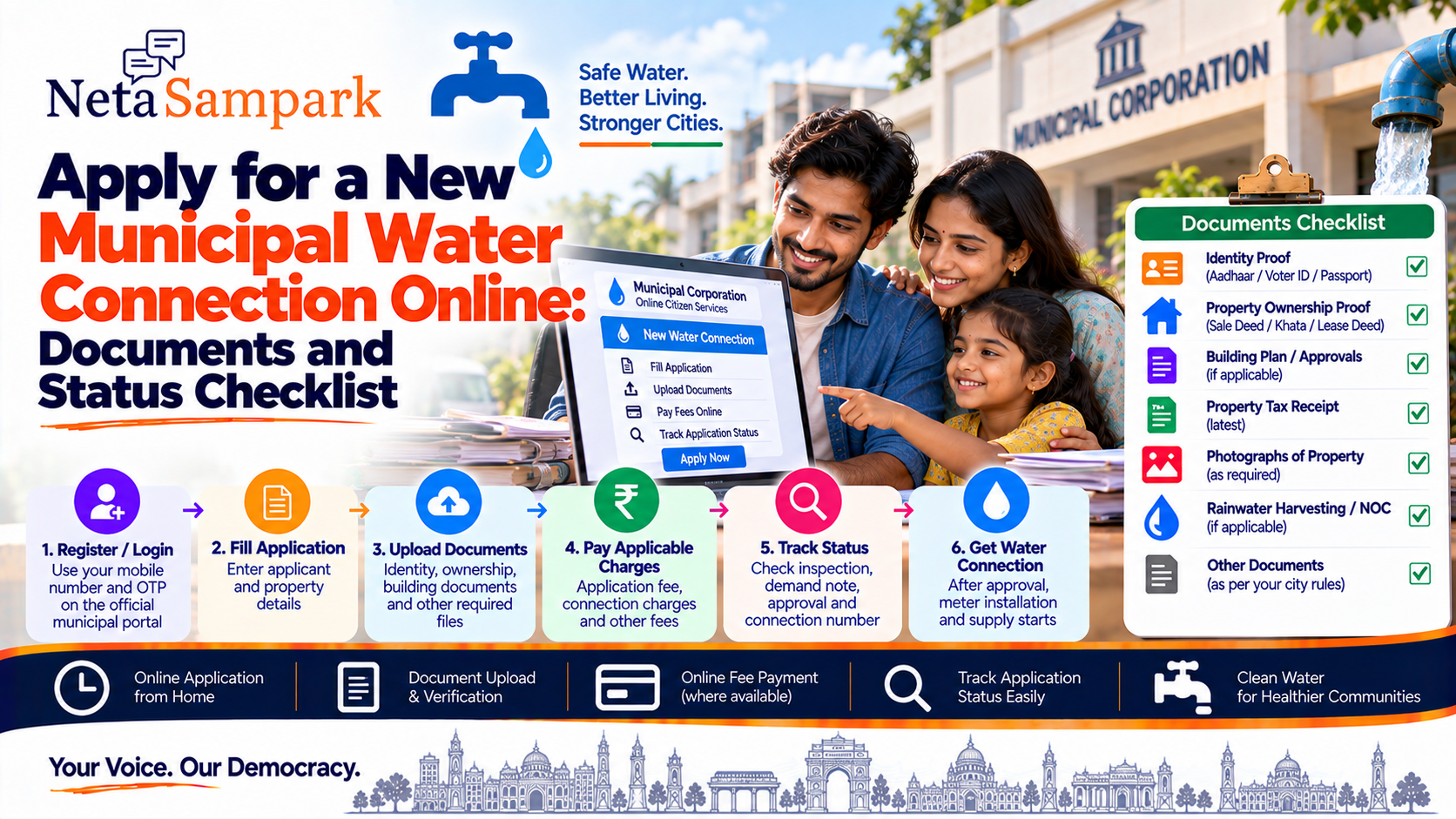
Need a new water connection for your house, apartment, shop or other property?
Many Urban Local Bodies and municipal water boards now provide an online application route for new water connections. The exact portal, documents, fees and processing time depend on your city or municipal authority. National urban-service platforms also support online workflows for applications, document uploads, status tracking and payments. (NUDM)
For example, Bengaluru's BWSSB provides online new-connection applications and stage-wise status tracking, while Delhi Jal Board has an online new-connection application with property, identity and ownership documents.
What is a municipal water connection?
A municipal water connection connects a property to the local government's authorised water-supply network.
Depending on the city, the service may be handled by:
- Municipal Corporation
- Municipality / Nagar Palika
- Urban Local Body
- Dedicated Water Supply Board
- State urban-development department
The application is normally assessed for property eligibility, documentation, technical feasibility and applicable charges before the connection is sanctioned.
Can you apply online?In many cities, yes.
The exact process varies.
A typical online workflow is:
Register / Login
↓
Apply for New Water Connection
↓
Enter applicant and property details
↓
Upload documents
↓
Submit application
↓
Inspection / verification
↓
Demand note / fee calculation
↓
Pay applicable charges
↓
Approval
↓
Connection / meter installation
↓
Connection number generated
National Urban Digital Mission's water-and-sewerage module specifically supports new-connection applications, document uploads, application tracking, online payments and downloading approval documents. (NUDM)
Where should you apply?There is no single national portal for every municipal water connection.
You should start with the official website of:
- Your Municipal Corporation
- Your Municipality
- Your city's water board
- Your State's urban local-body portal
Some states provide a common municipal-services platform.
For example, Andhra Pradesh's municipal administration system provides options for New Connection and Check Application Status. (Municipal Admin Director)
Documents checklistThe exact list varies by authority, but you may be asked for some combination of:
Identity documents
☐ Aadhaar
☐ Voter ID
☐ Passport
☐ Other accepted government ID
☐ Passport-size photograph
Delhi Jal Board, for example, lists Aadhaar, Electoral Identity Card, passport, ration card and government-issued photo ID among acceptable identity documents. (NDMC Online)
Property ownership documents
Depending on the municipality, you may need:
☐ Sale deed
☐ Lease deed
☐ Khata / property record
☐ Registered conveyance deed
☐ Possession/allotment document
☐ Property-tax record
☐ Ownership certificate
Bengaluru's BWSSB, for example, lists the lease-cum-sale deed or sale deed and Khata among its new-connection documents.
Building documents
Depending on the property and local rules:
☐ Approved building plan
☐ Sanction plan
☐ Occupancy Certificate, where applicable
☐ Completion plan/certificate
☐ Building photograph
BWSSB lists building plan/sanction plan and building photographs among its requirements, while West Bengal's urban-development department lists an Occupancy Certificate and approved completion plan for its constructed-building water-connection service.
Other documents
Depending on the connection:
☐ Property-tax receipt
☐ Rainwater-harvesting details
☐ Licensed-plumber certificate/agreement
☐ NOC, where applicable
☐ Self-declaration/undertaking
☐ Site/location plan
For example, BWSSB requires RWH-related documentation for applicable properties, while Delhi Jal Board asks applicants to provide ownership-related documents and declarations.
Residential vs commercial connectionBefore applying, select the correct connection category.
Common categories include:
- Domestic/residential
- Commercial
- Industrial
- Institutional
- Temporary
The charges and documentation can differ significantly.
Delhi Jal Board's application, for example, asks applicants to identify the property type and water-connection category. (DJB RMS Portal)
Step-by-step application processStep 1 — Find the official municipal portal
Search for your city's official municipal or water-board website.
Avoid websites that claim to be government portals but use unrelated domains.
Step 2 — Register or log in
You may need:
- Mobile number
- Email address
- OTP
- Password
- Aadhaar authentication, depending on the authority
For Bengaluru's current BWSSB online system, applicants log in using their mobile number and OTP.
Step 3 — Select "New Water Connection"
Look for options such as:
New Connection
Apply for New Connection
Water Connection
or
Water & Sewerage Connection
Don't accidentally choose:
- Additional connection
- Reconnection
- Change of ownership
- Change of use
- Regularisation
unless that is actually what you need.
Step 4 — Enter property detailsYou may be asked for:
- Property address
- Ward
- Zone
- PIN code
- Property number
- Plot area
- Built-up area
- Number of floors
- Property type
- Connection category
- Purpose of water use
Delhi Jal Board's application, for example, asks for address, locality, ward, property type, floors, plot area, built-up area and water-connection category. (DJB RMS Portal)
Step 5 — Upload documentsScan your documents clearly.
Before uploading:
☐ Name is readable
☐ Document is complete
☐ No important page is missing
☐ File size is within the portal limit
☐ Correct document is attached to the correct field
Don't upload a blurry photograph of a document if the portal requires a readable scan.
Step 6 — Review the applicationCheck:
Applicant name
Mobile number
Property address
Ward/zone
Property details
Ownership information
Connection category
Uploaded documents
Correct errors before submitting.
Step 7 — SubmitAfter submission, save:
- Application number
- Acknowledgement
- Submission date
- Payment receipt, if applicable
Take a screenshot if the portal does not automatically generate a downloadable acknowledgement.
Step 8 — Inspection and verificationDepending on the local authority, an officer or engineer may verify:
- Property details
- Documents
- Existing infrastructure
- Water-main availability
- Technical feasibility
- Site conditions
The next step can therefore be different from one municipality to another.
Step 9 — Pay the applicable chargesA new connection may involve several charges.
Depending on the authority, these can include:
- Application fee
- Connection fee
- Inspection fee
- Security deposit
- Meter cost
- Infrastructure charges
- Road-cutting charges
- Pro-rata charges
- Other applicable charges
For example, BWSSB lists application, attachment, inspection, minimum-deposit, meter, sanitary-point, pro-rata and other applicable charges.
Don't assume that the application fee is the total cost of getting the connection.
What is a demand note?Some water authorities calculate the applicable connection charges after inspection or assessment.
The authority may then issue a demand note showing the amount payable.
BWSSB's current process, for example, states that after inspection, applicable charges are calculated and a demand note is raised. The applicant can then make the final payment online and receive an e-receipt. (BWSSB)
How to check your application statusUse the same official portal through which you submitted the application.
Look for:
Track Application
Application Status
My Applications
or
Check Status
You will usually need your:
- Application number
- Registered mobile number
- OTP/login credentials
BWSSB specifically allows applicants to log in with the same mobile number to check application status, while its FAQ describes stage-wise status information showing the application's current processing stage.
What can your status mean?The exact terminology differs between municipalities.
You may see statuses such as:
Submitted
Your application has been successfully filed.
Under scrutiny
The authority is checking the application and documents.
Document verification
Submitted documents are being examined.
Inspection pending
A field inspection may be required.
Demand note generated
The authority has calculated the applicable charges.
Payment pending
You need to pay the amount shown.
Approved
The connection has been sanctioned.
Rejected
The application was not approved.
Returned for correction
You may need to correct information or submit additional documents.
What if the application is returned?Don't immediately submit a new application.
First read the reason.
It may be something straightforward such as:
- Missing document
- Incorrect property number
- Wrong ward
- Unclear document
- Ownership mismatch
- Incorrect connection category
- Missing building approval
- Additional information required
Correct the issue through the portal if the system provides an edit/resubmission option.
How long does a new connection take?There is no single nationwide processing time.
It depends on:
- City
- Connection type
- Residential/commercial category
- Document completeness
- Technical feasibility
- Inspection
- Payment
- Availability of a water main
- Local service standards
For example, BWSSB currently displays indicative permission timelines of 14 days for residential connections and 42 days for commercial/high-rise connections on its online system.
Other authorities may have completely different timelines.
Can you apply if you are a tenant?This depends on the local authority's rules and the documentation available.
Some authorities may require:
- Lease/rent agreement
- Owner's consent/NOC
- Ownership proof
- Other declarations
For example, NDMC lists a lease agreement together with an NOC and proof of the landlord's ownership for certain non-domestic applications. (NDMC Online)
Check the specific municipal requirements before applying.
Does getting a water connection prove ownership?Not necessarily.
A water connection is a utility service.
It should not automatically be treated as a title document establishing ownership of the property.
Delhi Jal Board's application declaration explicitly states that sanction of a connection does not confer title, ownership or occupancy rights on the applicant. (DJB RMS Portal)
What if there is no municipal water line near your property?Online application does not necessarily mean automatic approval.
The authority may assess technical feasibility before sanctioning the connection.
If the required distribution infrastructure is unavailable or the connection is technically not feasible, the application may require further action or may not be sanctioned under the applicable rules.
What if you need both water and sewerage?Some municipal systems allow you to apply for:
Water + Sewerage
together.
Others treat them as separate services.
Delhi Jal Board's online application, for example, provides options for water and sewerage together or separately depending on the circumstances. (DJB RMS Portal)
Check the service selected before submitting.
Special documents for larger propertiesLarger residential buildings, commercial establishments and high-rise properties may have additional requirements.
These can include:
- Approved building plans
- Occupancy Certificate
- Rainwater-harvesting compliance
- STP-related documentation
- Fire/NOC-related documents where applicable
- Licensed plumber documentation
- Additional technical drawings
BWSSB, for example, lists RWH and STP photographs where applicable. (OWC BWSSB)
Don't pay an unofficial agent for a "guaranteed" connectionBe cautious if someone says:
"Pay me and I'll guarantee your municipal water connection."
A genuine application still has to satisfy the relevant authority's requirements.
If you use a CSC, municipal facilitation centre or other authorised service provider, ask for the official acknowledgement and receipt.
Never share:
- OTP
- UPI PIN
- ATM PIN
- Internet-banking password
with an agent or field worker.
New water connection checklistBefore applying
☐ Identify the correct municipal/water authority
☐ Confirm that online applications are available
☐ Select residential/commercial/other category
☐ Keep identity proof ready
☐ Keep ownership/occupancy documents ready
☐ Keep building documents ready
☐ Check whether NOC is required
☐ Check applicable fees
During application
☐ Register/login
☐ Select New Water Connection
☐ Enter applicant details
☐ Enter property details
☐ Upload documents
☐ Review all information
☐ Submit application
☐ Save acknowledgement/application number
After submission
☐ Track application
☐ Respond to document queries
☐ Attend/allow inspection if required
☐ Check demand note
☐ Pay applicable charges
☐ Save payment receipt
☐ Check approval
☐ Record your new connection/consumer number
Common mistakes to avoid1. Using the wrong portal
Water connections are generally handled locally, not through one universal national application portal.
2. Uploading the wrong property document
Make sure your ownership/occupancy document matches the property details.
3. Ignoring building approvals
Some municipalities require approved building plans or occupancy/completion documents. (Department of Urban Development)
4. Assuming the application fee is the complete cost
Additional charges can be calculated later.
5. Losing the application number
You'll often need it to track the application.
6. Applying for the wrong service
Make sure you select New Connection, rather than additional connection, reconnection or change of ownership.
The complete processFind your municipal/water-board portal
↓
Register / Login
↓
Select New Water Connection
↓
Enter applicant + property details
↓
Upload documents
↓
Submit
↓
Verification / inspection
↓
Demand note
↓
Pay applicable charges
↓
Approval
↓
Meter/connection installation
↓
Connection number
↓
Start receiving water bills
NetaSampark checklist
Before applying for a municipal water connection, keep these five things ready:
1. Identity proof
2. Property/ownership document
3. Building approval documents, where applicable
4. Mobile number and email
5. Application and payment records
The exact requirements are city-specific. For example, Bengaluru BWSSB asks for documents including sale/lease deed, Khata, building plan, building photographs and applicable RWH/OC documents, while Delhi Jal Board has its own identity, ownership and property-document requirements.
So the safest route is:
Official municipal portal → New Water Connection → Check document list → Apply → Track → Pay only through the authorised payment channel.
Requirements, fees, processing times and online workflows vary by municipality and can change. Always check your local water authority's current official portal before submitting the application.