
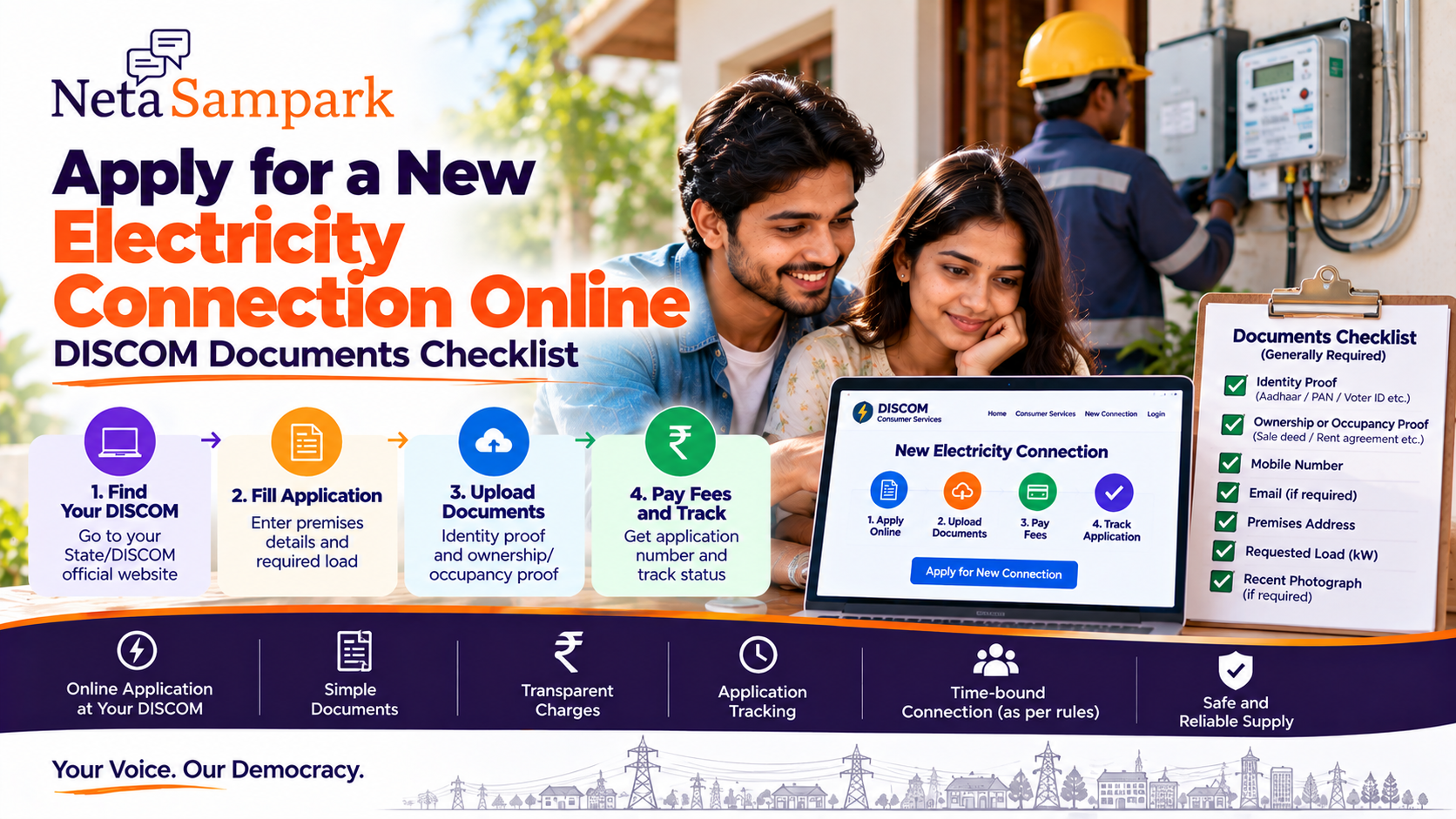
Getting a new electricity connection is increasingly an online process, but the exact portal, documents, charges and workflow depend on your State/UT and the local DISCOM.
At the national level, the Electricity (Rights of Consumers) Rules require distribution licensees to publish their procedure, required documents, applicable charges and online application route. DISCOMs must also provide an acknowledgement/registration number and an application-tracking mechanism. (Power Ministry of India)
So before visiting an electricity office, check your DISCOM's official online connection service.
First: Find your DISCOM
A DISCOM is the distribution company responsible for supplying electricity to your premises.
Your DISCOM depends on where the property is located.
For example, different areas of a state can be served by different distribution companies.
Your first step should therefore be:
State → Electricity Department/DISCOM → New Connection
Don't submit your property details on an unofficial electricity-connection website just because it appears in a search result.
What you generally needFor a standard new connection, the core documentation is relatively simple.
The Electricity (Rights of Consumers) framework provides that for new connections up to 10 kW, or a higher limit specified by the appropriate Commission, only two mandatory documents are generally required:
- Identity proof of the applicant
- Proof of ownership or occupancy of the premises
If ownership/occupancy proof isn't available, applicable address/occupancy proof can be used as permitted under the rules. (Power Ministry of India)
Basic checklist
☐ Identity proof
☐ Ownership/occupancy proof
☐ Mobile number
☐ Email, where required
☐ Property/premises address
☐ Requested load
☐ Applicant photograph, if required by the DISCOM
☐ Applicable application/connection charges
The precise list can differ by DISCOM.
Identity proofDepending on the DISCOM, commonly accepted identity documents can include:
- Aadhaar
- Passport
- Voter ID
- Driving licence
- Other officially accepted identity documents
The Ministry of Power has previously listed documents such as Voter ID, Passport, Driving Licence, Ration Card and Aadhaar as examples of identity proof for electricity connection applications. (Power Ministry of India)
Important: Aadhaar is not universally the only acceptable identity document.
Check the document list displayed by your particular DISCOM.
Ownership or occupancy proofThis establishes your connection with the premises.
Depending on the applicable DISCOM rules, examples can include:
- Sale deed
- Registered lease/rent agreement
- Property document
- Property tax record
- Possession document
- Other accepted proof of ownership or lawful occupancy
If you are a tenant, don't automatically upload the landlord's documents without checking what your DISCOM requires.
The relevant question is:
What does this DISCOM accept as proof that I own or legally occupy the premises?Tenant applying for a connection
Tenants can encounter additional documentation requirements depending on the local DISCOM.
Keep ready:
☐ Rent/lease agreement
☐ Identity proof
☐ Address/premises details
☐ Landlord consent/NOC if specifically required
☐ Any declaration prescribed by the DISCOM
Don't assume that every DISCOM requires the same landlord documentation.
Check the official application page before submitting.
Step 1 — Select "New Connection"On your DISCOM's official website, look for something such as:
Consumer Services
→ New Connection
→ Apply Online
or
New Electricity Connection
The exact wording varies.
The national rules require distribution licensees to provide an online application route through a web portal and/or mobile app. (Power Ministry of India)
Step 2 — Select the connection categoryYou may be asked to choose the type of connection.
Examples can include:
- Domestic
- Commercial
- Industrial
- Agricultural
- Institutional
- Temporary
Choose based on the actual intended use of the premises.
Don't select domestic simply because it is cheaper if the premises will be used for a commercial activity.
Tariff category and applicable charges can depend on the connection type.
Step 3 — Enter applicant detailsKeep the following ready:
Applicant name
Mobile number
Identity details
Correspondence address
Premises address
The spelling should ideally match your supporting documents.
Step 4 — Enter the premises detailsYou may be asked for:
- House/flat number
- Street/locality
- Village/town/city
- District
- PIN code
- Nearby landmark
- Existing service details, if applicable
Some portals may also ask for location information or details needed to identify the nearest distribution infrastructure.
Step 5 — Choose the required loadThis is an important part of the application.
The application may ask for the sanctioned/required load, usually expressed in kW.
Think about the equipment you intend to operate:
- Lights
- Fans
- Refrigerator
- Television
- Washing machine
- Air conditioner
- Water heater
- Pump
- Kitchen equipment
- Other appliances
Don't simply choose a random number.
If you need a substantially higher load, additional technical requirements may apply.
Step 6 — Upload documentsUpload clear copies of the documents requested by your DISCOM.
Before submitting:
☐ Document is readable
☐ Name is visible
☐ Address is visible where relevant
☐ File format is accepted
☐ File size is within the portal limit
☐ No unnecessary personal documents are included
Keep the original documents with you.
Step 7 — Pay the applicable chargesA new connection can involve applicable charges determined under the relevant regulatory framework/DISCOM schedule.
Depending on the connection, these can include items such as:
- Application/processing charges
- Connection charges
- Security deposit
- Meter-related charges
- Service-line/external connection charges
- Other applicable charges
The Electricity (Rights of Consumers) Rules require DISCOMs to display applicable charges as part of their new-connection procedure. (Power Ministry of India)
Don't rely on a neighbour's old connection receipt to estimate your current cost.
Charges can vary by:
- State
- DISCOM
- Connection category
- Load
- Location
- Applicable regulatory orders
This is critical.
Once your application is successfully submitted, the DISCOM should generate an acknowledgement/registration number. The rules provide for an acknowledgement with a registration number for online applications. (Power Ministry of India)
Save:
Application number
Date
Payment receipt
Submitted application
Uploaded documents
Take a screenshot if necessary.
Track the connectionThe national rules require an application-tracking mechanism so consumers can monitor stages such as:
Application received
→ Site inspection
→ Demand note
→ External connection
→ Meter installation
→ Electricity flow
The tracking mechanism can be provided through the web, mobile app, SMS or another method. (Power Ministry of India)
So don't keep calling the local office just to ask:
"What happened to my application?"
Use the official tracking number first.
Site inspection may be requiredDepending on the connection and local procedure, the DISCOM may need to inspect the premises.
They may verify:
- Location
- Wiring arrangements
- Load
- Meter location
- Technical feasibility
- Required service line
- Other safety/connection requirements
Not every straightforward application necessarily follows the exact same inspection process.
How long does it take?The Electricity (Rights of Consumers) Rules provide maximum timelines, subject to the applicable conditions and regulatory framework.
The 2025 amended rules state that, after a complete application, the appropriate Commission is to specify the maximum period, not exceeding 7 days in metropolitan areas, 15 days in other municipal areas and 30 days in rural areas. Where distribution-main extension or a new substation is required, different timing can apply. (Power Ministry of India)
So don't assume:
"Online application = connection tomorrow."
The actual timeline depends on whether the application is complete and whether additional network work is necessary.
What if the DISCOM asks for additional documents?First check whether the request is consistent with the applicable connection category and local procedure.
For a standard low-load application, the national rules provide a simplified two-document requirement, subject to the applicable load threshold and State Commission provisions. (Power Ministry of India)
For higher-load or special-category connections, additional documentation can apply.
Keep a copy of any deficiency notice or request.
What if the application is rejected?Don't immediately submit another application.
First identify the reason.
It could relate to:
- Incomplete documents
- Incorrect address
- Ownership/occupancy issue
- Load/category issue
- Technical feasibility
- Existing connection/account issue
- Payment problem
- Other DISCOM-specific requirement
Save the rejection/deficiency message.
Then correct the specific issue or use the DISCOM's grievance mechanism where appropriate.
New connection vs reconnecting an old connectionThese aren't necessarily the same process.
If electricity was previously connected to the premises and later disconnected, you may need:
- Reconnection/restoration
- Settlement of outstanding dues
- Name transfer
- Load modification
rather than simply applying for a completely new connection.
Check your DISCOM's service menu before creating a new application.
What if you're buying a new house?Don't assume that the builder's electricity arrangement automatically means your individual connection is complete.
Ask:
Is there already an individual meter?
Is the connection in my name?
Is there a pending application?
Are there outstanding electricity dues?
What is the sanctioned load?
Who is responsible for internal wiring and meter-related work?
Get the answers in writing where possible.
What if you're renting?Before moving in, check:
☐ Is there already an electricity meter?
☐ Whose name is on the connection?
☐ Are previous bills paid?
☐ What is the sanctioned load?
☐ Who pays the electricity bill?
☐ Is a name change required?
If there is already a functioning connection, you may need change of name/consumer details rather than a new connection.
Meter installationA connection cannot simply be treated as complete because the application was approved.
The process normally progresses through the applicable connection work and meter installation, followed by energisation/supply.
The consumer-rights framework specifically tracks meter installation and electricity flow as part of the connection process. (Power Ministry of India)
Don't pay an unofficial agentA new electricity connection should be applied for through the official DISCOM process.
Be cautious if someone says:
"Pay me and I'll get your connection approved faster."
Instead:
Official portal
→ Application number
→ Official payment receipt
→ Official tracking
→ Official communication
If someone asks for money outside the prescribed charges, ask for the official demand/receipt.
Safety matters tooGetting the electricity connection is only one part of the process.
Your internal electrical installation should comply with the applicable safety requirements.
Use a qualified electrician for internal wiring and don't bypass the meter or service equipment.
Never attempt to connect a property directly to the distribution network yourself.
Documents checklistApplicant
☐ Identity proof
☐ Mobile number
☐ Email, if required
☐ Photograph, if required
Property/premises
☐ Ownership proof or accepted occupancy proof
☐ Rent/lease documents, if applicable
☐ Landlord/NOC documents, if specifically required
Application
☐ Connection category
☐ Required load
☐ Premises address
☐ Application form
☐ Applicable declarations
Payment
☐ Application/processing charge
☐ Connection/security/meter charges as applicable
☐ Official payment receipt
After submission
☐ Application/registration number
☐ Site-inspection details
☐ Demand note, if issued
☐ Meter installation status
☐ Final connection/supply status
Quick online workflowFind your DISCOM
↓
Open official website/app
↓
New Connection
↓
Choose category
↓
Enter applicant + premises details
↓
Select load
↓
Upload required documents
↓
Pay applicable charges
↓
Submit
↓
Save acknowledgement number
↓
Track application
↓
Inspection/technical work if required
↓
Meter installation
↓
Connection energised
One important ruleFor a normal new connection within the applicable low-load threshold, don't assume you need a huge folder of documents.
The Electricity (Rights of Consumers) framework specifically provides for a simplified requirement of identity proof + ownership/occupancy proof for new connections up to 10 kW, or such higher load as the Commission may specify. (Power Ministry of India)
But the actual State/DISCOM portal remains the place to check the current application requirements.
NetaSampark checklist
Before applying, keep these three things ready:
1. Your identity proof
2. Proof that you own or legally occupy the premises
3. The correct DISCOM and connection category
Then submit through the official DISCOM portal, save the application number and track the connection online.
Don't pay an unofficial agent for something the DISCOM already provides as an online service.
Requirements, charges and procedures can differ by State/UT, DISCOM, connection category and load. This guide uses the national consumer-rights framework as the baseline; check your local DISCOM's current official instructions before submitting.