
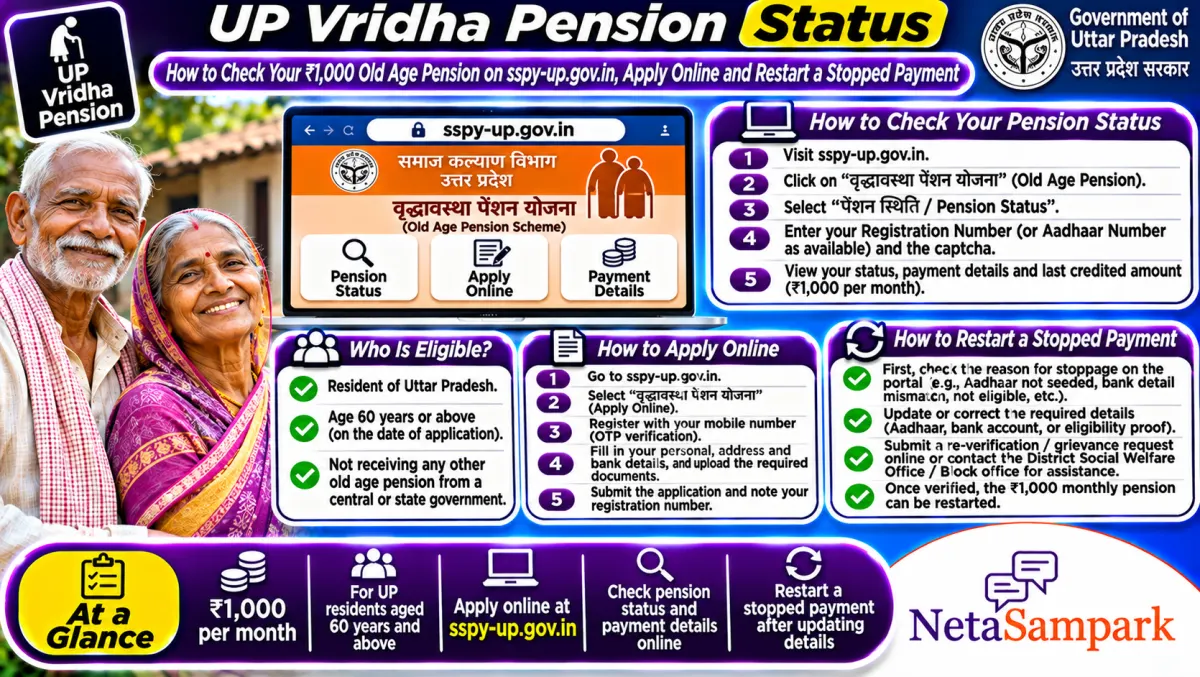
To check UP old age pension status, open sspy-up.gov.in, go to the Vridhavastha Pension section, choose the status option and enter your registration or application number with the registered mobile. The pension is ₹1,000 a month, usually paid ₹3,000 every quarter by DBT. Stopped payments are mostly Aadhaar, bank or verification issues.
Updated 11 November 2026
UP's old age pension reaches over a crore elderly people, and when a quarter's money doesn't arrive, families start running between the bank and the block. Most of the time, the reason is sitting right there on the Integrated Social Pension portal. You just need to know where to look.
This guide covers checking status, applying, the real reasons payments stop, and where to complain.
Quick facts: UP old age pension
| Item | Details |
|---|---|
| Official portal | sspy-up.gov.in (Integrated Social Pension Portal, Social Welfare Department, UP) |
| Helpline | Block office / District Social Welfare Officer; UP CM Helpline 1076 for complaints |
| Fee | None. Applying is free |
| Deadline | None; apply once you turn 60 |
| Documents | Aadhaar, age proof, income certificate, bank passbook, photo, mobile number |
| Amount | ₹1,000 a month, typically credited ₹3,000 per quarter by DBT |
| Who verifies | BDO in rural areas, SDM in urban areas, then District Social Welfare Officer |
| Related pensions | Widow (Nirashrit Mahila) and Divyang pensions on the same portal |
Who is eligible?
• Resident of Uttar Pradesh
• Age 60 or above
• Family income within the limit set by the department, which the portal lists for rural and urban areas
• Not getting another government pension
Income limits are checked using the income certificate, so get one from e-District if you don't have it. Our income certificate guide explains how.
How to check pension status on sspy-up.gov.in
1. Open sspy-up.gov.in.
2. Click Vridhavastha Pension (old age pension).
3. Choose the application or payment status option.
4. Enter the registration or application number and the mobile number used while applying, or search by bank account where the option is available.
5. Fill the captcha and submit.
6. You'll see where the application is: pending with BDO or SDM, approved, or rejected, plus payment details.
You can also look up the beneficiary list by district, block and village or ward on the portal.
How to apply online
1. On sspy-up.gov.in, open Vridhavastha Pension and choose the new registration option.
2. Fill in basic details: name, date of birth, Aadhaar, mobile, district, block or town.
3. Save and note the registration number.
4. Log in again with the registration number and complete the full form with bank details.
5. Upload the photo, age proof, income certificate and bank passbook.
6. Submit and print the form. Some districts ask you to submit the printout at the block or tehsil.
You can also apply at a Jan Seva Kendra. The operator may charge a small service fee, but the application itself is free.
Payment stopped? Here's why it usually happens
| Problem | What it usually means | Fix |
|---|---|---|
| Approved but no money | Aadhaar not seeded for DBT in your bank | Ask the bank to seed Aadhaar on NPCI for DBT |
| Name not in list | Application stuck at BDO or SDM verification | Visit the block or tehsil with the registration number |
| Payment returned | Wrong IFSC or closed account | Update bank details through the District Social Welfare Officer |
| Rejected | Income or age didn't match | Read the reason; reapply with correct certificates |
| Stopped after years | Annual verification found an issue | Ask at the block what was flagged |
Aadhaar authentication and seeding
UP pays pensions through PFMS and DBT. If Aadhaar authentication of the pensioner hasn't been done, or the account isn't seeded on NPCI, payments can stop. The fix is at the bank, not at the block: ask clearly for Aadhaar seeding for DBT. Keep the receipt.
Widow and Divyang pensions
The same portal handles the Nirashrit Mahila Pension for widows and destitute women and the Divyang pension. The steps are almost the same; pick the right scheme on the homepage. Widows need the husband's death certificate. Divyang applicants need the disability certificate.
A real-life example
Kamla Devi in Sitapur stopped getting her pension after March 2026. Her grandson checked sspy-up.gov.in and the payment showed as failed. At the bank, they found her Aadhaar was seeded to an account her late husband had opened. She seeded it to her own account, informed the block office, and the next quarter came through.
Documents checklist
☐ Aadhaar card with a working mobile
☐ Age proof (Aadhaar, birth certificate or school record)
☐ Income certificate from e-District
☐ Bank passbook in the pensioner's own name
☐ Recent photo
☐ Registration number, once you apply
Where to complain
Start with the block (rural) or SDM office (urban), then the District Social Welfare Officer. If that fails, file on UP Jansunwai or call 1076. Our Jansunwai guide shows how to file and send a reminder. You can also reach your MLA. Find yours in the UP MLAs list or on NetaSampark's UP page.
What the status stages mean
When you check, you'll see words like pending at BDO, pending at SDM, pending at DSWO, approved, or rejected. Pending at BDO or SDM means field verification hasn't finished, so visit that office with your registration number. Pending at DSWO means verification is done and the district office needs to approve. Approved means you're on the list and the next quarterly payment should come, provided Aadhaar seeding is right. Rejected shows a reason. Common reasons are income above the limit, age not proven, or the person already getting another pension.
Checking the credit in your bank account
Pension payments come in quarterly lumps, so don't panic if a month passes without a credit. Look for a DBT or PFMS entry of about ₹3,000 once a quarter. If two quarters pass with nothing while the portal says approved, that's the signal to go to the bank first and check seeding, then the block office.
Helping an elderly parent apply
Many elderly people can't fill online forms. A family member can apply on their behalf at a Jan Seva Kendra, using the pensioner's Aadhaar and mobile. Make sure the bank account is in the pensioner's own name, not a joint one with a child, as joint or wrong-name accounts are a common reason for failed payments. Keep a photo of every receipt and the registration number on your phone.
Beware of pension agents
Some middlemen promise "fast approval" for a fee. There's no such thing. Verification goes through the BDO or SDM and the district office no matter who files the form. If someone asks for money to get your pension sanctioned, report it on 1076.
Final reminder
Check the status on sspy-up.gov.in once every quarter, keep Aadhaar seeded in the pensioner's own account, and don't wait months to act on a missed payment. The sooner you check, the faster the block can fix it.
Frequently asked questions
How much is UP old age pension?
₹1,000 a month. It's usually credited as ₹3,000 every quarter by DBT.
How do I check UP pension status without a registration number?
Try the bank account search on the portal where available, or ask the block office to look it up with Aadhaar.
Who approves the pension?
The BDO in rural areas or SDM in urban areas verifies it, and the District Social Welfare Officer approves.
Can I apply at a Jan Seva Kendra?
Yes. The operator fills the online form for you; the application itself is free.
Can a person get both old age and widow pension in UP?
Usually not. You can get one social pension at a time, so pick the one you're eligible for.