
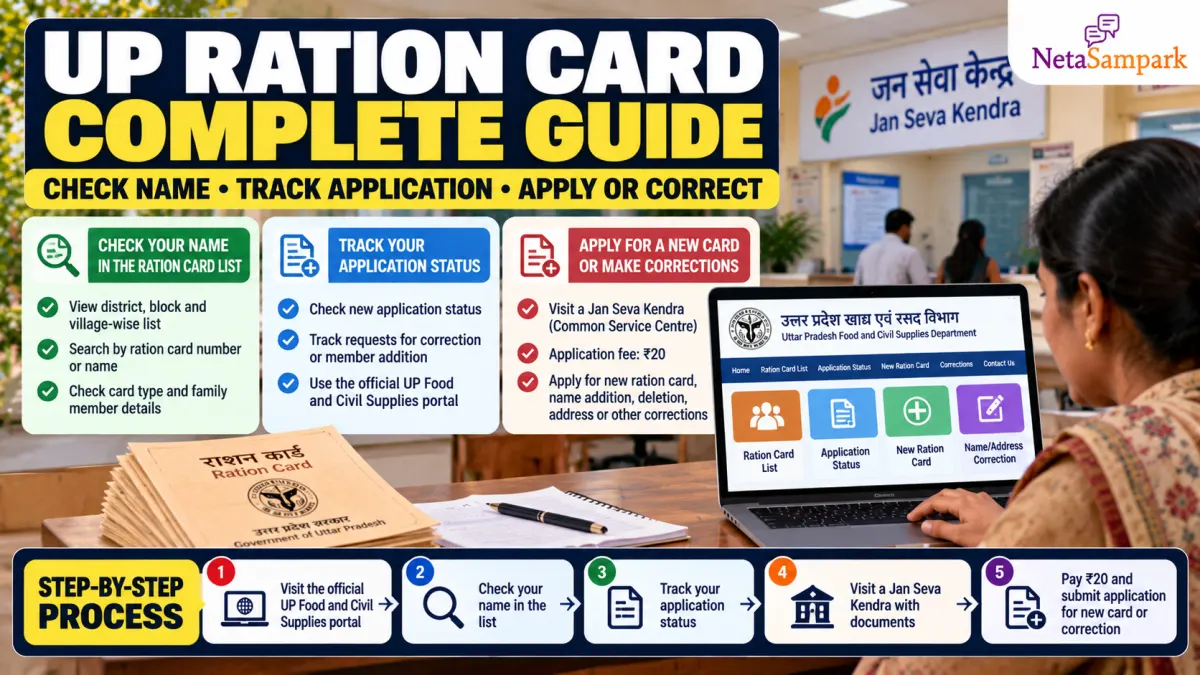
A ration card is an important document for eligible households in Uttar Pradesh. It helps families access subsidised food grains under the Public Distribution System (PDS) and serves as a record of household members linked to the card.
If you want to check whether your name appears in the UP ration-card list, track a pending application, apply for a new card or correct existing details, start with the official Food and Civil Supplies Department portal.
Official portal: fcs.up.gov.in
This guide explains the online checks, the documents you may need, how to use a Jan Seva Kendra and what to do if your application remains pending.
UP ration card services at a glance
| Service | Where to start |
|---|---|
| Check your name in the ration-card list | UP Food and Civil Supplies portal |
| Track a new application | Official application-status page |
| Apply for a new ration card | Ask a Jan Seva Kendra or your local Tehsil Supply Office about the current application process |
| Correct a name or household details | Ask the Kendra or Supply Office about the applicable modification process |
| Report a ration-card grievance | UP PDS grievance portal |
| Department helpline | 1800-1800-150; 1967 is also listed for grievances |
The UP application-status page specifically says that it can show the status of applications submitted after 1 January 2022. It asks for a reference ID or ration ID, a captcha and OTP verification.
1 How to check your name in the UP ration-card list
If you already have a ration card or want to check whether your household appears in the eligibility list, follow these steps.
Step 1: Open the official portal
Visit fcs.up.gov.in. Avoid lookalike websites that ask for unnecessary personal details or payment to display a list.
Step 2: Find the eligibility-list or ration-card search option
Look for the option labelled “Eligibility List of NFSA”, “Ration Card” or similar wording. The portal layout may change, so check the official homepage if the menu names differ.
You can also open the NFSA Uttar Pradesh page for official state-level information.
Step 3: Select your location
Where the list requires it, select the relevant details, such as:
- District
- Urban local body or rural block
- Town, village, ward or Gram Panchayat
- Fair Price Shop (ration dealer)
The exact sequence may vary depending on the service you select.
Step 4: Find your household
Check the displayed list for your household name or ration-card number. Verify the card type and family-member details where available.
If your name is missing, do not immediately assume that the card has been cancelled. Check the spelling, the selected location and the relevant list before contacting the local Supply Office.
Tip: Save or print the list details for your records, but do not publicly share screenshots containing Aadhaar numbers, mobile numbers or other sensitive information.
2 How to track a UP ration-card application online
If you applied through a Jan Seva Kendra or another authorised channel, keep your acknowledgement receipt. The reference ID on it is important for tracking the request.
Step-by-step tracking process
- Open the official UP ration-card application-status page.
- Enter the reference ID or ration ID requested by the portal.
- Complete the captcha.
- Follow the OTP verification process using the mobile number registered with the application.
- Submit the OTP and review the displayed application details and status history.
The official page identifies the service in Hindi as “राशन कार्ड आवेदन की स्थिति” and includes fields for the applicant's details, family members and application-status history.
What if your status is pending?
A pending status does not necessarily mean that the application has been rejected. It may still require document checks, field verification or approval by the relevant authority.
If the status does not change:
- Keep your acknowledgement or reference number.
- Ask the Jan Seva Kendra that submitted the application to check the record.
- Contact your Tehsil Supply Office or District Supply Office if further verification is needed.
- If the issue remains unresolved, lodge a grievance through the UP PDS grievance portal.
If the application is rejected, ask for the recorded reason and the procedure for correction, resubmission or appeal.
3 How to apply for a new UP ration card at a Jan Seva Kendra
A Jan Seva Kendra, also known as a Common Service Centre (CSC), can help applicants access available government services and submit applications through authorised systems.
The exact application route can depend on the applicant's circumstances and the service currently enabled by the department. Confirm the current process with the Kendra or local Supply Office before paying.
Documents to prepare
Requirements may differ according to the application and household circumstances. Carry the documents relevant to your case, which may include:
- Aadhaar cards or other accepted identity documents for household members
- Proof of residence, where required
- Details of the head of the household and family members
- Existing ration-card details, if applicable
- Birth certificate for a child being added, where applicable
- Marriage certificate or other accepted supporting document for a spouse's inclusion, where applicable
- Mobile number for application updates and OTP verification
The operator or Supply Office may ask for additional documents. Confirm the official requirements before submitting originals or paying any service charge.
Application steps
- Visit an authorised Jan Seva Kendra or the relevant Supply Office.
- Explain that you want to apply for a new ration card.
- Provide the requested information and supporting documents.
- Check that the household names, address and other details have been entered correctly.
- Ask for the acknowledgement receipt and application reference number.
- Use the official application-status page to track progress.
Submitting an application does not automatically guarantee approval. Eligibility and verification are determined by the competent authority under the applicable rules.
4 How to correct a name or update family details
If your existing ration card contains an incorrect spelling, outdated address or incomplete family information, ask about the appropriate modification service.
Depending on the circumstances, requests may include:
- Correction of a name or other personal detail
- Addition of an eligible family member
- Removal of a member when legally and administratively appropriate
- Address updates
- Other changes permitted under the department's rules
What documents may be needed?
Carry your existing ration-card details and evidence supporting the requested change. For example:
| Requested change | Supporting document that may be relevant |
|---|---|
| Name correction | Aadhaar or another accepted identity document showing the correct name |
| Child's inclusion | Birth certificate and identity details, as applicable |
| Spouse's inclusion | Marriage-related proof and identity details, as applicable |
| Address change | Accepted residence proof |
| Removal of a family member | Relevant supporting records, depending on the circumstances |
These are examples, not a guarantee that every document will be accepted in every case. Ask the Kendra or Supply Office for the current checklist.
After submitting the request, keep the acknowledgement and track the status. Check the updated card or list once the modification has been approved.
5 Is the Jan Seva Kendra charge ₹20?
Some service guides and local centres may quote ₹20 for assistance with an application. However, I could not verify an official Uttar Pradesh government notification establishing ₹20 as a universal fee for every new ration-card application or correction.
Before paying:
- Ask whether ₹20 is the Kendra's service charge or a government fee.
- Request the displayed rate or applicable fee schedule.
- Ask for a receipt.
- Confirm whether any additional charge applies to the particular service.
- Do not pay extra for a promise of guaranteed approval or faster eligibility.
Important: Checking a publicly available eligibility list is different from submitting an application through a service centre. Do not assume you need to pay a Kendra merely to look up a list online.
6 What to do if your name is missing from the list
If you believe your household is eligible but cannot find the name:
- Check the spelling and the correct district, block, ward or ration dealer.
- Confirm whether you are checking an existing-card list or the status of a new application.
- If you applied recently, check the application-status page using your acknowledgement details.
- Ask the local ration dealer or Supply Office to verify the household record.
- If necessary, submit a grievance through the official UP PDS grievance portal.
Do not submit a duplicate application without first checking whether an earlier request is already active. Duplicate records can complicate verification.
7 Official helplines and websites
Keep these official links handy:
- UP Food and Civil Supplies Department: https://fcs.up.gov.in/
- UP ration-card application status: Open tracking page
- UP PDS grievance portal: https://cms.up.gov.in/
- National Food Security Portal — Uttar Pradesh: https://www.nfsa.gov.in/State/UP
- Department helpline: 1800-1800-150
- Additional grievance number listed by the department: 1967
If you contact a helpline, note the date, the issue reported and any complaint or reference number provided.
Frequently asked questions
Can I check my name in the UP ration-card list for free?
The official department portal provides eligibility-list and ration-card information. Checking a publicly available list is different from paying a service centre to submit an application.
Can I track an application submitted through a Jan Seva Kendra?
Yes. Start with the official UP application-status page. Keep the reference ID or ration ID from your acknowledgement receipt and the registered mobile number available for OTP verification.
How much does a new ration-card application cost?
The ₹20 amount should not be treated as a universally confirmed government fee. Ask the centre to explain its service charge and show the applicable fee schedule before paying.
Can I correct a spelling mistake on my ration card?
You can ask the authorised Kendra or Supply Office about the applicable correction process. Carry the existing ration-card details and an accepted document that supports the correction.
What if the online application-status page does not work?
Try again later and check that you have entered the correct reference details. If the problem persists, return to the centre that submitted your application or contact the local Supply Office.
Final takeaway
For UP ration-card services, begin with the official Food and Civil Supplies Department website. Use the eligibility list to check your household details and the dedicated application-status page to follow a pending request.
For a new card or correction, visit an authorised Jan Seva Kendra or the relevant Supply Office with the supporting documents. Keep your acknowledgement receipt, verify every entry and confirm the service charge before paying. Most importantly, rely on the official department's eligibility decision—not on anyone promising guaranteed approval.