
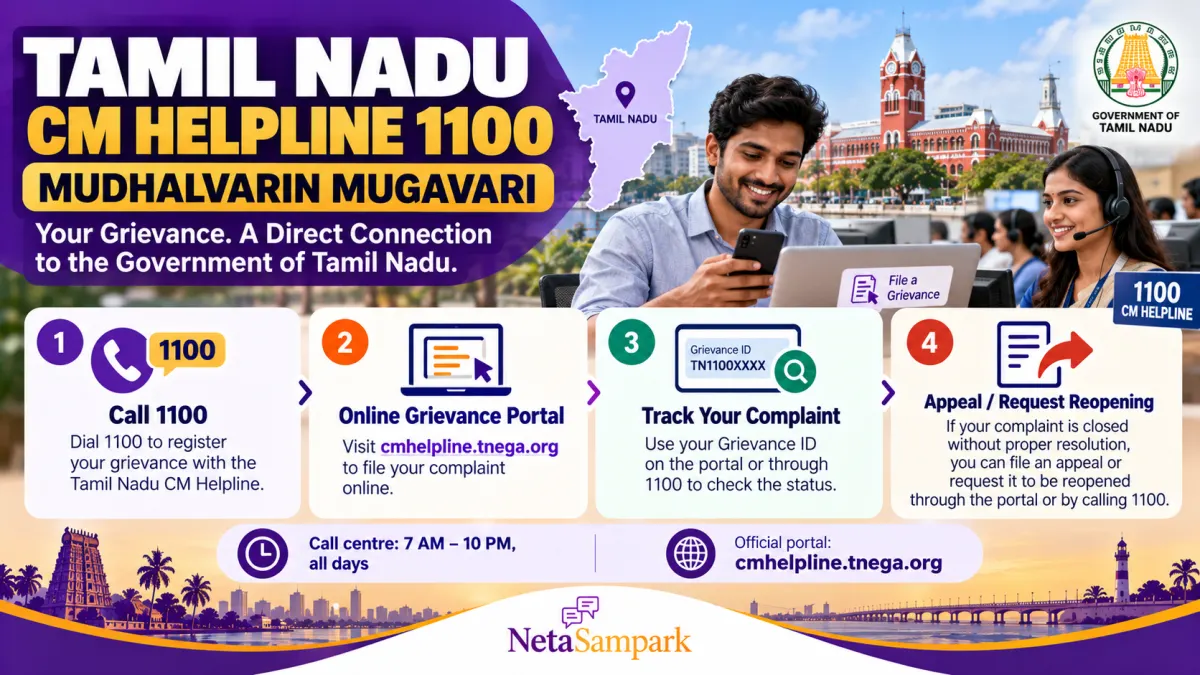
Have you complained about a broken streetlight, delayed government service, drainage problem, or difficulty accessing a welfare scheme but received no satisfactory response? Tamil Nadu residents can use Mudhalvarin Mugavari, the state's integrated public grievance redressal system, to submit complaints, track their progress, and request reopening when a grievance is closed without proper resolution.
The service is available through the CM Helpline number 1100 and the official online portal. Citizens can also submit grievances through the mobile app and other supported channels.
This guide explains how to file a complaint, what information to provide, how to track it, and what to do if the response does not resolve your problem.
What Is Mudhalvarin Mugavari?
Mudhalvarin Mugavari is Tamil Nadu's integrated public grievance redressal platform, developed by the Tamil Nadu e-Governance Agency (TNeGA).
It provides a common system for citizens to submit complaints and have them routed to the government department responsible for addressing the issue.
Citizens can use the platform to:
- Report problems with government services or eligible welfare schemes.
- Raise civic complaints about roads, drainage, waste, streetlights, and similar issues.
- Submit questions and suggestions.
- Track grievance status.
- Request reopening or appeal when a complaint has been closed without satisfactory resolution.
Official website: https://cmhelpline.tnega.org/
The portal supports grievances in Tamil and English.
CM Helpline 1100: Important Contact Details
Keep these details handy before submitting a complaint.
- Helpline number: 1100
- Official grievance portal: https://cmhelpline.tnega.org/
- Email: cmcell@tn.gov.in or cmhelpline@tn.gov.in
- Call centre hours: 7 AM to 10 PM, Monday to Sunday, including government holidays.
These details are published in the official CM Helpline FAQs. Check the portal for the latest instructions if a contact channel changes.
What Complaints Can You File Through 1100?
The platform accepts grievances relating to government services, public issues, and civic problems.
Examples include:
Civic and public infrastructure issues
- Broken streetlights.
- Damaged public roads.
- Open manholes.
- Waterlogging.
- Waste accumulation or public waste burning.
Government service issues
- Delays in receiving an eligible government service.
- Difficulties accessing a welfare scheme.
- Applications pending with a department.
- Problems requiring attention from a relevant government office.
Other public grievances
- Issues affecting public services.
- Complaints requiring coordination between departments.
- Suggestions for improving government services.
The helpline is a grievance-routing and tracking mechanism. It does not guarantee that every request will be approved, and some matters may require a different statutory process.
For example, a grievance involving an entitlement should include the relevant application details and explain what action is pending.
How to File a Grievance Online
You can submit a complaint through the official portal without visiting a government office.
Step 1: Open the Official Portal
Visit https://cmhelpline.tnega.org/ and select the option to file a grievance.
Step 2: Sign In or Register
Register using your mobile number or email address, as supported by the portal. You may be asked to verify your mobile number through an OTP.
Step 3: Select the Grievance Option
Choose “File a Grievance” and follow the instructions on the screen.
Step 4: Select the Relevant Department
Choose the government department responsible for the issue whenever possible.
If you cannot identify the correct department, the official FAQ advises selecting “Other Petitions” and providing enough information for the helpline team to route the grievance appropriately.
Step 5: Write a Clear Complaint
Describe the issue in Tamil or English. Include the location, dates, relevant application or reference numbers, previous complaint details, and the action you are requesting.
Avoid vague descriptions such as “no action taken.” Explain what happened and what remains unresolved.
Step 6: Attach Supporting Evidence
The portal allows supporting documents, photographs, and videos up to 20 MB per file, according to its published FAQ.
Useful evidence may include:
- Photographs of the problem.
- Copies of previous representations.
- Application or service reference numbers.
- Receipts or acknowledgements.
- Relevant correspondence from the department.
Do not upload unnecessary personal or financial information.
Step 7: Submit and Save the Acknowledgement
After submission, the system generates an acknowledgement. Save the grievance ID and retain the acknowledgement SMS.
You will need the reference details to track the complaint or request reopening later.
Official filing page: https://cmhelpline.tnega.org/portal/en/newticket
How to File a Complaint by Calling 1100
If you do not have internet access or prefer speaking to a representative, call 1100.
The official call centre operates from 7 AM to 10 PM every day, including government holidays.
Before calling, keep the following information ready:
- Your name and contact details.
- The department or public service involved, if known.
- The location where the issue occurred.
- Relevant application or reference numbers.
- The date you first reported the issue, if applicable.
- A concise explanation of what happened and what action you need.
Explain the problem clearly and ask for the grievance acknowledgement or reference number.
Write down the number and keep it safe. You can use it to ask about the complaint's progress or request reopening if it is closed without satisfactory resolution.
The same helpline can also help you check the status of grievances submitted through other supported channels.
How to Track Your Grievance Online
Once a complaint has been registered, you can follow its status through the portal.
- Visit https://cmhelpline.tnega.org/.
- Sign in using your registered mobile number, OTP, or the applicable login credentials.
- Open “My Dashboard.”
- Select the grievance you want to check.
- Review the current status and available details.
The system also sends acknowledgement and closure updates by SMS.
If you filed the complaint by phone, email, or another channel and cannot see it in your online dashboard, call 1100 and provide the grievance ID. The official FAQ notes that tracking grievances filed through other channels may require assistance from the call centre.
What If Your Grievance Is Closed Without Solving the Problem?
A grievance marked “closed” does not necessarily mean the underlying issue has been resolved to your satisfaction.
If the response is incomplete, the department has not taken the promised action, or the complaint has been closed without addressing the facts, the official CM Helpline FAQ provides ways to request reopening.
Option 1: Use the Appeal Option in My Dashboard
- Sign in to the official portal.
- Open “My Dashboard.”
- Select the closed grievance.
- Look for the appeal option.
- Explain why the response is unsatisfactory and what remains unresolved.
- Submit the appeal and retain the acknowledgement.
The portal's published FAQ says the appeal facility can be used once for each grievance. Therefore, explain the issue carefully and attach relevant evidence where appropriate.
Option 2: Call 1100 and Request Reopening
You can call 1100, provide your grievance ID, and explain why the complaint needs further action.
The helpline representative may reopen the grievance for further processing based on the merits of the case.
Explain specifically:
- What the department's response said.
- Why the response does not resolve the problem.
- What evidence or facts were overlooked.
- What action is still required.
Option 3: File a New Grievance Referencing the Old One
If needed, you can file a new grievance and mention the earlier grievance ID.
Explain why the earlier complaint remains unresolved and refer to the previous response. This helps the receiving office understand the history rather than treating the new complaint as an unrelated issue.
Official guidance: https://cmhelpline.tnega.org/portal/en/kb/articles/tamil-nadu-cm-helpline-faqs
How to Write an Effective Appeal
A useful appeal is factual, specific, and supported by evidence.
You can adapt this template:
Subject: Request to Reopen Grievance [Grievance ID]
I submitted grievance [Grievance ID] on [date] regarding [brief description of the issue].
The grievance has been marked as closed. However, the issue remains unresolved for the following reasons:
- [Explain what action has not been taken.]
- [Describe any incorrect or incomplete response.]
- [Mention the supporting evidence or earlier correspondence.]
I request that the grievance be reopened and reviewed by the concerned department. The specific action required is [state the requested action].
I have attached the relevant documents and previous correspondence for reference.
Please review the matter and provide an appropriate response.
Thank you.
Keep a copy of your appeal and any documents submitted with it.
How Long Does the Department Take to Respond?
The official CM Helpline FAQ states that each department has a timeline under its Service Level Agreement (SLA).
There is no single guaranteed resolution period for every type of grievance. The time required depends on the issue, department, verification needs, and applicable service standards.
Check your grievance status regularly. If the stated period has passed without an adequate response, contact 1100 with your grievance ID and ask for an update.
What If the Department Still Does Not Resolve the Issue?
If reopening does not resolve the problem, identify whether a separate departmental, statutory, or legal remedy applies.
Depending on the matter, you may be able to approach the relevant departmental grievance authority, district administration, or another designated complaint mechanism.
For example, certain service-delivery matters have their own procedures and appeal routes. Court-related matters and other legally restricted issues may not be resolved through the CM Helpline alone.
Keep your grievance acknowledgement, departmental replies, supporting documents, and appeal records together. These records can help when approaching the appropriate authority.
Common Mistakes to Avoid
- Filing a complaint without identifying the location or service involved.
- Choosing an unrelated department when the correct one is known.
- Submitting unclear descriptions without explaining the requested action.
- Failing to save the grievance ID.
- Assuming that an SMS saying “closed” proves the problem has been resolved.
- Using the appeal option without explaining what remains unresolved.
- Submitting duplicate complaints without referring to the earlier grievance.
- Uploading unnecessary sensitive personal information.
Frequently Asked Questions
Is Tamil Nadu CM Helpline 1100 free to call?
The government identifies 1100 as the CM Helpline number. Check the official portal for current call and access information.
Can I submit a grievance in Tamil?
Yes. The official portal supports grievance submission in Tamil and English.
Can I file a grievance without a smartphone?
Yes. You can use a computer to access the portal or call 1100. Other supported methods include email and post.
Can I attach photos and documents?
Yes. The official FAQ states that documents, photos, and videos can be attached up to 20 MB per file.
Can I track a grievance filed by phone?
Yes. Call 1100 and provide your grievance ID. The portal's dashboard may not display grievances submitted through every other channel.
Can a closed grievance be reopened?
Yes. According to the official FAQ, you can use the appeal option in My Dashboard once for that grievance or call 1100 and request reopening. The request is considered on its merits.
What if I do not know which department to select?
The official FAQ recommends choosing “Other Petitions” if you cannot identify the correct department. Provide enough information for the helpline team to route the complaint.
Does filing a grievance guarantee that the government will approve my request?
No. The platform routes and tracks grievances, but the concerned department must examine the facts, applicable rules, and evidence before deciding what action is appropriate.
Conclusion
Tamil Nadu's Mudhalvarin Mugavari system gives residents a common way to raise public-service and civic grievances through the online portal or helpline 1100.
To improve the chances of your complaint being handled correctly, provide clear facts, select the appropriate department, attach relevant evidence, and save your grievance ID. Track the response through My Dashboard or the helpline.
If a complaint is closed without resolving the problem, use the portal's appeal option, call 1100 to request reopening, or submit a new grievance referencing the earlier ID.
Official resources
- CM Helpline portal: https://cmhelpline.tnega.org/
- File a grievance: https://cmhelpline.tnega.org/portal/en/newticket
- Official FAQs: https://cmhelpline.tnega.org/portal/en/kb/articles/tamil-nadu-cm-helpline-faqs
- Email: cmcell@tn.gov.in or cmhelpline@tn.gov.in
- Helpline: 1100
Information is based on the official CM Helpline portal and its published FAQs. Check the official website for the latest service instructions and contact details.