
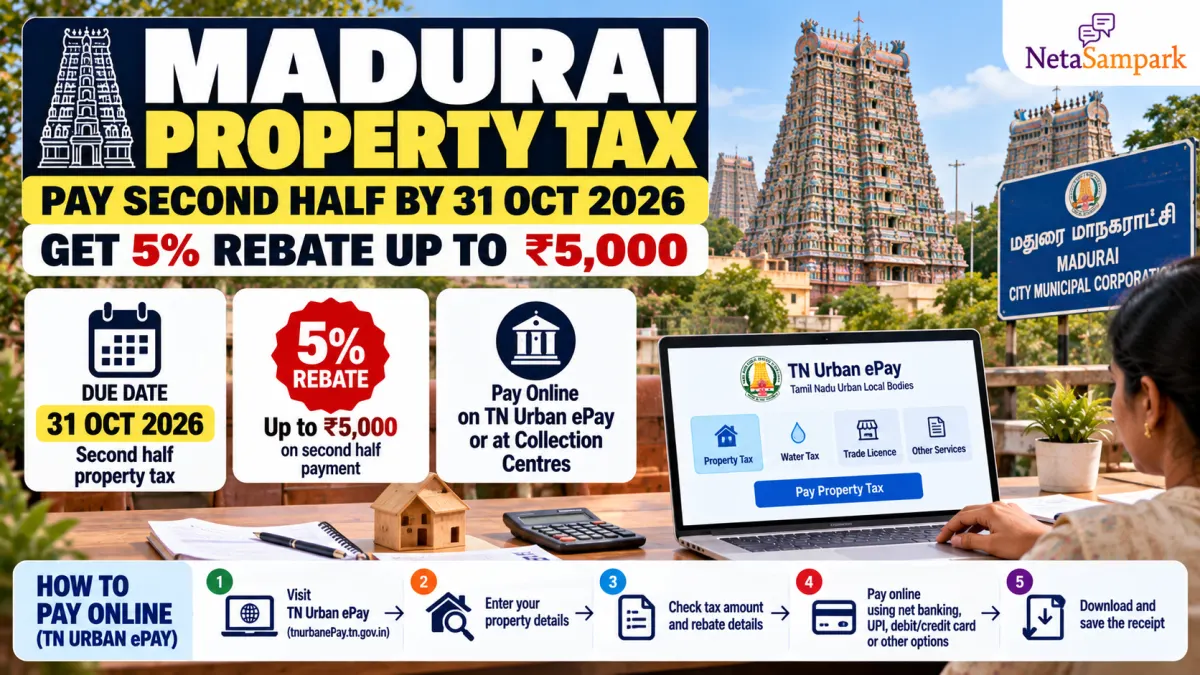
Property owners in Madurai have a limited window to save on their property tax. The Madurai City Municipal Corporation has announced a 5% rebate, capped at ₹5,000 per assessment, for eligible owners who pay their property tax for the second half of the 2026–27 financial year by 31 October 2026.
According to the announcement reported on 14 October, residents can pay through the Tamil Nadu Urban ePay portal or at the Corporation’s tax collection centres. Collection centres are scheduled to operate on Saturdays during October, except public holidays.
If you have not paid your second-half property tax yet, here is how to check your dues, make the payment and keep your receipt.
Madurai property tax rebate 2026: Key details
| Detail | Information |
|---|---|
| City | Madurai, Tamil Nadu |
| Financial year | 2026–27 |
| Tax period | Second half |
| Payment deadline | 31 October 2026 |
| Rebate | 5% |
| Maximum rebate | ₹5,000 per assessment |
| Online payment portal | TN Urban ePay |
| Offline payment | Madurai Corporation tax collection centres |
The rebate and deadline were reported in local news coverage of the Corporation’s announcement. Check the amount shown against your assessment on the official portal before paying.
Who can get the 5% rebate?
The announced concession applies to property owners in Madurai who pay the second-half property tax for 2026–27 by the deadline.
The maximum saving is ₹5,000 per assessment. The actual rebate depends on the eligible tax amount, so not every property owner will receive the maximum benefit.
For example, if the eligible tax component is ₹10,000, a 5% rebate would be ₹500. If it is ₹1,00,000, 5% would be ₹5,000, subject to the stated cap and the portal’s calculation.
Important: Confirm that the rebate appears in the payment calculation. Do not assume that paying a partial amount will qualify for the incentive.
How to pay Madurai property tax online on TN Urban ePay
The Tamil Nadu Urban ePay portal supports property-tax payments for participating urban local bodies across the state, including corporations and municipalities other than Chennai Corporation.
Official portal: https://tnurbanepay.tn.gov.in/
Step 1: Open the official portal
Visit TN Urban ePay. Check that the address is correct before entering property or payment details.
Step 2: Select the payment option
Look for the property-tax payment option. The portal provides facilities to view property information and pay taxes.
Step 3: Select Madurai Corporation and enter your assessment details
Choose the relevant municipality or corporation and enter your property assessment number and any other requested details.
Keep your latest property-tax receipt handy. If your assessment number has changed or the details do not match, verify the correct number with the Corporation before proceeding.
Step 4: Verify the property and amount due
Before paying, carefully check:
- Property owner's name and property address
- Assessment number
- Second-half tax amount and any outstanding dues
- Rebate or incentive shown in the calculation
- Final payable amount
If the property details are incorrect or the expected rebate is missing, contact the Corporation or seek help at a collection centre rather than making a payment against the wrong assessment.
Step 5: Complete the payment
Use one of the payment methods offered by the official portal. Follow the on-screen instructions and wait for the transaction status to be confirmed.
Avoid refreshing the page or making another payment immediately if the first transaction appears pending. Check the payment status first.
Step 6: Download and save the receipt
Once payment is successful, download the receipt and save a copy on your phone or computer. Keep the transaction reference number as well.
If money has been debited but no receipt appears, check the portal’s payment status or payment history before attempting another transaction.
How to pay at Madurai Corporation tax collection centres
Residents who prefer offline payment can visit a Madurai Corporation property-tax collection centre.
The Corporation’s announcement, reported on 14 October, said that all its tax collection centres would operate on Saturdays during October, except public holidays, to help residents pay before the deadline.
Before visiting:
- Carry your latest property-tax receipt or assessment number.
- Confirm the property details and amount due.
- Ask the collection staff to verify the applicable rebate.
- Pay through the methods accepted at that centre.
- Collect the official receipt and check that it reflects the payment correctly.
If you plan to visit on 31 October, confirm the centre’s operating hours and whether that particular centre will be open. Do not assume that every centre will operate beyond its normal hours.
What if you cannot find your assessment number?
Check your previous property-tax receipt or any earlier Corporation payment record. You can also use the property-search and assessment-related services available through TN Urban ePay.
Start at the official portal. If the record cannot be located, contact the Madurai Corporation or visit a collection centre with the property address and previous receipt, if available.
Do not pay using another property’s assessment number just because the address appears similar.
What happens if you miss 31 October 2026?
The announced 5% rebate is linked to payment by the deadline. If you pay after 31 October, you should not assume that the concession will remain available.
Tamil Nadu’s urban local-body rules provide for property-tax incentives and interest on delayed payments. However, the precise amount due and the treatment of any late payment should be checked against your assessment and the applicable Madurai Corporation rules.
If you are unable to pay before the deadline, check the portal for the outstanding balance and contact the Corporation about your payment options.
Common mistakes to avoid
- Waiting until the last minute: Portal traffic or payment failures could delay confirmation.
- Using an unofficial website: Type the official portal address directly into your browser.
- Ignoring the rebate calculation: Review the final amount before confirming payment.
- Paying the wrong assessment: Verify the owner's name and property address.
- Not saving the receipt: Keep proof of payment and the transaction reference.
- Paying twice after a pending transaction: Verify the first payment status before retrying.
Frequently asked questions
1. What is the last date to pay Madurai’s second-half property tax and receive the rebate?
The announced deadline is 31 October 2026.
2. How much is the property-tax rebate?
The announced rebate is 5%, capped at ₹5,000 per assessment, for eligible second-half payments made by the deadline.
3. Where can I pay online?
Use the official Tamil Nadu Urban ePay portal: https://tnurbanepay.tn.gov.in/.
4. Can I pay at a Corporation collection centre?
Yes. The announcement says residents can pay at Madurai Corporation tax collection centres. Saturday operations were announced for October, except public holidays; confirm local timings before visiting.
5. Should I keep the payment receipt?
Yes. Download or collect the receipt and retain the transaction reference as proof of payment.
6. What should I do if the rebate is not showing?
Check the selected assessment, tax period and payment details. If the rebate still does not appear, contact the Corporation or ask the collection-centre staff to verify your eligibility before paying.
Official links and sources
- TN Urban ePay: https://tnurbanepay.tn.gov.in/
- Tamil Nadu Commissionerate of Municipal Administration: https://www.tnurbantree.tn.gov.in/
- Madurai rebate announcement reported by Dinamalar, 14 October 2026: Read the report
- Madurai property-tax payment service on the National Government Services Portal: View service information
Final takeaway
If you own a property within Madurai Corporation limits, check your second-half 2026–27 property-tax dues now. Paying by 31 October 2026 can secure the announced 5% rebate up to ₹5,000 per assessment.
Use TN Urban ePay for online payment or visit a Corporation collection centre. In either case, verify the rebate and property details, confirm that payment has succeeded, and keep your receipt.