
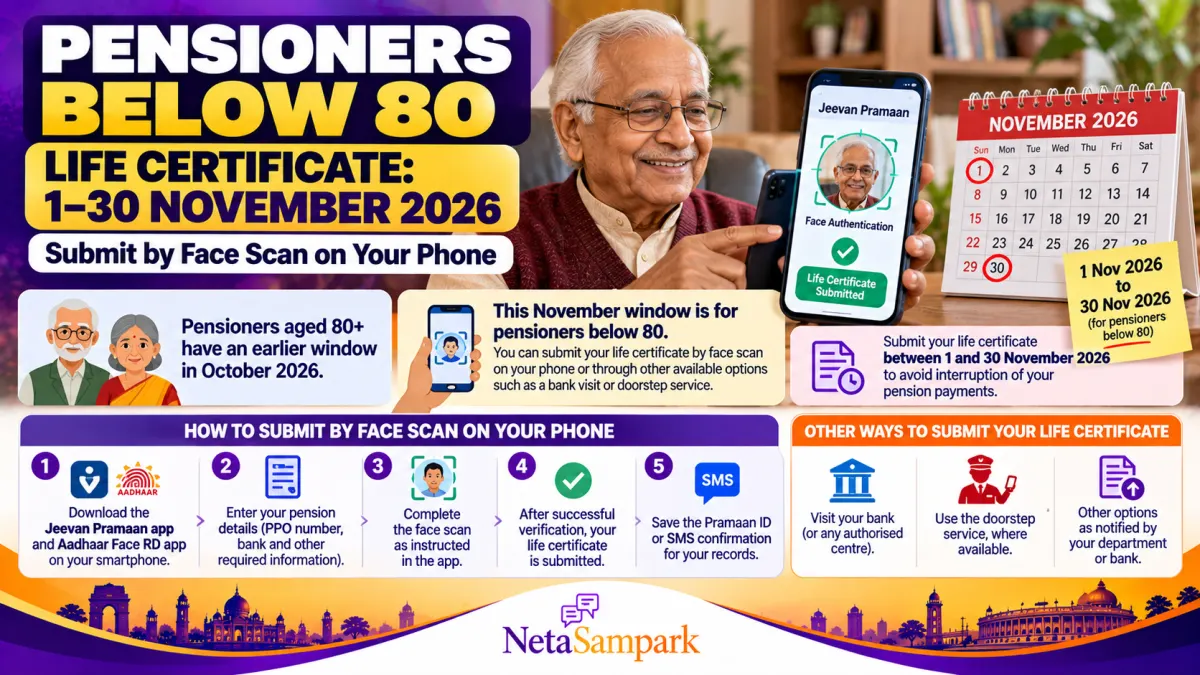
If you are a pensioner aged below 80, 1 November 2026 marks the start of the annual life certificate submission window for November. You have until 30 November 2026 to submit your life certificate through the method accepted by your pension-disbursing authority.
You may not need to travel to a bank or pension office. Eligible pensioners can use Jeevan Pramaan, the Government of India's Digital Life Certificate service, to submit their certificate using face authentication on a compatible smartphone.
The November window is separate from the earlier October window for pensioners aged 80 and above. If you are below 80, this is the time to check your pension details, prepare your phone and submit your certificate well before the deadline.
This guide explains how to complete the face-scan process, what you need, how to confirm submission and what alternatives are available if you do not own a smartphone.
1 Who Must Submit a Life Certificate in November 2026?
Pensioners who are required to submit an annual life certificate to their pension-disbursing authority must follow that authority's submission schedule.
For the 2026 annual submission cycle, the published schedule for bank pensioners includes:
| Pensioner's age | Life certificate submission window |
|---|---|
| 80 years and above | 1 October–30 November 2026 |
| Below 80 years | 1 November–30 November 2026 |
If you are below 80, you can begin submitting your life certificate from 1 November 2026.
The age-based schedule is confirmed in the official information published by the State Bank of India. Check with your own pension-disbursing bank or department if your pension follows a separate procedure or if you have received specific instructions.
Official reference: SBI — Digital Life Certificate (Jeevan Pramaan).
Why is a life certificate required?
A life certificate helps the pension-disbursing authority confirm that the pensioner is alive and remains eligible for continued pension payments under the applicable rules.
If a required certificate is not submitted and recorded, pension payments may be interrupted in accordance with the relevant pension rules. Submitting it early and checking the acknowledgement can help prevent avoidable delays.
2 What Is Jeevan Pramaan?
Jeevan Pramaan is an Aadhaar-based Digital Life Certificate service developed for pensioners. It uses biometric authentication to generate a digital certificate that can be accessed by the pension-disbursing authority.
Depending on your eligibility and the services supported by your pension authority, you may be able to complete the process through:
- Face authentication on a compatible smartphone
- Fingerprint or iris authentication using an authorised biometric setup
- A Jeevan Pramaan Centre
- A bank branch or another authorised service channel
- Other life certificate methods accepted by your pension-disbursing authority
Once successfully generated, the Digital Life Certificate is stored in the Jeevan Pramaan repository and can be accessed by the relevant authority.
Official website: Jeevan Pramaan — Digital Life Certificate for Pensioners.
3 What Do You Need Before Starting the Face Scan?
Keep the following details and facilities ready before you begin.
- Aadhaar number or Virtual ID, as supported by the application
- Pension Payment Order (PPO) number
- Bank account and pension-disbursing agency details
- Mobile number and email address
- A compatible smartphone with a working front camera
- Internet access
- The official Jeevan Pramaan and Aadhaar Face RD applications
The current Jeevan Pramaan download page lists Android 10.0 or later and iOS 14.0 or later for its mobile applications. Face authentication uses your phone's camera, so a separate fingerprint scanner is not required.
Download the applications only from the official portal or its linked app-store listings.
Official download page: Jeevan Pramaan — Download Applications.
4 How to Submit Your Life Certificate Using Face Authentication
Follow these steps carefully. The exact screens may vary slightly depending on your phone and the app version.
Step 1: Download the official applications
Visit the Jeevan Pramaan application download page.
Install the Jeevan Pramaan app and the Aadhaar Face RD app from the official links provided there.
Do not download APK files from unknown websites or install applications sent by strangers through messaging apps.
Step 2: Complete operator authentication
Open the Jeevan Pramaan app and follow the instructions for operator identification and authentication.
The pensioner can act as the operator. Depending on the app's workflow, this initial authentication is completed before the pensioner's life certificate is generated.
Follow the prompts and grant the camera permission required for face authentication.
Step 3: Enter your pension details
Enter the information requested by the app, which may include:
- Aadhaar number or Virtual ID
- PPO number
- Pension account or bank details
- Pension-sanctioning authority and pension-disbursing agency
- Mobile number and other required information
Check each entry before continuing. Incorrect PPO or bank details can lead to processing problems.
Step 4: Complete the face scan
Position yourself in front of the phone's camera and follow the on-screen instructions.
For a smoother scan:
- Sit in a well-lit room.
- Keep your face clearly visible.
- Remove anything obstructing your face, if possible.
- Hold the phone steadily.
- Follow the instructions on the screen until authentication is completed.
The app uses Aadhaar face authentication to verify the pensioner's identity. A successful authentication allows the Digital Life Certificate to be generated.
Step 5: Save the acknowledgement
After successful generation, note the Jeevan Pramaan ID or Pramaan ID and retain the confirmation SMS.
Where available, download or save the certificate PDF for your records.
Do not assume that merely opening the app or completing a face scan means the certificate has been submitted. Look for the successful-generation confirmation and retain the reference number.
The official portal provides further instructions in its Jeevan Pramaan FAQ.
5 How to Check Whether Your Life Certificate Was Submitted Successfully
After completing the process, take these steps:
- Check for the SMS confirming successful generation of the Digital Life Certificate.
- Save the Pramaan ID.
- Use the official Jeevan Pramaan portal's pensioner sign-in facility, if you need to view or download the certificate.
- Contact your pension-disbursing bank or department if the certificate does not appear to have been received or your pension record remains unupdated.
You can use the official Jeevan Pramaan pensioner sign-in page to access the certificate using the required identification and OTP process.
If your certificate has been generated but your pension-disbursing authority cannot locate it, provide the Pramaan ID and ask the authority to verify receipt and processing.
6 What If You Do Not Have a Smartphone?
A smartphone is not compulsory for submitting a life certificate. If you cannot complete face authentication yourself, check the alternative methods accepted by your pension-disbursing authority.
Option A: Visit your bank
You can submit your life certificate through the accepted procedure at your pension-disbursing bank. Carry the identification and pension details requested by the bank.
Option B: Visit a Jeevan Pramaan Centre
Jeevan Pramaan Centres provide assistance with generating a Digital Life Certificate. You can locate a centre through the official Jeevan Pramaan Centre Locator.
Check the centre's available services before travelling.
Option C: Ask about doorstep services
Some banks and authorised service providers offer doorstep services for eligible pensioners, subject to their terms and availability.
Contact your bank to ask whether a doorstep life certificate service is available in your area and whether any service charges apply.
Option D: Use another accepted submission method
Depending on your pension category and the applicable rules, other methods may be available. Ask your pension-disbursing authority which methods it accepts.
Official background: National Informatics Centre — Jeevan Pramaan.
7 What Happens If You Miss the 30 November Deadline?
Do not assume that missing the deadline automatically ends your pension entitlement. However, failure to submit a required life certificate may result in pension payment being withheld or interrupted under the applicable rules until the requirement is fulfilled.
If you miss the window:
- Contact your pension-disbursing bank or department immediately.
- Ask how to submit a late life certificate.
- Complete the accepted submission process as soon as possible.
- Retain the certificate acknowledgement and Pramaan ID.
- Ask the authority to confirm whether any further action is needed to resume or regularise pension payments.
If a payment has already been interrupted, ask the pension-disbursing authority about the applicable procedure and timeline for restoring payment. The process can depend on the pension scheme and the circumstances of the case.
8 Important Safety Tips for Pensioners
Pensioners should take particular care when using digital services.
- Use only the official Jeevan Pramaan portal and its linked applications.
- Never share your bank password, ATM PIN or OTP with someone claiming to help with a life certificate.
- Do not allow an unknown person to operate your banking app or transfer money in the name of life certificate verification.
- Save your Pramaan ID and confirmation message.
- If someone assists you with the process, make sure you understand what is being submitted and through which application.
- Contact your bank directly if you receive a message claiming that your pension will stop unless you click an unfamiliar link.
A legitimate life certificate submission should not require you to transfer money to an individual or disclose your banking password.
Frequently Asked Questions
Can pensioners below 80 submit their life certificate in October 2026?
For the standard annual schedule applicable to bank pensioners, the November window for pensioners below 80 begins on 1 November 2026. Pensioners aged 80 and above have an earlier window beginning on 1 October. Confirm your own pension authority's instructions if you are unsure.
Is face authentication available on both Android and iPhone?
The official Jeevan Pramaan download page lists support for Android 10.0 or later and iOS 14.0 or later. Install the required applications from the official links and check the current device requirements before starting.
Do I need a fingerprint scanner?
No separate biometric scanner is required when using the supported face-authentication process. The phone's camera is used to capture the face, along with the required Aadhaar Face RD service.
Do I need to visit my bank after generating Jeevan Pramaan?
Usually, a successful Digital Life Certificate is made available electronically to the pension-disbursing authority. However, check that it was generated successfully and contact your bank or department if your pension record has not been updated.
How can I download my certificate later?
Use the official Jeevan Pramaan pensioner sign-in facility. You will need the identification details and OTP requested by the portal.
Is Jeevan Pramaan available to state government pensioners?
The service supports eligible pensioners from Central Government, State Government and other government organisations. Whether your pension authority accepts the Digital Life Certificate depends on its participation and applicable procedures.
Final Checklist: Submit Your Life Certificate Before 30 November 2026
- Confirm that the November window applies to your pension category.
- Keep your PPO, Aadhaar or Virtual ID, bank and mobile details ready.
- Download the official Jeevan Pramaan and Aadhaar Face RD applications.
- Complete operator authentication and enter the correct pension details.
- Complete face authentication successfully.
- Save your Pramaan ID and confirmation SMS.
- Verify receipt with your pension-disbursing authority if needed.
- If you cannot use a smartphone, arrange an accepted alternative method well before the deadline.
Conclusion
For pensioners below 80, the annual life certificate window opens on 1 November 2026 and runs through 30 November 2026 under the standard schedule for bank pensioners.
Jeevan Pramaan's face-authentication facility can make submission easier by allowing eligible pensioners to generate a Digital Life Certificate using a compatible smartphone, without needing a separate biometric scanner.
Complete the process early, save your acknowledgement and confirm that your pension-disbursing authority has received the certificate. If face authentication is not practical for you, use a bank, Jeevan Pramaan Centre or another method accepted by your pension authority.
Official links:
- Jeevan Pramaan portal
- Download the official applications
- Jeevan Pramaan FAQ
- Locate a Jeevan Pramaan Centre
- SBI — Digital Life Certificate submission schedule