
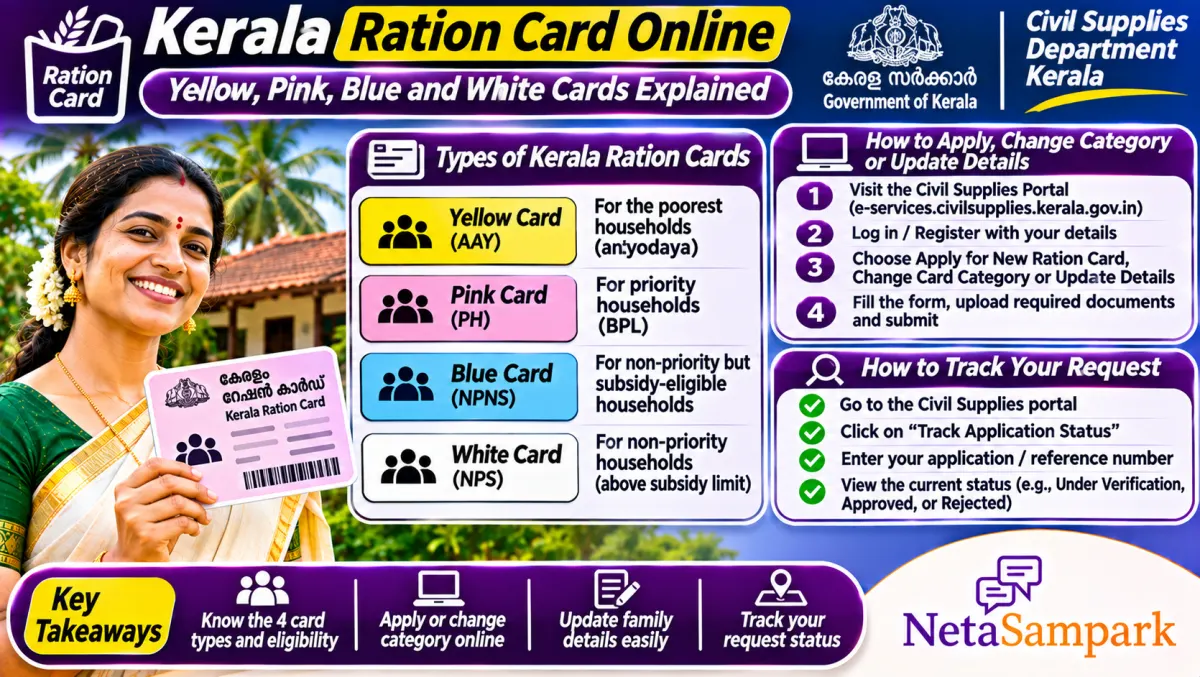
Kerala has four ration card colours: yellow for Antyodaya, pink for priority households, blue for non-priority subsidised and white for non-priority non-subsidised. Apply for a new card, add a member or ask for a category change through the Civil Supplies e-citizen portal (ecitizen.civilsupplieskerala.gov.in) or an Akshaya centre, then track it with your application number.
Updated 11 November 2026
In Kerala, the colour of your ration card decides how much rice you get and whether you qualify for many welfare schemes and medical help. That's why families care so much about moving from white or blue to pink, and why a wrong category can feel like a big loss.
Here's how the card types work, how to apply or change category, and how to track your request without running to the taluk supply office again and again.
Quick facts: Kerala ration card
| Item | Details |
|---|---|
| Official portal | civilsupplieskerala.gov.in and ecitizen.civilsupplieskerala.gov.in (Civil Supplies Department, Kerala) |
| Helpline | Taluk Supply Office; 1967 food and civil supplies helpline |
| Fee | Fee for new cards and some services as notified on the portal; Akshaya service charge extra |
| Deadline | Category change and priority list applications when the department opens a window |
| Documents | Aadhaar of all members, residence proof, income certificate, photo, old card details |
| Yellow card | Antyodaya Anna Yojana (AAY), poorest families |
| Pink card | Priority households (PHH) under NFSA |
| Blue and white | Non-priority cards, subsidised (blue) and non-subsidised (white) |
What each colour means for you
• Yellow (AAY): the poorest families, with the highest fixed quota of free rice under NFSA.
• Pink (PHH): priority households under NFSA, with free grain per member.
• Blue (NPS): non-priority subsidised; grain at concessional rates set by the state.
• White (NPNS): non-priority non-subsidised; limited quantities at set rates.
Priority status (yellow or pink) also matters for some health and welfare benefits, so the category is more than just rice.
How to check your card details
1. Open civilsupplieskerala.gov.in.
2. Look for the ration card details or e-citizen services.
3. Enter your ration card number.
4. See your card type, members and the ration shop (ARD).
You can also see recent purchases at your shop if the option is shown.
How to apply for a new card
1. Open ecitizen.civilsupplieskerala.gov.in and create a login, or go to an Akshaya centre.
2. Choose the new ration card application.
3. Fill in the family details, Aadhaar of each member, address and income.
4. Upload a family photo and documents.
5. Submit and note the application number.
6. The Taluk Supply Office verifies, sometimes with an inquiry by the rationing inspector.
How to add or remove a member
1. Log in on the e-citizen portal or visit Akshaya.
2. Choose member addition or deletion.
3. For a newborn, attach the birth certificate. For a bride, attach the marriage certificate and the reduction certificate from her parents' card.
4. For deletion, attach a death certificate or proof of moving out.
5. Submit and track.
How to apply for a category change (to priority)
The department opens windows for families to apply to be included in the priority list. When it's open:
1. Apply online through the e-citizen portal or at Akshaya.
2. Give income proof and details of hardship (serious illness, disability, widowhood, no house, and so on) as asked in the form.
3. The application is scored against criteria, and an inquiry may be done.
4. A draft list may be published for objections before the final list.
Keep checking official notices for the window. Agents can't change your category.
Common problems and fixes
| Problem | Likely reason | Fix |
|---|---|---|
| Priority card turned non-priority | Household didn't draw rations, or failed criteria | Apply for reinclusion with proof; see the Taluk Supply Office |
| Member can't be added | Still on another card | Get a reduction certificate from the other card |
| Application pending | Inquiry not done | Follow up at the Taluk Supply Office |
| Wrong name | Data error | Apply for correction with Aadhaar |
| Less ration than due | Shop error | Ask for the receipt; complain on 1967 |
Why priority cards get cancelled
Kerala has removed priority cards from families who didn't draw rations for months, or who were found to have income or assets above the criteria. If that happened to you wrongly, read our guide on Kerala priority ration exclusion and reinclusion through Akshaya. The lesson: keep drawing your rations regularly if you're on a priority card.
A real-life example
Saramma in Kottayam was a widow on a white card. When the department opened a priority window, she applied at Akshaya with her husband's death certificate and an income certificate. The rationing inspector visited, her application scored high on the criteria, and in the final list her family moved to a pink card.
Documents checklist
☐ Aadhaar of every member
☐ Old ration card number, if any
☐ Residence proof
☐ Income certificate
☐ Birth, marriage or death certificate for changes
☐ Reduction certificate for a member moving from another card
Moving out of Kerala for work
Under One Nation One Ration Card, NFSA card holders (yellow and pink) can draw their central quota in other states with Aadhaar. Read our One Nation One Ration Card guide.
Where to complain
Start at the Taluk Supply Office, then the District Supply Office. Call 1967 for ration issues. Your MLA or MP can raise a stuck case too. Find them on NetaSampark's Kerala page. If you're also checking voter details, see our Kerala voter list revision guide.
Getting a reduction certificate
When a member moves from one card to another, for example a bride moving to her husband's family, the old card has to "release" her first. The Taluk Supply Office issues a reduction certificate, sometimes called a name-deletion certificate, that you attach to the addition request on the new card. Apply for it on the e-citizen portal or at Akshaya. Without it, the addition gets stuck.
Changing the head of family
Kerala ration cards name a woman as head of family wherever possible. If the head has passed away or moved, apply to change the head with the death certificate or proof. Some benefits and the card's identity follow the head, so keep it updated.
Shifting your ration shop (ARD)
If you've moved within Kerala, apply to transfer your card to a ration shop near your new home. Until it's done, NFSA cardholders can usually draw rations at another shop using Aadhaar authentication.
Keep track of your requests
Every application on the e-citizen portal has a number. Log in to check its status, and keep screenshots. If the status hasn't moved for a long time, take the number to the Taluk Supply Office and ask what's pending.
Final reminder
Check your card colour and members on the Civil Supplies portal, keep drawing rations if you're on a priority card, and apply for a category change when the window opens, with real proof of need.
Frequently asked questions
What do the Kerala ration card colours mean?
Yellow is Antyodaya, pink is priority household, blue is non-priority subsidised and white is non-priority non-subsidised.
How do I apply for a new ration card in Kerala?
Apply on ecitizen.civilsupplieskerala.gov.in or at an Akshaya centre, then track with the application number.
How can I change my card from white to pink?
Apply for inclusion in the priority list when the department opens a window, with proof of income and hardship.
Why was my pink card changed?
Often because rations weren't drawn for months or the family didn't meet criteria. Apply for reinclusion with proof.
Can I use my Kerala ration card in another state?
Yellow and pink NFSA cards can draw the central quota in other states under One Nation One Ration Card.
Sources
• Civil Supplies Department, Kerala