
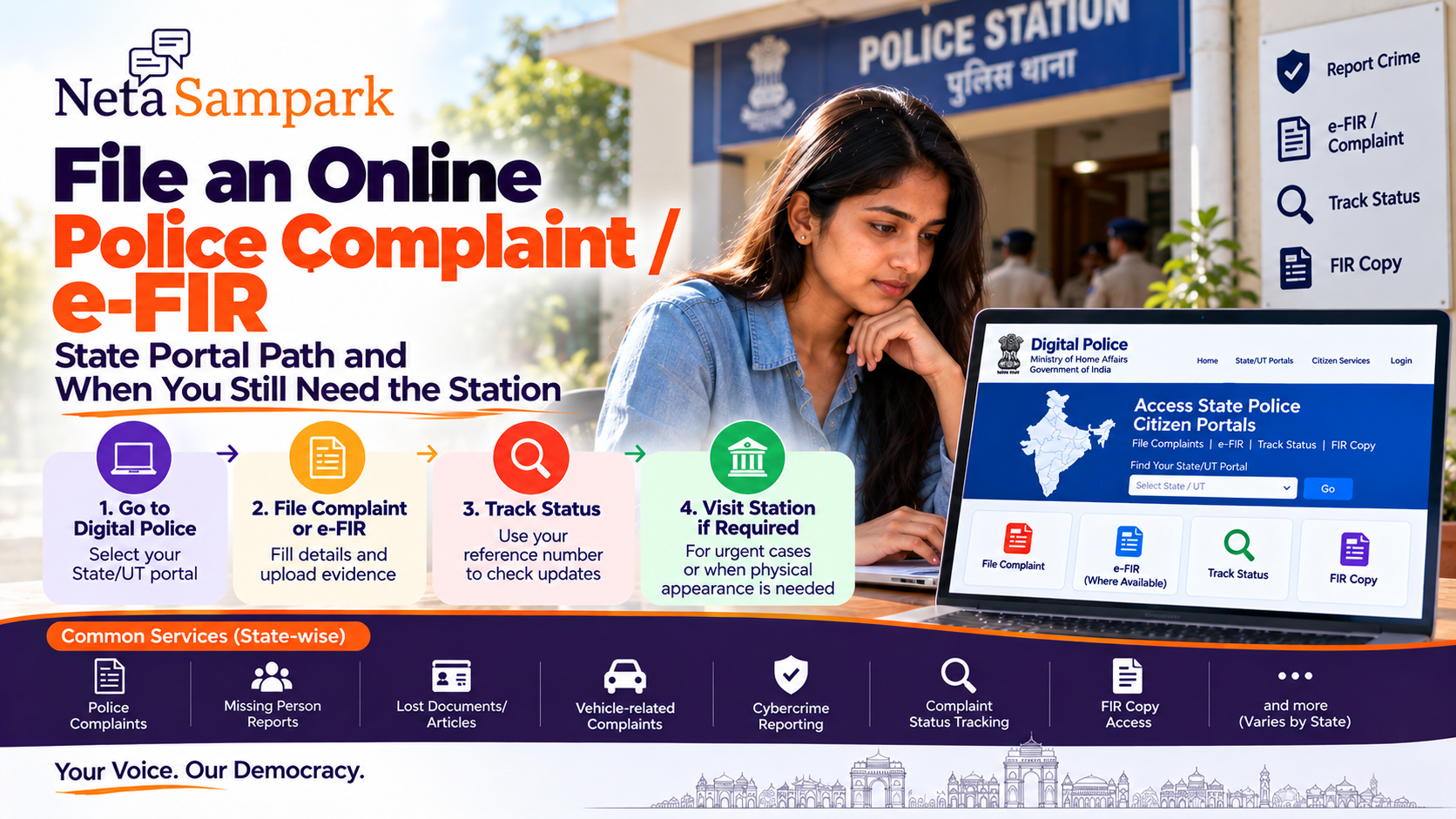
Quick take: India now has a national Digital Police directory that links citizens to the official police portals of the States and Union Territories. Those state portals can provide services such as online complaint filing, complaint-status tracking and FIR-copy access, but the exact workflow differs by state. (Digital Police)
There is also an important legal distinction: an online complaint is not automatically the same thing as an FIR. Under Section 173 of the Bharatiya Nagarik Suraksha Sanhita (BNSS), information about a cognizable offence may be given electronically to the officer in charge of a police station; electronically submitted information is taken on record after the informant signs it within three days. A copy of recorded information is to be provided free of cost.
First: Complaint vs FIR
Think of these as different stages.
Online police complaint
You submit information to the police through a citizen portal.
The portal may generate:
- Complaint/reference number
- Acknowledgement
- Status updates
- Police-station routing
- Requests for further information
Digital Police specifically lists filing complaints to the concerned police station and obtaining complaint status among services provided through state police citizen portals. (Digital Police)
FIR
An FIR is the formal recording of information relating to a cognizable offence.
Under BNSS Section 173, such information can be given orally or electronically, irrespective of where the offence occurred. If provided electronically, it must be signed within three days to be taken on record.
So don't assume:
“I submitted the online form, therefore an FIR has been registered.”
Check what acknowledgement or document the police actually provide.
Where to start: Digital PoliceThe safest national starting point is the Ministry of Home Affairs' Digital Police portal.
Digital Police — Government of India
Digital Police maintains links to the State Police Citizen Portals for States and UTs, including Karnataka, Kerala, Maharashtra, Delhi, Telangana, Tamil Nadu, Uttar Pradesh and others. (Digital Police)
Basic path
Digital Police
↓
State Police Citizen Portal
↓
Citizen Services
↓
Complaint / Report Crime / FIR-related service
↓
Submit details
↓
Save acknowledgement/reference number
The exact labels vary by state.
Don't Google a random police websitePolice websites are frequently confused with private legal-help websites, complaint aggregators and old URLs.
Use the Digital Police state-directory route where possible.
It specifically provides links to the official State/UT citizen portals. (Digital Police)
For example:
Karnataka
Kerala
Delhi
Maharashtra
Telangana
Tamil Nadu
and other State/UT portals are listed there. (Digital Police)
What can you usually report online?The exact categories depend on the State Police portal.
Common online citizen services can include:
- Police complaints
- Lost documents/articles
- Missing-person information
- Vehicle-related complaints
- Cybercrime reporting
- Verification requests
- FIR-copy access
- Complaint-status tracking
Digital Police describes state portals as providing complaint filing, complaint status and FIR-copy services, among other citizen services. (Digital Police)
Do not assume every state provides every service online.
Step 1 — Select your State/UTOpen Digital Police and select the relevant State/UT citizen portal.
The important point is:
Use the state where the police service/report should be handled, not simply whichever state appears first in Google.
If you're unsure which police station has jurisdiction, the state portal or police helpline can help direct you.
Step 2 — Create a citizen account if requiredSome state portals require registration/login.
Keep ready:
- Mobile number
- Email address
- Identity details where requested
- Address
- Basic incident information
Use your own mobile number where possible.
Save the username/password securely.
Step 3 — Select the appropriate serviceThe wording can differ considerably.
Look for something similar to:
Citizen Services
→ Complaint
→ Register Complaint
→ Report Crime
→ e-FIR
→ Lost Property/Document
→ Complaint Status
Don't select e-FIR merely because it sounds faster.
First understand what the particular state means by that service.
What is an e-FIR?There isn't one identical e-FIR workflow across every State/UT.
Some states provide dedicated online FIR/e-FIR facilities for specific categories of cases, while others primarily provide online complaint registration and subsequent police verification/action.
Therefore:
“Online complaint” and “e-FIR” should not be treated as interchangeable terms.
Check the description on your State Police portal before submitting.
Step 4 — Write the incident clearlyA good complaint should answer:
Who?
Who is involved?
What?
What happened?
When?
Date and approximate time.
Where?
Exact location, if known.
How?
Brief chronological description.
Evidence?
Photos, videos, screenshots, documents, transaction records, vehicle numbers, phone numbers or other relevant material.
Witnesses?
Names/contact details if appropriate and known.
Don't turn the complaint into a 20-page emotional narrative.
Give the police the facts they need to identify the incident and investigate it.
A simple complaint structureYou can use:
Subject: Complaint regarding [brief incident]
Date/time:
[date + approximate time]
Location:
[place]
Persons involved:
[names/details if known]
Facts:
- What happened first
- What happened next
- What happened afterward
Evidence available:
- CCTV
- Photos
- Screenshots
- Messages
- Bank transaction
- Documents
- Witnesses
Request:
“I request the police to take the appropriate action and provide me with the complaint/reference number.”
Keep it factual.
Step 5 — Upload evidence carefullyDepending on the state portal, you may be able to attach supporting material.
Possible evidence:
- Photos
- Videos
- Screenshots
- PDFs
- Receipts
- Bank transaction records
- Vehicle details
- Chat records
Before uploading
Check:
☐ File actually relates to the incident
☐ Date/time is preserved where relevant
☐ Screenshots aren't cropped so heavily that context disappears
☐ You have retained the original files
☐ You aren't unnecessarily uploading unrelated personal information
Keep the originals on your device.
Step 6 — SubmitBefore pressing Submit, read everything once.
Particularly check:
- Your phone number
- Incident date
- Location
- Names
- Vehicle registration
- Transaction amount
- Description
- Uploaded evidence
A small factual error can create unnecessary follow-up.
Step 7 — Save the acknowledgementThis is one of the most important steps.
Take a screenshot or download the acknowledgement.
Record:
Complaint/reference number
Date/time
Police station/unit
Submitted category
Portal used
Any acknowledgement PDF
Don't rely only on the SMS.
Keep the reference number until the matter is resolved.
Tracking your complaintDigital Police says State Police Citizen Portals provide complaint-status facilities. (Digital Police)
Use the same official portal where possible.
Typical workflow:
Citizen Login
↓
My Complaints / Complaint Status
↓
Enter reference number
↓
View status
Possible terminology includes:
- Submitted
- Received
- Forwarded
- Under verification
- Under enquiry
- Closed
- FIR registered
- Further information required
The exact terminology is state-specific.
"Complaint closed" does not necessarily mean "FIR registered"Read the status carefully.
A complaint portal can have its own administrative workflow.
If your objective is specifically to report a cognizable offence and seek FIR registration, don't assume that a generic "complaint submitted" acknowledgement proves that an FIR exists.
If an FIR has been registered, ask for the FIR number/copy.
Under BNSS Section 173(2), a copy of information recorded under Section 173(1) is to be provided forthwith and free of cost to the informant or victim.
When you should still go to the police stationOnline reporting is useful, but it is not a universal substitute for the station.
Go to or contact the appropriate police authority when:
1. The matter is urgent
For an immediate threat to life, violence or an offence happening right now, don't wait for an online portal.
Use the appropriate emergency police channel and seek immediate assistance.
2. You need immediate physical protection
An online form is not an emergency-response mechanism.
3. The portal doesn't accept your category
Some state portals restrict online reporting to particular categories.
4. Police need your statement or documents
You may be asked to appear physically.
5. Physical evidence needs examination
For example, damaged property, documents or other material may need to be examined.
6. An FIR needs to be formally processed
If the portal only records a complaint, the police may require further steps before formal registration.
7. The matter involves complex facts
A detailed investigation cannot necessarily be completed through a web form.
Important legal point: jurisdictionOne useful change under the BNSS is that information relating to a cognizable offence may be given to a police station irrespective of the area where the offence was committed.
This is important for citizens who hear:
“This didn't happen in our area, so we can't take your information.”
The statutory position under Section 173(1) allows the information to be given irrespective of the area where the offence occurred.
That does not mean every investigation must ultimately be conducted by that same station; police can route the matter appropriately.
If police refuse to record informationBNSS Section 173(4) provides an escalation route.
If an officer in charge refuses to record information relating to a cognizable offence, the aggrieved person may send the substance of the information in writing by post to the Superintendent of Police concerned.
If the SP is satisfied that the information discloses a cognizable offence, the SP can investigate or direct investigation.
If that route does not resolve the matter, the provision allows the person to approach the Magistrate.
This gives you a documented escalation path instead of simply submitting the same complaint repeatedly.
Keep an escalation fileIf you're following up, create one folder:
01 — Original complaint
02 — Acknowledgement
03 — Evidence
04 — Police responses
05 — Follow-up communications
06 — FIR copy, if registered
07 — SP/Magistrate correspondence, if applicable
Put dates on everything.
This is much more useful than relying on memory.
Cybercrime is a separate online routeIf the incident is primarily a cybercrime, don't automatically use a generic state police complaint form.
The Government provides the dedicated National Cyber Crime Reporting Portal.
National Cyber Crime Reporting Portal
The Digital Police portal specifically identifies reporting cybercrime as a central citizen service. (Digital Police)
For financial cyber fraud, speed matters because transaction-freezing/recovery efforts can depend on how quickly the incident is reported.
Lost document vs stolen documentThese aren't necessarily the same reporting situation.
For example:
Lost Aadhaar/document:
A lost-document/lost-article service may be appropriate where your state provides one.
Wallet forcibly taken:
That is potentially a criminal incident and should be reported through the appropriate police channel.
Phone stolen:
Police reporting plus telecom/device-blocking processes may both be relevant.
Don't choose a "lost item" category simply because it is easier if the underlying incident was theft or another offence.
What not to doDon't submit five contradictory complaints
If something changes, update through the appropriate channel and reference the original complaint.
Don't exaggerate
False details can create problems.
Don't delete original evidence
Keep original photographs, videos, chats and transaction records.
Don't pay someone for a "guaranteed FIR"
Police registration is not a private paid service.
Don't share OTPs
Police, portal operators and CSC personnel should not need your banking OTP or UPI PIN.
Online complaint vs police stationSituationOnline routeStation/contactRoutine complaint✅ Often usefulIf requiredNeed complaint acknowledgement✅✅Immediate danger❌ Don't waitImmediate police assistanceCybercrimeUse cybercrime.gov.inIf directed/requiredState portal supports e-FIR category✅May still require follow-upComplex investigationInitial report may helpLikely follow-upPhysical evidenceInitial report may helpMay be requiredPortal doesn't support category❌✅Police refuses to record cognizable informationDocument attemptSP escalation under BNSSMini scenarioRahul discovers that money has been transferred from his bank account without his authorisation.
Instead of posting the incident on social media, he:
1. Preserves the transaction SMS and bank statement.
2. Reports the cyber incident through the official cybercrime route.
3. Uses the relevant State Police channel if a police complaint/FIR is required.
4. Saves every acknowledgement/reference number.
5. Contacts the bank through its official fraud channel.
6. Follows up with the police if physical verification or further statement is required.
The important principle is:
Online reporting starts the documented trail; it doesn't necessarily finish the investigation.Citizen checklist
Before submitting:
☐ Correct State/UT portal
☐ Correct complaint category
☐ Incident date/time
☐ Exact location
☐ Names/details of people involved
☐ Evidence preserved
☐ Concise factual description
☐ Reference number saved
☐ Screenshot/PDF of acknowledgement saved
☐ Follow-up date noted
☐ FIR number/copy obtained if an FIR is registered
The simple workflowIncident
↓
Immediate danger? → Police emergency assistance
↓
Identify correct reporting route
↓
Digital Police → State Police Citizen Portal
↓
Register complaint / applicable e-FIR service
↓
Upload relevant evidence
↓
Submit
↓
Save reference number
↓
Track status
↓
Police verification / investigation
↓
FIR copy if FIR is registered
↓
Station visit if required
↓
Escalate appropriately if information about a cognizable offence is refused
How NetaSampark helps
Police services are increasingly available through state citizen portals, but the citizen still has to answer three basic questions:
Where do I report it?
What exactly have I submitted?
When do I need to physically approach the police?
Use NetaSampark Explore Guides to understand the government process, identify the relevant public-service route and keep your complaint/reference details organised.
Be Informed. Be Heard.