
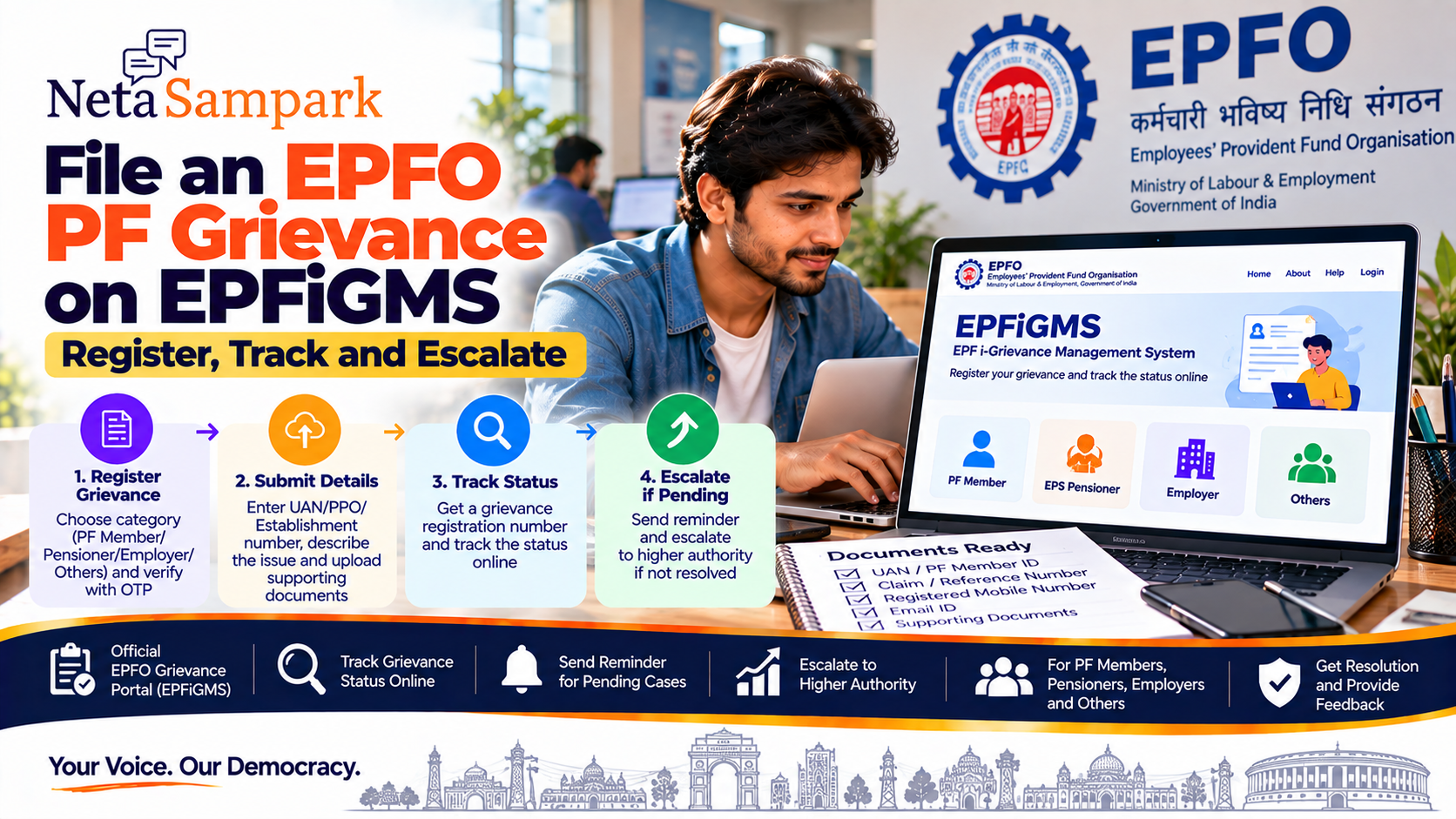
File an EPFO PF Grievance on EPFiGMS: Register, Track and Escalate
If your EPF claim, transfer, passbook, pension, contribution, UAN or other EPFO service is stuck or has an issue, you can raise a grievance through the EPFiGMS — EPF i-Grievance Management System.
EPFiGMS is EPFO's dedicated grievance portal. It accepts complaints from PF members, EPS pensioners, employers and others, and provides online tracking, reminders and feedback after resolution. (EPFiGMS)
What can you complain about?
EPFiGMS can be used for issues relating to EPFO services, including problems such as:
- PF withdrawal/claim issues
- PF transfer problems
- Contributions not reflecting
- UAN-related issues
- Pension-related matters
- Employer/PF-account issues
- Delays in EPFO services
- Problems with an EPFO application or transaction
When filing, select the category that most closely matches your actual problem.
Before filing a grievance
Keep these details ready:
☐ UAN, if you have one
☐ PF Member ID, if relevant
☐ PPO number, for pension-related complaints
☐ Establishment number, where applicable
☐ Registered mobile number
☐ Email address
☐ Claim/application/reference number
☐ Relevant EPFO correspondence
☐ Supporting documents/screenshots
EPFiGMS specifically allows grievances to be associated with a UAN, PPO number or establishment number, which helps route the complaint to the relevant EPFO office. (EPFiGMS)
How to register an EPFO grievance online
Start with the official portal:
EPFiGMS — Register Grievance
Step 1 — Choose your category
The registration page provides options including:
- PF Member
- EPS Pensioner
- Employer
- Others
Choose the category that applies to you. (EPFiGMS)
Step 2 — Enter your identification details
If you have a UAN, PPO or establishment number, select the applicable status and enter the requested information.
EPFiGMS integrates UAN information with EPFO's database and can identify the relevant PF office for the grievance. (EPFiGMS)
For pensioners, PPO validation is also integrated into the system. (EPFiGMS)
Step 3 — Verify your mobile number
The revamped EPFiGMS uses OTP verification as part of the grievance-registration process. (EPFiGMS)
Keep your registered mobile phone nearby.
Step 4 — Describe the problem clearly
This is where many grievances become unnecessarily difficult to resolve.
Don't write:
"My PF is not coming."
Instead provide:
What happened → when it happened → application/reference number → what is still pending → what you want EPFO to resolve.
Example
"I submitted my PF withdrawal claim on 10 September 2026. The claim reference is XXXXX. The claim has not been settled and the current status remains unchanged. Please verify the status and inform me if any action or document is pending from my side."
Keep the description factual and concise.
Step 5 — Upload supporting documents
EPFiGMS allows users to upload more than one grievance document. (EPFiGMS)
Depending on your complaint, useful evidence may include:
- Claim acknowledgement
- Claim-status screenshot
- Passbook screenshot
- Employer communication
- Previous EPFO response
- Bank/transaction evidence
- Relevant application/reference details
Only upload documents relevant to the complaint.
Don't upload unnecessary personal or financial information.
Step 6 — Submit the grievance
Before pressing submit, check:
☐ UAN/PPO/establishment number
☐ Mobile number
☐ Grievance category
☐ Description
☐ Claim/reference number
☐ Supporting documents
Then submit the complaint.
Save your grievance registration number
This is extremely important.
After successful registration, EPFiGMS generates a unique grievance registration number and sends an acknowledgement through SMS/email when contact details are provided. (EPFiGMS)
Save it.
Your grievance number is effectively the reference number for following up on the complaint.
Keep:
Grievance number + date + screenshot + email/SMS acknowledgement
How to track your EPFO grievance
Return to the official EPFiGMS portal and use the grievance-status facility.
EPFiGMS — Official Portal
The system provides a facility to view the current status of a grievance. (EPFiGMS)
Keep your grievance registration number available.
What if the grievance is still pending?
Don't immediately file multiple identical complaints.
EPFiGMS provides a reminder facility for pending grievances. (EPFiGMS)
A better sequence is:
Original grievance
↓
Save registration number
↓
Track status
↓
Send reminder if pending
↓
Escalate if it remains unresolved
This creates a clear record of your follow-up.
How long should EPFO take?
EPFO's published grievance-redressal material states a general 15-day timeline for settlement and says that non-redressed grievances are escalated to the next higher authority. (EPF India)
EPFO has also published a Citizen Charter referring to a 7-working-day general timeline, while retaining escalation where a grievance is not redressed. (EPF India)
Because EPFO's published materials show different service-timeline formulations, the safest approach is to track the grievance rather than assume that every complaint will be resolved within one fixed number of days.
If your complaint remains unresolved, use the available reminder/escalation mechanism.
What does escalation mean?
Escalation does not mean filing a completely new complaint with a different description.
It means the unresolved grievance can move to a higher authority for action.
EPFO's grievance system has been designed with escalation mechanisms for grievances that remain unresolved. (EPF India)
Before escalating, keep:
- Original grievance number
- Date of filing
- Previous response
- Reminder details
- Relevant documents
- Exact issue still unresolved
This gives the next authority a complete record.
What if EPFO closes the grievance but the problem isn't fixed?
This is an important situation.
EPFiGMS provides a feedback facility after grievance redressal. (EPFiGMS)
If the response doesn't actually address your problem:
- Read the closure response carefully.
- Check whether EPFO requested any additional action.
- Save the response.
- Use the available feedback/reminder/escalation mechanism.
- Refer to the original grievance number when explaining what remains unresolved.
Don't simply rewrite the entire complaint without mentioning the earlier reference.
Can you file a grievance without a UAN?
Yes.
The EPFiGMS registration page provides options for people who don't have a UAN, PPO or establishment number. (EPFiGMS)
However, if you do have a UAN/PPO/establishment number, use the appropriate identifier because EPFO says this helps route the grievance to the relevant office. (EPFiGMS)
Can pensioners use EPFiGMS?
Yes.
EPS pensioners are one of the categories supported by EPFiGMS. The system also supports PPO-number validation/integration. (EPFiGMS)
For pension-related complaints, keep your PPO number and relevant pension/payment details ready.
Can employers use EPFiGMS?
Yes.
The registration system explicitly supports Employers as a grievance category. (EPFiGMS)
Choose the employer category and provide the establishment information requested by the portal.
What complaints should NOT be filed through EPFiGMS?
EPFiGMS's terms specifically exclude certain matters from being treated as grievances, including:
- RTI matters
- Court-related/sub-judice matters
- Religious matters
- Grievances against a foreign government
- Suggestions rather than grievances
- Certain government-employee service matters unless prescribed channels have already been exhausted. (EPFiGMS)
So don't use EPFiGMS as a substitute for an RTI application or a court proceeding.
EPFiGMS vs RTI
These are different.
EPFiGMS
Use when you want EPFO to address a service grievance/problem.
RTI
Use when you want information or records under the Right to Information Act.
EPFiGMS explicitly says RTI matters are not treated as grievances. (EPFiGMS)
EPFiGMS vs EPFO Helpdesk
For a straightforward service question, you may first use EPFO's available support channels.
For an actual unresolved service problem, EPFiGMS gives you a formal grievance reference and tracking trail.
EPFO's member portal currently lists 14470 as the EPFO helpdesk number. (EPF India Member Portal)
EPFiGMS is also available through UMANG
EPFO states that EPFiGMS is available in the UMANG mobile application under EPFO services. (EPFiGMS)
So you can use the web portal or the relevant UMANG service.
Don't pay anyone to file your grievance
EPFiGMS is an official government grievance facility.
Be cautious if someone says:
"Pay me and I will get your PF grievance cleared."
You don't need to give a private agent control of your EPFO account.
EPFiGMS itself warns users not to share UAN, password, PAN, Aadhaar, bank-account details or OTPs with callers/messages claiming to represent EPFO. (EPFiGMS)
Never give anyone your:
❌ UAN password
❌ OTP
❌ UPI PIN
❌ ATM PIN
❌ Internet-banking password
How to write a strong grievance
Use this simple structure:
1. Identify the issue
"My PF transfer claim has not been processed."
2. Give the date
"I submitted the claim on 5 September 2026."
3. Give the reference
"Claim/reference number: XXXXX."
4. State the current status
"The status has remained unchanged since submission."
5. State the requested action
"Please verify the claim and inform me if any document or action is pending."
This is much easier for the receiving officer to process than a long emotional description.
Example: PF transfer grievance
Subject/description:
"My PF transfer claim submitted on [date] under reference [number] has not been completed. The previous PF account details and current UAN are available in my EPFO records. The claim status has remained unchanged. Kindly verify the transfer status and inform me if any action or document is pending from my side."
Attach the relevant claim/status evidence if available.
Example: PF contribution missing
"My employer's PF contribution for [month/year] is not reflecting in my EPFO account. My UAN is [number] and establishment details are available in EPFO records. Kindly verify the contribution records and inform me of the reason for the non-reflection."
Attach relevant payslip or contribution evidence if appropriate.
Example: Claim delayed
"I submitted my PF withdrawal claim on [date], reference [number]. The claim has not been settled and no additional requirement is visible to me. Kindly verify the status and inform me whether any action or document is pending."
10-point EPFiGMS checklist
Before submitting:
☐ Correct category selected
☐ UAN/PPO/establishment number entered
☐ Mobile number verified
☐ Email entered
☐ Correct grievance category selected
☐ Claim/application number included
☐ Dates included
☐ Problem described clearly
☐ Relevant documents attached
☐ Screenshot/reference number saved after submission
After submission:
☐ Save grievance registration number
☐ Save SMS/email acknowledgement
☐ Track status
☐ Send reminder if necessary
☐ Escalate if unresolved
The complete EPFiGMS process
Problem with EPFO service
↓
Collect UAN/PPO/reference details
↓
Open EPFiGMS
↓
Select PF Member / Pensioner / Employer / Others
↓
Complete OTP verification
↓
Describe grievance
↓
Upload evidence
↓
Submit
↓
Get grievance registration number
↓
Track
↓
Reminder if pending
↓
Escalate if unresolved
↓
Provide feedback after resolution
EPFO specifically lists registration, status tracking, reminders and feedback among the features of the revamped EPFiGMS. (EPFiGMS)
Official links
EPFiGMS — Register a Grievance
EPFiGMS — Official Portal
NetaSampark checklist
If your PF issue is stuck, incorrect or unresolved, don't just keep checking your passbook.
Create a formal record:
EPFiGMS → Register → Save grievance number → Track → Remind → Escalate if necessary.
The most important thing after submitting is to save the grievance registration number. It is the reference you will need for subsequent follow-up.
EPFO services and portal workflows can change. For a live grievance, use the current EPFiGMS interface and the instructions displayed there.
Related reading
- File an Online Police Complaint / e-FIR: State Portal Path and When You Still Need the Station
- Lok Adalat 2026: How to Check the Next National Sitting and Approach Your DLSA
- CBSE Answer Sheets Under RTI After CIC’s Sep 2026 Order: Fees and Remedies
- File a Consumer Complaint on e-Daakhil: Commission Choice, Documents, Fees and 2-Year Limit