
Lost your marksheet? Need a degree certificate for a job application? Applying for higher studies and don't have the original document with you?
If your university, college or education board has published your academic records through the National Academic Depository (NAD), you may be able to retrieve the digital document through DigiLocker.
NAD is a digital repository for academic awards such as degrees, diplomas, certificates, marksheets and evaluation reports issued by participating academic institutions and boards. (DigiLocker)
The important point is that students do not need a separate NAD account. You access NAD-issued academic documents through your DigiLocker account. (DigiLocker)
What is DigiLocker NAD?
The National Academic Depository (NAD) is an online repository where participating educational institutions publish academic awards in digital form.
The records are published by the academic institution or board rather than being uploaded by the student. (DigiLocker)
That distinction is important.
You cannot simply scan your old marksheet and upload it to NAD.
NAD's FAQ says scanned images/PDFs of academic records cannot be uploaded as NAD records by students. Academic institutions publish the digitised academic data through the NAD system. (DigiLocker)
Do students need a separate NAD registration?This is one of the easiest things to misunderstand.
Students access their NAD academic awards through DigiLocker. The official NAD FAQ says students do not need to register separately on the NAD portal. (DigiLocker)
Document appears in Issued Documents
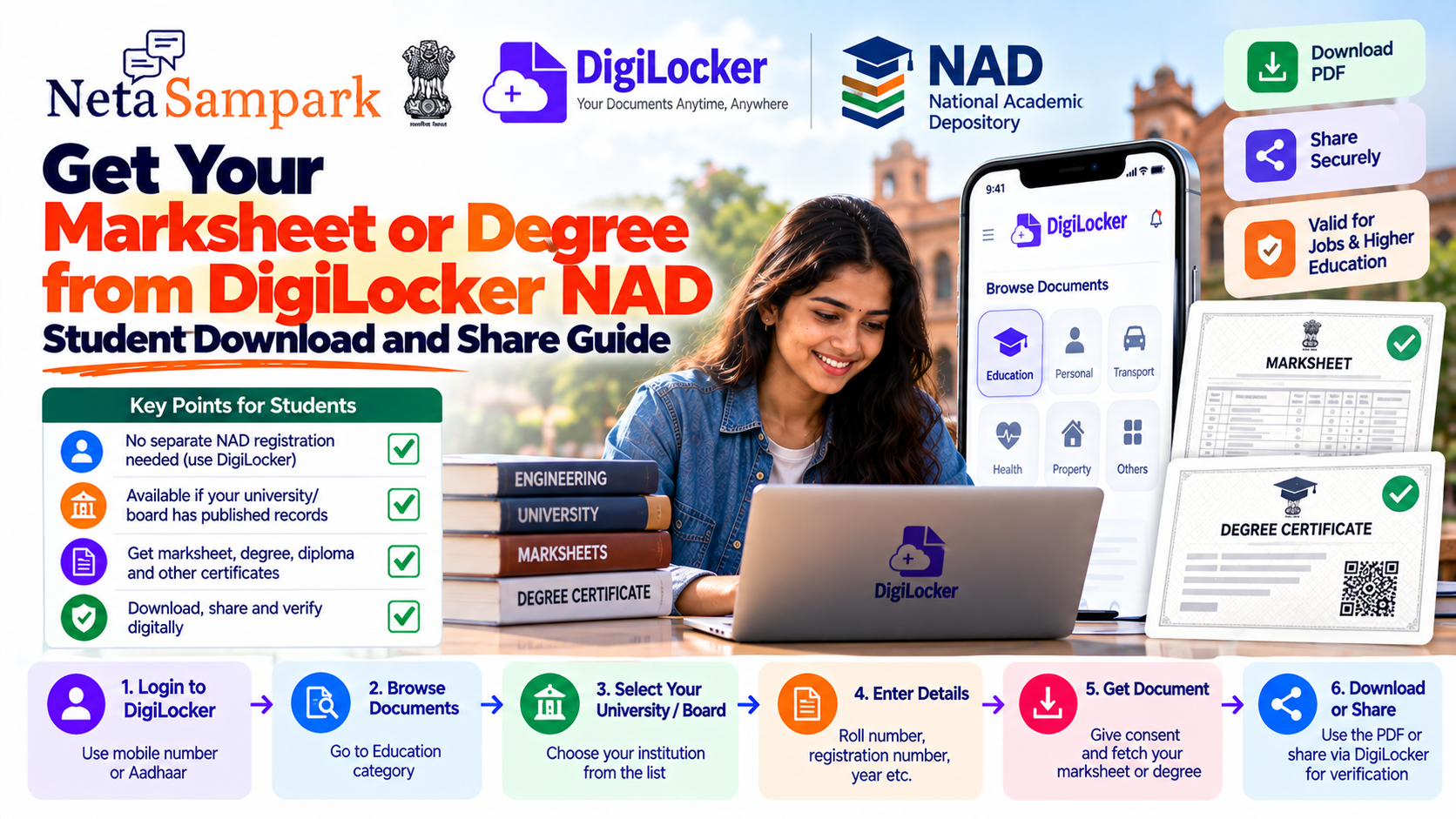
Step 1: Create or log in to DigiLockerGo to the official DigiLocker website:
DigiLocker — Government of India
DigiLocker is the Government of India's digital document platform for accessing, sharing and verifying digital documents and certificates. (DigiLocker)
The NAD student page says students can register on DigiLocker using a mobile number or Aadhaar, depending on the available registration route. (DigiLocker)
If you already have a DigiLocker account, simply sign in.
Step 2: Open "Browse Documents"The NAD FAQ specifically instructs students to use the Browse Documents → Education section to locate their academic institution. (DigiLocker)
Step 3: Find your university, college or boardSearch through the available educational institutions.
Select the institution that issued your academic document.
Important
Your institution needs to have published the relevant academic records on DigiLocker-NAD before you can retrieve them.
The official NAD FAQ says that if your university or college is not available, it may be because the institution has not yet provided and published its academic certificate data on the platform. (DigiLocker)
Step 4: Select your documentOnce you select the institution, choose the document type you need.
Depending on what the institution has published, this could be:
The exact options depend on the records published by your institution.
Step 5: Enter your academic detailsDigiLocker will ask for information needed to locate your record.
The NAD FAQ gives examples such as:
Enter the details carefully as they appear in your academic records. (DigiLocker)
For some institutions, the exact fields may differ.
Step 6: Give consent and request the documentAfter entering the required details, you will be asked to provide the applicable consent.
DigiLocker will search the NAD records for the academic award matching the information you supplied. (DigiLocker)
If a matching record is available, it will be added to your Issued Documents section.
Step 7: Open "Issued Documents"Once the document has been successfully fetched, go to:
Your retrieved marksheet or degree should appear there.
This is different from simply uploading a PDF yourself.
A document in Issued Documents is an electronically issued record from the relevant issuer/institution through the DigiLocker ecosystem. (DigiLocker)
Can you download the marksheet or degree as a PDF?The NAD FAQ states that DigiLocker allows students to obtain a PDF version of their digital academic certificates. (DigiLocker)
This can be useful when an application asks you to upload a document.
However, when an organisation specifically asks for a DigiLocker-issued document or verification, it can be better to use DigiLocker's sharing/verification facility rather than relying only on a downloaded copy.
How to share your academic documentOne of the advantages of DigiLocker-NAD is that academic awards can be shared and verified.
The NAD ecosystem allows verifying entities such as:
to verify academic awards with the student's consent. (DigiLocker)
DigiLocker itself is designed for storage, sharing and verification of digital documents. (DigiLocker)
Why share instead of sending a random PDF?Suppose an employer asks for your degree certificate.
Option 1: A photograph/scan of the physical certificate
Option 2: The digital academic award issued through DigiLocker
The second route can provide a more direct way for the receiving organisation to verify the record.
NAD describes its verification process as consent-based, with verifying partners accessing the academic award with the student's permission. (DigiLocker)
Are DigiLocker NAD academic documents valid?The NAD FAQ states that digital certificates/marksheets issued through NAD are treated as being at par with original physical documents under the applicable provisions of the Information Technology Act, 2000. (DigiLocker)
The UGC has also issued a communication asking higher educational institutions to accept degrees, marksheets and other educational documents available in DigiLocker as valid documents. (DigiLocker)
However, a particular application may still specify its own submission or verification procedure. Always follow the instructions of the organisation requesting the document.
Is a DigiLocker PDF the same as a scanned certificate?There is an important distinction:
Scanned copy
You take your physical certificate and scan it yourself.
DigiLocker-NAD document
The academic record has been published by the relevant institution/board through the NAD system and is made available through DigiLocker.
NAD's system is specifically designed around institution-issued academic records and verification. (DigiLocker)
What if your university isn't listed?Don't immediately assume that something is wrong with your DigiLocker account.
The institution may simply not have published the relevant records.
The official NAD FAQ says that a university or college becomes discoverable after the concerned institution provides and completes publication of its academic certificate data on the DigiLocker-NAD platform. (DigiLocker)
What you can do
- Try again later if the institution is currently publishing records.
- Contact your university/board's examination or records department.
Your institution may have published only certain years or document types.
NAD maintains a year-wise academic record availability page showing institutions and the years for which different academic records are available. (DigiLocker)
So if, for example, you find your university but cannot select your particular passing year, check whether that year has actually been published.
What if your 2015 or older degree isn't available?The absence of an older document does not necessarily mean that your degree is invalid or that DigiLocker cannot support it.
It may simply mean the institution has not published that particular year's records.
DigiLocker's own support guidance for cases where a particular year's educational documents are missing asks users to raise a support ticket and provide information such as:
- Year of passing/session (DigiLocker)
For older records, contacting your institution is also useful because the institution is responsible for the accuracy and publication of its academic records. (DigiLocker)
What if the information on the digital document is wrong?The academic institution is responsible for the accuracy of its academic records.
NAD's FAQ explicitly states that the academic institution is responsible for ensuring the accuracy of the records, while DigiLocker-NAD protects the authenticity, integrity and privacy of the stored academic award data. (DigiLocker)
contact the relevant university, board or institution.
DigiLocker cannot simply let a student edit an issued academic award.
Can you edit a DigiLocker-issued marksheet?Issued academic documents are not ordinary files that you can modify.
The NAD FAQ states that users cannot change the documents issued to them. (DigiLocker)
This is important for verification.
If your physical certificate has an error, don't try to edit the DigiLocker copy. Contact the original issuing institution.
Can an employer verify your degree?Yes, where the relevant verification service and record are available.
NAD is designed to allow verifying entities—including employers and educational institutions—to verify academic awards with the student's consent. (DigiLocker)
The NAD FAQ also says that if an employer requests verification of your certificate record, DigiLocker NAD can notify you through the registered contact information. (DigiLocker)
Can someone else access your academic records?NAD's FAQ states that students control access to their certificates, while verifying partners can view the certificate record with the student's permission and authorisation. (DigiLocker)
If an organisation needs verification, use the official sharing/verification mechanism where available.
Is NAD free for students?The official NAD FAQ states that DigiLocker NAD is free of cost. (DigiLocker)
Be cautious if a website or person asks you to pay simply to retrieve a DigiLocker-NAD academic document.
Do you need Aadhaar to get your degree?Aadhaar is not universally required for the academic institution to publish your record on NAD.
The NAD FAQ explicitly states that a student's Aadhaar is not mandatory for publishing data. (DigiLocker)
For DigiLocker account creation, the official NAD student guidance says registration can be done using a mobile number or Aadhaar, depending on the registration route. (DigiLocker)
No Aadhaar → No digital degree
That is not how NAD's academic-record publication system works.
What if your college asks you to upload a scanned copy?A scanned copy may be required by a particular application or organisation, but that is separate from the NAD process.
NAD itself is designed around records supplied by academic institutions. The official FAQ says scanned images/PDFs cannot be uploaded as NAD academic records by students. (DigiLocker)
If an employer or university asks for a scan, follow that organisation's specific instructions.
What should students keep ready?Before fetching a document, keep these details nearby:
☐ Full name as recorded by the institution
☐ Registration/enrolment number
☐ University/college/board name
☐ DigiLocker-registered mobile number
Not every institution will ask for all of these.
Quick guide: MarksheetSelect your Board/University/Institution
Enter roll/registration/year details
This is the workflow described in the official NAD student FAQ. (DigiLocker)
Quick guide: Degree certificateThe exact fields and document types depend on what the institution has published to NAD. (DigiLocker)
What if you have multiple degrees?Repeat the process for each institution.
Bachelor's degree → University A
Master's degree → University B
Each academic institution needs to have published the relevant record to DigiLocker-NAD.
What if your marksheet is available but degree isn't?This can happen if the institution has published one type of academic award but not another.
NAD's records are published by academic institutions, and the available document types can differ between institutions and years. (DigiLocker)
Check the available document types under your institution.
If the degree is missing, contact the institution's examination/records department and ask whether the degree certificate has been published on DigiLocker-NAD.
Student checklist before submitting a job or college applicationBefore uploading
☐ Check the document is in Issued Documents
☐ Verify roll/registration number
☐ Download the PDF if the application specifically requires one
If the organisation accepts DigiLocker
☐ Use the official DigiLocker document
☐ Use the available sharing/verification facility
☐ Don't share your DigiLocker password or OTP
If the document is missing
☐ Check your institution again
☐ Check the year/document availability
☐ Raise a DigiLocker support request where appropriate
Important: Don't create a fake "digital certificate"A PDF or image that looks like a marksheet is not the same as an institution-issued NAD document.
The value of NAD comes from the fact that academic records are supplied and published by the issuing institutions and can be verified through the ecosystem. (DigiLocker)
If an organisation asks for a DigiLocker-issued document, use the document obtained through the official DigiLocker process.
DigiLocker vs NAD: What's the difference?DigiLockerNADDigital document platformAcademic-record repositoryStores many types of government/official documentsFocuses on academic awardsUsed by citizensAcademic institutions publish recordsAllows documents to be accessed/sharedEnables academic awards to be issued and verifiedIncludes education documentsPowers the academic-record ecosystem
They work together for academic documents.
NAD holds the academic record; DigiLocker gives the student access to it.
The official NAD site describes DigiLocker as the platform through which students access their degree, diploma certificates and marksheets. (DigiLocker)
The 5-minute student checkIf you're applying for a job, college admission, scholarship or examination and need an academic document:
1. Open DigiLocker
2. Go to Browse Documents → Education
3. Find your university/board
4. Fetch the required document
5. Check Issued Documents
If it's there, you can download or share it according to the receiving organisation's requirements.
Official resources
DigiLocker — Government of India
NAD — Frequently Asked Questions
NAD — Year-wise Academic Record Availability
Bottom line
You do not need a separate NAD account as a student.
Use your DigiLocker account → Browse Documents → Education → select your institution → enter the required academic details → Get Document.
If the institution has published your record, the degree or marksheet will appear under Issued Documents, where you can access the digital award and use DigiLocker's sharing/verification facilities. (DigiLocker)
If you cannot find your document, first check whether your institution and passing year are covered. If the record should be available but isn't, contact the institution or raise a DigiLocker support request rather than uploading an unofficial scan as an NAD document. (DigiLocker)
Availability of a particular degree, marksheet, year or institution depends on records published through DigiLocker-NAD. Check the official portal for the current status.