
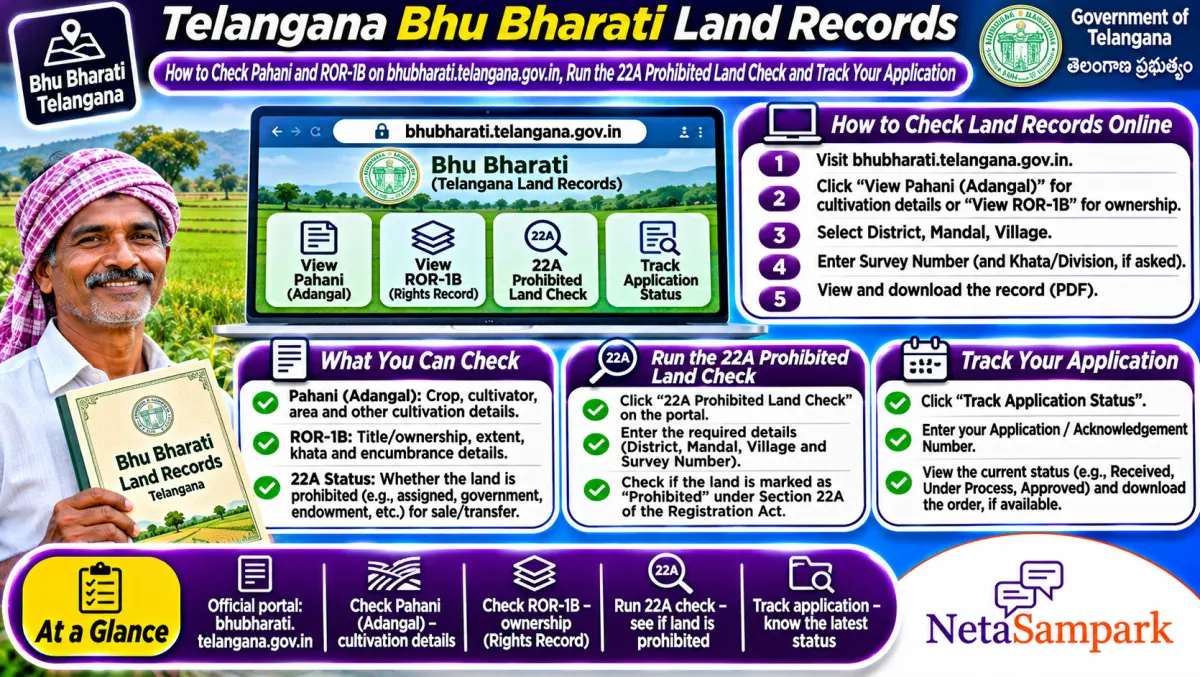
To check land records in Telangana, open bhubharati.telangana.gov.in, go to the land details search, pick district, mandal and village, and enter the survey number or pattadar passbook number. You'll see the pahani (ROR-1B) with owner, extent and classification. Bhu Bharati replaced Dharani in April 2025, and viewing records is free.
Updated 11 November 2026
If you're buying a plot near Hyderabad, taking a crop loan in Nalgonda or sorting out family land in Warangal, everything now runs through Bhu Bharati. The Telangana government brought it in under the Bhu Bharati (Record of Rights in Land) Act, 2025, to replace the Dharani portal that farmers had complained about for years.
The good part for citizens is that the public search works without much fuss. Here's how to use it, what each field means, and what to check before you pay any advance.
Quick facts: Bhu Bharati
| Item | Details |
|---|---|
| Official portal | bhubharati.telangana.gov.in (Revenue Department, Telangana) |
| Helpline | Mandal Revenue Office (Tahsildar); MeeSeva centres for help with applications |
| Fee | Free to view; paid services like certified copies and applications carry fees shown on the portal |
| Deadline | None for viewing |
| Documents | Survey number or pattadar passbook number; Aadhaar for transactional services |
| Replaced | Dharani portal, from 14 April 2025, as widely reported |
| Key record | Pahani / ROR-1B (record of rights) |
| Extra checks | 22A prohibited land list, encumbrance details, application status |
What changed from Dharani to Bhu Bharati?
Under Dharani, many farmers said the pahani had lost useful columns, and that fixing errors meant going to the Collector. Bhu Bharati brought back a fuller pahani, including an enjoyment column that records who is actually cultivating or occupying the land, and gave Tahsildars and RDOs more power to fix problems locally, with an appeal route. It also introduced the idea of a Bhudhaar number for land parcels.
For you, the practical result is: the record is more detailed, and there's a clearer path to correct it.
How to check pahani and ROR-1B, step by step
1. Open bhubharati.telangana.gov.in.
2. Go to the information services or land details search section. Public search doesn't need you to transact.
3. Pick district, then mandal, then village.
4. Search by survey number with sub-division (for example 142/A), or by pattadar passbook number.
5. Enter the captcha and fetch details.
6. Read the pahani. Save a screenshot or print it.
Getting "no record found"? Most often the sub-division was entered wrongly. 142 and 142/A are separate records.
What to read in the pahani
• Pattadar name: the recorded owner. It should match the seller's ID and documents.
• Survey number and sub-division: the exact plot. It should match the sale deed.
• Extent: the area. It should be at least what you're buying.
• Classification: patta, assigned, government, inam and so on. Assigned and government land usually can't be sold.
• Enjoyment: who actually occupies or cultivates the land.
• Mode of acquisition: purchase, inheritance, gift or assignment.
Run the 22A prohibited land check
Section 22A of the Registration Act lets the government list land that can't be registered, like government land, assigned land, endowment and wakf land. Before you buy, search the same survey number in the prohibited properties option on Bhu Bharati. If it's on the list, the registration will be blocked. For non-agricultural plots in municipal areas, also check the IGRS Telangana registration portal.
Check encumbrance and pending applications
Bhu Bharati shows encumbrance details for transactions done through the Tahsildar since the Dharani changeover in 2020. For older history, use the registration department's encumbrance search. Also look up application status on the survey number. A pending mutation, correction or dispute is a clear warning sign for a buyer.
Wrong entry in your pahani?
Errors from the Dharani years are common: wrong names, missing extent, land shown under the wrong classification. Bhu Bharati lets you apply for correction to the Tahsildar, with appeals to the RDO and Collector as set out in the Act and rules. Carry your pattadar passbook, sale deeds, old pahanis and any court orders. Some reports say a special correction window ran until April 2026, so ask the MRO what route applies to your case now.
Common problems and fixes
| Problem | Likely reason | What to do |
|---|---|---|
| No record found | Sub-division typed wrongly | Recheck the exact survey and sub-division |
| Old owner still showing | Mutation not done | Apply for mutation through Bhu Bharati or MeeSeva |
| Land in prohibited list wrongly | 22A entry error | Apply to the Tahsildar or Collector with documents |
| Extent mismatch | Resurvey or entry error | Apply for correction with the MRO |
| Captcha won't load | Server rush | Refresh, or try another browser |
A real-life example
Srinivas in Rangareddy was about to pay an advance for a quarter-acre plot. He searched the survey number on Bhu Bharati and saw the classification as assigned land, and the number was on the 22A list. The seller had a sale agreement from years ago, but the plot couldn't be registered. Srinivas walked away and saved his money. A five-minute check did that.
Documents checklist
☐ Survey number with sub-division
☐ Pattadar passbook (owner's copy)
☐ Aadhaar, for transactional services
☐ Sale deed or inheritance papers, for mutation
☐ Old pahanis or court orders, for corrections
Buyer's routine before any advance
1. Search the survey number and read the pahani.
2. Match the pattadar name with the seller's ID.
3. Check the classification allows sale.
4. Run the 22A prohibited land check.
5. Check encumbrance and pending applications.
6. Ask for the pattadar passbook and compare it with the pahani.
Farmers: keep the record clean for schemes
Crop loans, Rythu Bharosa-type support, crop insurance and PM-Kisan all depend on your land record. If your name, extent or crop details are wrong, payments can stop. For PM-Kisan in particular, see our guide on checking your instalment, and our explainer on the Farmer ID under AgriStack.
Who to approach when it's stuck
Start with the MRO (Tahsildar), then the RDO. You can also use MeeSeva for applications. If nothing moves, your MLA can push it in the district review. Find yours on NetaSampark's Telangana page.
Bhudhaar number: what it is and why to note it
Bhu Bharati brings in a Bhudhaar number, a unique ID for each land parcel, much like Aadhaar for people. Once your land gets one, you can search by it, and it reduces confusion between plots with similar survey numbers. Note it down next to your passbook number. Over time, banks and registration offices are expected to use it to pull up your record quickly, so a correct Bhudhaar entry will save you trips.
Mutation after buying or inheriting
After registration, the buyer's name should move into the record through mutation. For inheritance, the heirs apply with the death certificate and family details. You can start both through Bhu Bharati or a MeeSeva centre. Keep the application number, and check application status on the portal until the new pahani shows your name. Don't assume it happened just because the registration is done.
Final reminder
Search your survey number on Bhu Bharati and save the pahani. If you're buying, run the 22A check before paying a rupee. If your own record is wrong, start the correction with the MRO now.
Frequently asked questions
Is Dharani still working in Telangana?
No. Bhu Bharati replaced Dharani in April 2025. Use bhubharati.telangana.gov.in for land records.
Is it free to see pahani on Bhu Bharati?
Yes, viewing is free. Paid services like certified copies and applications show their fee on the portal.
What is ROR-1B?
It's the record of rights for the land, showing owner, extent and classification. Banks and registrars ask for it.
How do I check if land is prohibited under 22A?
Use the prohibited properties option on Bhu Bharati with the survey number.
Where do I fix a wrong name in my pahani?
Apply to the Tahsildar through Bhu Bharati or MeeSeva with your documents. Appeals go to the RDO and Collector.
Sources
• Bhu Bharati, Government of Telangana