
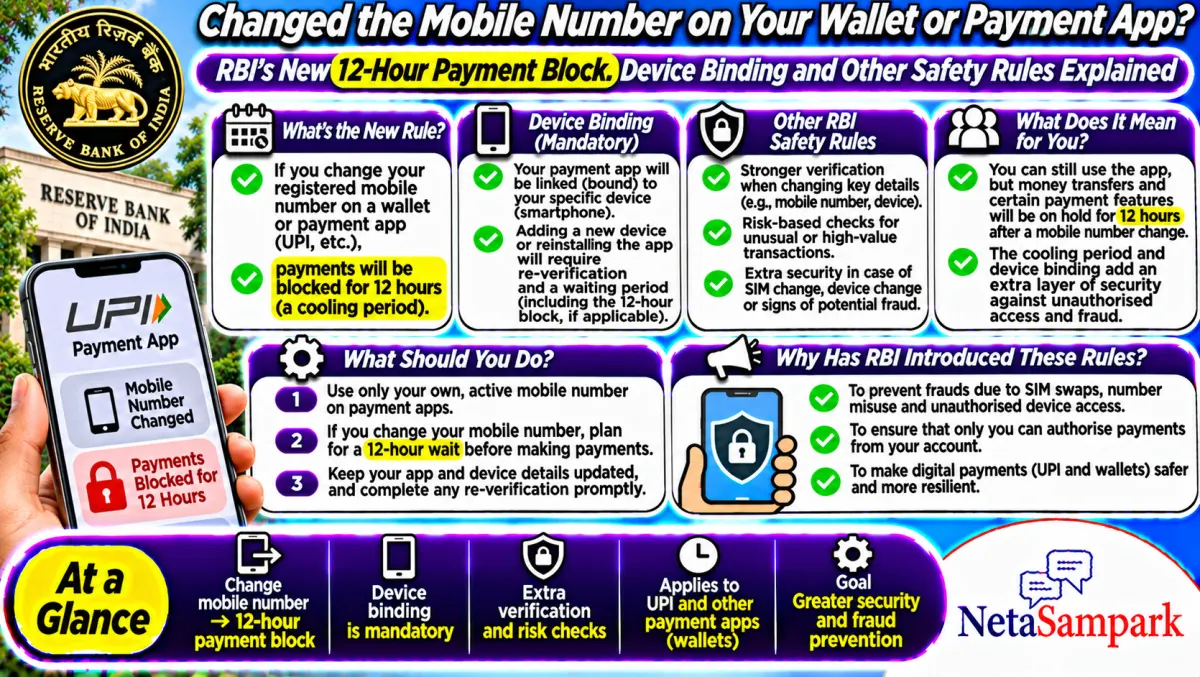
Under RBI's Master Directions of 5 November 2026, when you change the mobile number or email linked to a payment instrument, online payments are held for at least 12 hours. Payment apps must also bind to your phone and SIM, log you out when idle and block use while screen-sharing apps run.
Updated 21 November 2026
You changed your number on your wallet app, tried to pay the milkman, and the app said "try after some time". Annoying? Yes. A bug? No. It's one of the new safety rules the Reserve Bank of India (RBI) has written into its Master Directions for non-bank payment companies.
The reason is simple. A lot of fraud starts with a crook changing the mobile number or email on your account, so that OTPs and alerts go to them. A 12-hour pause gives you time to notice and stop it. This post explains what the rules say, who they apply to, and what you should do if you get stuck or get cheated.
Quick facts
| Item | Details |
|---|---|
| Official portal | RBI Master Directions page (rbi.org.in) |
| Helpline | 1930 (National Cyber Crime Helpline) for fraud; your app's 24x7 customer care |
| Fee | None |
| Deadline | In force from the day RBI posted it (5 November 2026) for large and medium non-bank payment companies; small ones from 1 April 2028 |
| Documents | None to follow the rule. For a fraud complaint, keep transaction IDs, screenshots and your bank statement |
| Rule number | RBI/DPSS/2026-27/475, dated 5 November 2026 |
| Cooling period | Minimum 12 hours after a change in registered mobile number or email ID, for online payments |
| Complaints | App first, then RBI Ombudsman (cms.rbi.org.in) if unresolved |
Who has to follow these rules?
The Master Directions cover RBI-authorised non-bank Payment System Operators. RBI's own list of "large" operators includes NPCI (which runs UPI), card networks, large prepaid wallet (PPI) issuers, Bharat Bill Pay operating units, payment aggregators and white-label ATM operators. Medium ones include medium wallet issuers and inbound money transfer operators. Small wallet issuers and instant money transfer operators get time till 1 April 2028.
The mobile payment rules in paragraph 31 also say the operator must make sure the "participants in its payment system" follow them. So apps that work inside these systems, like UPI apps working through NPCI, are expected to fall in line too.
Banks have their own separate RBI rules on digital payment security. Your bank app may already have a similar pause after a number change.
What exactly do the new rules say?
Here are the parts that you'll actually notice, in plain words.
1. 12-hour cooling period. Whenever the registered mobile number or email ID linked to a payment instrument changes, there must be a cooling period of at least 12 hours before any online payment is allowed. That's paragraph 31(g).
2. Device and SIM binding. The app must be bound to your phone and your SIM. If you don't use the app for a while, it must do the binding again. So expect re-verification SMS if you open an old app.
3. Auto logout. If you're idle, the session must end and you'll have to log in again.
4. Failed login lock. After a set number of wrong attempts, the app gets blocked, with a secure way to reactivate. You must be told right away about failed attempts.
5. Screen-sharing apps blocked. If the app detects a remote access app running (like the screen-sharing apps fraudsters ask you to install), it must not let you use the payment app while that's live.
6. Clearer alerts. SMS and email alerts must hide full account or card numbers, show the merchant name (not just the payment gateway), show the beneficiary name for transfers, and put the OTP at the end of the message with the transaction it's for.
7. Report fraud inside the app. The app or website must have an option to mark a transaction as fraud, which goes straight to the issuer.
8. 24x7 fraud desk. Operators must have a manned facility round the clock to handle fraud reports from customers and the police.
Why the 12-hour pause helps you
Think about how a SIM-swap or account takeover works. The fraudster first gets your number or email changed on the account. Then every OTP and alert goes to them, and they empty the wallet before you even know.
With a 12-hour hold, even if someone manages to change your details, they can't pay out right away. You get time to see the "your mobile number was changed" alert and call the app. That's why it's a good rule, even if it's a small irritation when you change numbers yourself.
If you've ever had a sudden "no network" on your SIM followed by strange messages, read our guide on SIM swap and eSIM hijack fraud.
What should you do before changing your number?
A little planning saves the headache.
☐ Pay any urgent bills or rent before you change the number
☐ Keep your old SIM active till the change is done
☐ Change the number only on the official app or website, never through a link someone sent
☐ Note the time of the change, so you know when the 12 hours end
☐ Check your email and old number for any "details changed" alert you didn't ask for
If you're changing your number at the bank too, do it at the branch or the bank's official app. Then update UPI apps after that.
Stuck after the 12 hours? Here's what to do
1. Wait for the full 12 hours. It's a minimum. Some apps may set a slightly longer pause.
2. Re-do device binding. Many apps ask you to send a verification SMS from the SIM in your phone. Make sure the new SIM is in the phone you're using.
3. Update the app. Old versions can fail the new checks.
4. Close screen-sharing apps. If any remote access app is running, the payment app may refuse to open.
5. Call customer care. If it still doesn't work, raise a ticket in the app and keep the ticket number.
Got cheated anyway? Act in the first hour
If money has gone out without your consent, speed matters more than anything.
1. Call 1930 or report on cybercrime.gov.in right away.
2. Mark the transaction as fraud in the app. The new rules require this option.
3. Tell your bank and ask them to block the instrument.
4. Keep proof. Screenshots, SMS, transaction IDs and your bank statement.
Our full guide on what to do in the first hour after a UPI fraud has the steps and your liability rules. If the bank or app doesn't fix it, you can go to the RBI Ombudsman on cms.rbi.org.in.
Also read about RBI's separate bank fraud compensation rules from 1 January 2027, which can get you money back in some cases.
What else is in the Master Directions?
Most of the document is for the companies, not for you. It covers board-level cyber risk policies, data security, network security, vendor risk, audits, and incident reporting. For example, operators must report serious cyber incidents to RBI within 6 hours of detecting them, and also report cyber incidents to CERT-In. They also need real-time fraud monitoring that looks at things like unusual locations and transfers to numbers or UPI IDs already flagged for fraud.
You won't see these, but they decide how quickly a company spots and stops a fraud on your account.
Frequently asked questions
Why can't I make payments after changing my mobile number?
RBI's Master Directions of 5 November 2026 require a cooling period of at least 12 hours after the registered mobile number or email ID is changed, before online payments are allowed.
Does the 12-hour rule apply to UPI?
The rule binds non-bank payment operators like NPCI, wallets, card networks and payment aggregators, and they must make participants in their systems follow it. Banks have their own RBI security rules. Expect similar pauses across most apps.
Can I receive money during the 12 hours?
The rule talks about allowing payment transactions through online modes. Receiving money usually isn't blocked, but check with your app, since each one sets its own process.
Why does my app keep asking to verify my SIM?
That's device binding. The app must be linked to your phone and SIM, and must bind again if you haven't used it for a while.
Where do I complain if the app won't fix my problem?
Raise a ticket in the app first. If it isn't sorted within 30 days, or you're unhappy with the reply, file a complaint with the RBI Ombudsman at cms.rbi.org.in.
Final reminder
Next time you change your number, do it on a day when you don't need to pay anyone for 12 hours, and watch for alerts you didn't ask for. Save 1930 in your phone. If you think payment fraud in your area needs more police attention, tell your MP. Find your MP and MLA on NetaSampark and write to them.
Sources
• RBI Complaint Management System (Ombudsman)
• National Cyber Crime Reporting Portal
• MediaNama: RBI's cyber security rules for payment apps explained, November 2026 (news report)