
Need a PAN for the first time?
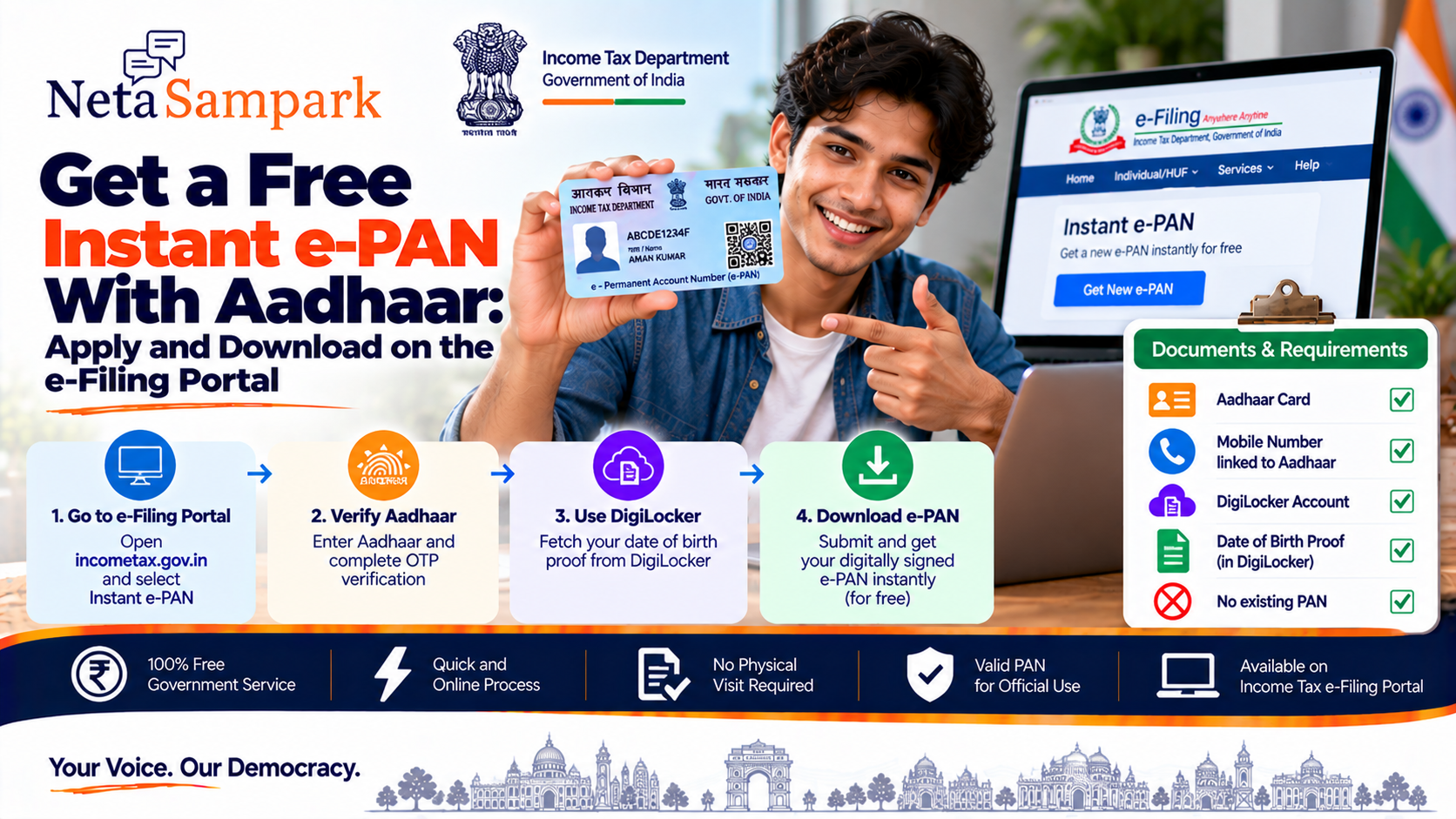
If you are an eligible individual who has not previously been allotted a PAN, the Income Tax Department's Instant e-PAN service lets you apply online using Aadhaar. The service is free and provides a digitally signed PAN in electronic form. (Income Tax Department)
You don't need to visit a PAN centre or submit a physical application for the Instant e-PAN process.
What is Instant e-PAN?
Instant e-PAN is a free, pre-login service available through the Income Tax Department's e-Filing portal.
It allows an eligible individual without an existing PAN to obtain a digitally signed PAN electronically using:
- Aadhaar
- Aadhaar-linked mobile number
- DigiLocker access
The current process also uses DigiLocker to obtain an acceptable proof of date of birth. (Income Tax Department)
The resulting e-PAN is a valid form of PAN. (Income Tax Department)
Who can apply for Instant e-PAN?You can use the service if you meet the applicable conditions.
Basic requirements
☐ You are an individual
☐ You have not already been allotted a PAN
☐ You have a valid Aadhaar
☐ Your mobile number is linked to Aadhaar
☐ You have access to DigiLocker
☐ You are not a minor on the date of the request
☐ You are not covered under the specified Representative Assessee provisions
The Income Tax Department specifically states that someone who already has a PAN cannot use Instant e-PAN to obtain another PAN. (Income Tax Department)
Is Instant e-PAN really free?Yes.
The Income Tax Department states that the Instant e-PAN service is free of cost. (Income Tax Department)
You therefore do not need to pay an agent simply to generate an Instant e-PAN.
Documents and information you needThe process is largely online.
Keep these ready:
Aadhaar
☐ Valid Aadhaar number
☐ Mobile number linked to Aadhaar
DigiLocker
☐ DigiLocker access/account
Date-of-birth proof
The current process uses DigiLocker to obtain an acceptable document for date-of-birth verification.
The Income Tax Department lists documents including:
- Birth Certificate
- Matriculation Certificate
- Driving Licence
- Matriculation Marksheet
- Central Government Health Scheme (CGHS) Card
The applicable document must be available through DigiLocker for the process. (Income Tax Department)
How to apply for Instant e-PANGo to the official Income Tax Department e-Filing portal:
You don't need to log in first.
Step 1 — Select Instant e-PAN
On the e-Filing homepage, find Instant e-PAN under Quick Links.
Then select:
Get New e-PAN
The Income Tax Department identifies this as the starting point for a new Instant e-PAN application. (Income Tax Department)
Step 2 — Confirm eligibility
The portal will ask you to confirm the applicable declarations.
Read them carefully before proceeding.
You will also provide consent for the use of Aadhaar e-KYC and DigiLocker information required for PAN generation. (Income Tax Department)
Step 3 — Enter Aadhaar details
Enter your 12-digit Aadhaar number as requested.
The system checks whether the Aadhaar is already associated with a PAN.
If the Aadhaar is already linked to an existing PAN, you cannot use Instant e-PAN to generate another PAN. (Income Tax Department)
Step 4 — Complete Aadhaar OTP verification
An OTP is sent to the mobile number registered with Aadhaar.
Enter the OTP to authenticate your Aadhaar.
According to the Income Tax Department's user manual:
- OTP validity is 15 minutes
- You have 3 attempts to enter the correct OTP
- A new OTP can be generated using Resend OTP (Income Tax Department)
The current Instant e-PAN process redirects you to DigiLocker to fetch your date-of-birth information and supporting proof. (Income Tax Department)
If you don't already have a DigiLocker account, the Income Tax Department says you can create one during the process using your Aadhaar-linked mobile number. (Income Tax Department)
Make sure the relevant document is already available in DigiLocker or can be fetched from the issuing authority.
Step 6 — Verify your Aadhaar detailsThe portal displays your Aadhaar-related information for verification.
Check details such as:
- Name
- Date of birth
- Gender
- Other applicable KYC information
If there is an error in your Aadhaar information, you may need to correct it through the appropriate Aadhaar process before successfully generating the e-PAN.
Step 7 — Submit the requestAfter completing the required verification and declarations, submit the request.
A successful submission generates an Acknowledgement Number.
Save this number.
The Income Tax Department also sends confirmation to the Aadhaar-linked mobile number. (Income Tax Department)
How to check your e-PAN statusYou don't necessarily need to log in to the e-Filing portal.
Go to:
e-Filing portal → Instant e-PAN → Check Status / Download e-PAN
Then:
- Enter your Aadhaar number
- Continue
- Enter the OTP sent to your Aadhaar-linked mobile
- Validate the OTP
- View the current e-PAN request status (Income Tax Department)
Once your PAN has been generated and allotted, the status screen provides options to:
View e-PAN
or
Download e-PAN
The downloaded document is your digitally signed electronic PAN. (Income Tax Department)
Can you download e-PAN after logging in?Yes.
After receiving your e-PAN and registering on the e-Filing portal, you can log in and go to:
Dashboard → Services → View / Download e-PAN
You will then authenticate using your Aadhaar-linked mobile OTP before viewing or downloading the e-PAN. (Income Tax Department)
Do you automatically receive a physical PAN card?No.
Instant e-PAN provides the PAN in electronic form.
The Income Tax Department states that a physical PAN card is not automatically issued through this service. If you want a printed physical card after PAN allotment, you can request one through the prescribed PAN card reprint channels. (Income Tax Department)
What if I already have a PAN?Don't apply for another PAN.
Instant e-PAN is intended for individuals who have not already been allotted a PAN. (Income Tax Department)
If you've lost your existing PAN card, that is a different situation.
The Income Tax Department specifically says that Instant e-PAN cannot be used to obtain a new PAN merely because you've lost your existing PAN. (Income Tax Department)
What if Aadhaar is already linked to a PAN?You cannot generate an Instant e-PAN for that Aadhaar.
If your Aadhaar is incorrectly linked to someone else's PAN or another incorrect PAN record, the Income Tax Department provides a separate process involving the jurisdictional Assessing Officer for resolving the linkage issue. (Income Tax Department)
What if your Aadhaar mobile number isn't linked?The Instant e-PAN process depends on Aadhaar OTP authentication.
If your Aadhaar does not have an active linked mobile number, you need to update the Aadhaar mobile information through an Aadhaar Enrolment/Update Centre before retrying the process. (Income Tax Department)
What if your name or date of birth is wrong?Check your Aadhaar information before starting.
If the Aadhaar information required for e-KYC doesn't match or is incorrect, you may need to correct the Aadhaar record first.
For example, the Income Tax Department states that if only the year of birth is available in Aadhaar, the date of birth needs to be updated in Aadhaar before proceeding. (Income Tax Department)
What if the e-PAN request fails?A failed Instant e-PAN request does not mean you are permanently unable to obtain a PAN.
The Income Tax Department advises applicants whose e-PAN allotment request fails to apply through the regular PAN application channels of Protean (formerly NSDL) or UTIITSL. (Income Tax Department)
What if your DigiLocker document isn't available?Check whether the relevant issuing authority has made the document available through DigiLocker.
The Income Tax Department currently uses DigiLocker to obtain the required date-of-birth proof in the Instant e-PAN flow. (Income Tax Department)
If none of the acceptable documents is available, you may need to obtain/fetch the appropriate document in DigiLocker before continuing.
Do you need to upload a photo or signature?For the Instant e-PAN process, the Income Tax Department states that you do not need to upload a scanned photograph or signature. (Income Tax Department)
The process uses Aadhaar e-KYC and the required digital information instead.
Do you need to visit a PAN centre?No physical visit is required for the Instant e-PAN process itself.
The Income Tax Department describes it as a completely online process and states that in-person verification is not required. (Income Tax Department)
Instant e-PAN checklistBefore starting
☐ No existing PAN
☐ Valid Aadhaar
☐ Aadhaar-linked mobile number
☐ DigiLocker access
☐ Date-of-birth document available through DigiLocker
☐ You are not a minor
During application
☐ Open official e-Filing portal
☐ Select Instant e-PAN
☐ Select Get New e-PAN
☐ Confirm eligibility
☐ Complete Aadhaar OTP
☐ Complete DigiLocker verification
☐ Check your details
☐ Submit
☐ Save the Acknowledgement Number
After submission
☐ Check status
☐ View e-PAN when allotted
☐ Download e-PAN
☐ Register on e-Filing if required
☐ Keep a secure copy of the PAN document
Common mistakes to avoid1. Applying for another PAN
If you already have a PAN, don't use Instant e-PAN to create another one.
2. Using an Aadhaar without an active mobile number
The OTP verification requires the Aadhaar-linked mobile.
3. Ignoring DigiLocker
The current process uses DigiLocker for the required date-of-birth documentation. (Income Tax Department)
4. Entering incorrect details
Check your Aadhaar information before submitting.
5. Paying an agent
Instant e-PAN is a free government service. (Income Tax Department)
6. Losing your acknowledgement number
Save it immediately after successful submission.
Instant e-PAN process in one viewValid Aadhaar + Aadhaar-linked mobile + DigiLocker
↓
Income Tax e-Filing Portal
↓
Instant e-PAN
↓
Get New e-PAN
↓
Aadhaar verification
↓
DigiLocker verification
↓
Submit request
↓
Acknowledgement Number
↓
Check status
↓
View / Download e-PAN
Official links
Instant e-PAN — Income Tax Department
NetaSampark checklist
If you're applying for PAN for the first time, the simplest route is:
Aadhaar ready → mobile linked → DigiLocker ready → e-Filing portal → Instant e-PAN → Get New e-PAN → verify → submit → save acknowledgement → download e-PAN.
The service is free, online and does not require a physical PAN application for the Instant e-PAN process. (Income Tax Department)
Portal screens and eligibility requirements can be updated. Check the official Income Tax e-Filing portal before submitting your request.