
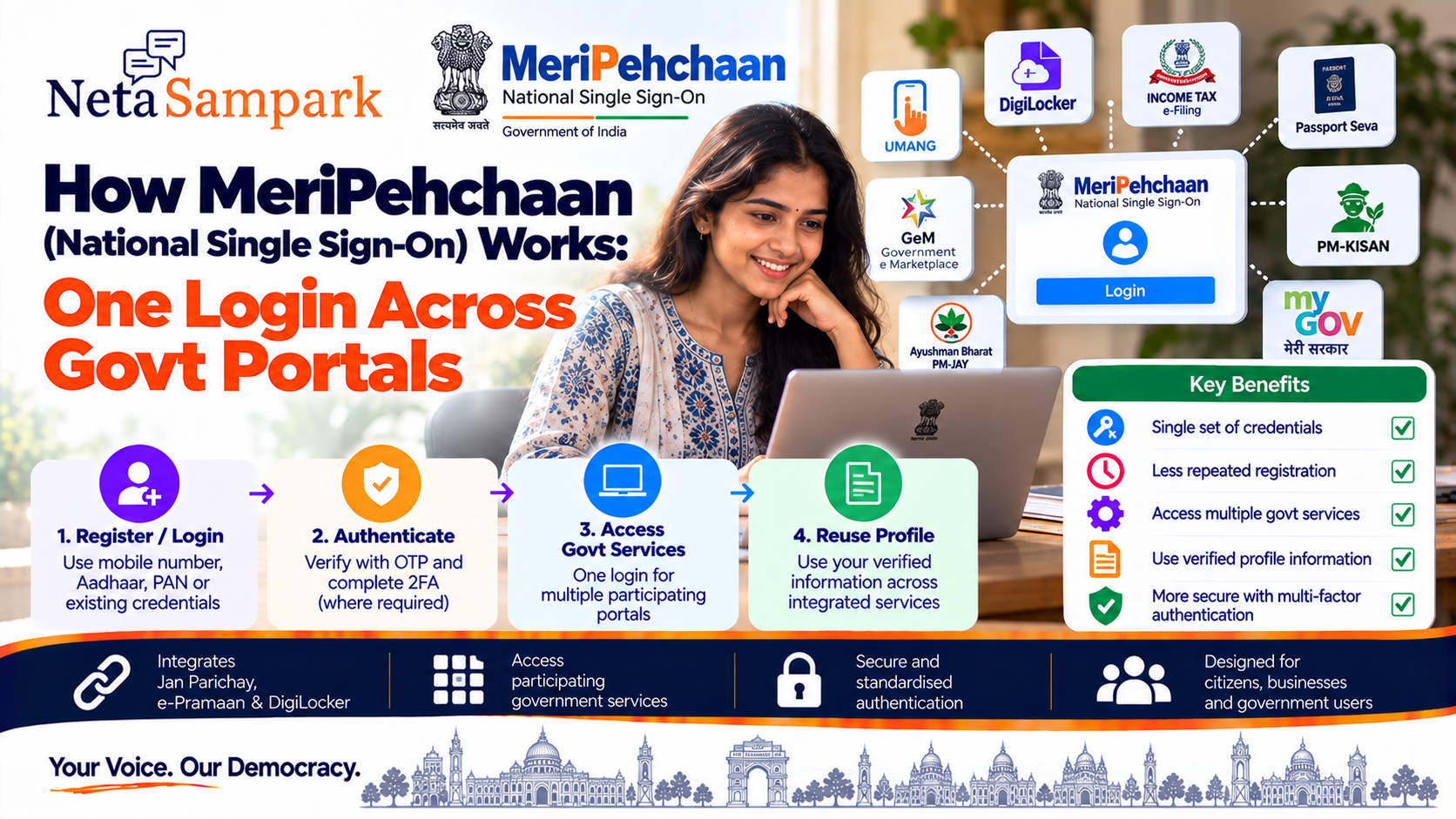
If you use multiple government online services, you may have encountered different registration and login screens for different portals.
MeriPehchaan is designed to reduce that repetition.
It is the Government of India's National Single Sign-On (NSSO) platform, providing a common authentication layer through which one set of credentials can be used to access multiple participating government applications and services. (MeriPehchaan)
Instead of creating and managing separate credentials for every participating service, citizens can authenticate through MeriPehchaan and then access services that have been integrated with the platform.
What is MeriPehchaan?
MeriPehchaan is a national-level common Single Sign-On platform under the Ministry of Electronics & Information Technology (MeitY).
The official platform describes it as an authentication service where a single set of credentials can provide access to multiple online applications or services. (MeriPehchaan)
MeriPehchaan brings together three national-level SSO platforms:
- Jan Parichay
- e-Pramaan
- DigiLocker
The official MeriPehchaan documentation describes these as the three mainstream SSO platforms integrated into the national framework. (MeriPehchaan)
What does "Single Sign-On" mean?Imagine you need to use three different government services.
Without SSO, you might have:
Service A → Login
Service B → Login again
Service C → Login again
With Single Sign-On:
MeriPehchaan → Authenticate once → Access participating services
The purpose is to reduce repetitive authentication and make movement between integrated applications easier. (MeriPehchaan)
It does not mean that every government website in India automatically becomes accessible with one login.
The individual service needs to be integrated with the MeriPehchaan ecosystem.
How MeriPehchaan worksThe basic flow looks like this:
Citizen
↓
Government service
↓
MeriPehchaan authentication
↓
Identity verification / authentication
↓
Two-factor authentication where required
↓
Service access
The service can use MeriPehchaan as its authentication layer rather than independently building an entire citizen-login system.
The official platform says participating applications can obtain verified user information and allow users to reuse MeriPehchaan profile information for other government services. (MeriPehchaan)
Which platforms are part of MeriPehchaan?MeriPehchaan currently describes its national SSO framework around three platforms.
1. Jan Parichay
Jan Parichay is a government SSO platform designed to provide a centralized authentication service for multiple government-to-citizen applications.
Its official documentation describes it as a centralized session and user authentication service that allows one set of credentials to be used across multiple applications. (JanParichay)
2. e-Pramaan
e-Pramaan is another authentication platform integrated with MeriPehchaan.
Its current login system supports authentication using different identifiers and OTP-based verification, with multi-factor authentication forming part of the login process. (DL Partners)
3. DigiLocker
DigiLocker is also integrated into the MeriPehchaan framework.
This is particularly useful because DigiLocker already provides citizens with access to authentic digital documents and identity-related services.
MeriPehchaan's partner documentation identifies DigiLocker alongside Jan Parichay and e-Pramaan as part of the national SSO framework. (DL Partners)
Do you need a separate MeriPehchaan username?Not necessarily.
The official FAQ says citizens can register through any of the three mainstream SSO platforms associated with MeriPehchaan. Registration can involve information such as:
- Mobile number
- Name
- Gender
- Username
- Password
The platform also supports eKYC using Aadhaar and PAN. (MeriPehchaan)
So your existing identity with one of the participating SSO platforms can form part of your MeriPehchaan experience.
What can you use to log in?Depending on the SSO platform and authentication flow, MeriPehchaan supports multiple verification parameters.
The official FAQ lists:
- Username
- Mobile number
- Aadhaar
- PAN
as examples of authentication parameters. (MeriPehchaan)
The partner FAQ also states that linked verification IDs can be used as usernames for login. (DL Partners)
The exact login options presented can therefore depend on the SSO service and the government application you are accessing.
Is Aadhaar mandatory?Not necessarily for every MeriPehchaan registration.
The official FAQ says a citizen can register by providing basic information such as mobile number, name and gender to create credentials. It also says citizens may perform eKYC using Aadhaar and PAN. (MeriPehchaan)
Therefore, don't assume that every MeriPehchaan login requires entering your Aadhaar number.
The authentication method depends on the service and identity-verification route being used.
How does two-factor authentication work?MeriPehchaan's partner documentation describes a login process in which, after initial authentication, two-step multi-factor authentication (2FA) is performed. (DL Partners)
This adds another authentication step beyond simply entering a username and password.
The exact second factor can vary according to the authentication method and platform.
Why is Single Sign-On useful?The main objective is to reduce repetitive authentication.
For citizens
Instead of maintaining credentials separately for every participating service, you can use a common authentication framework.
This can make it easier to:
- Access participating government services
- Reduce repeated registrations
- Reduce repeated identity verification
- Reuse profile information
- Manage fewer credentials
These are among the benefits identified by the official MeriPehchaan documentation. (MeriPehchaan)
What happens to your identity information?MeriPehchaan acts as an authentication and identity-management layer.
The official platform says that participating applications can receive verified information about the user who authenticated through MeriPehchaan and can reuse MeriPehchaan profile information for other government services. (MeriPehchaan)
This is different from saying that every participating website gets unrestricted access to all of your personal information.
The information available to an application depends on the integration and permissions involved.
Is MeriPehchaan the same as DigiLocker?No.
They are related but serve different purposes.
DigiLocker
Primarily provides citizens with access to digital documents and document-related services.
MeriPehchaan
Provides a common authentication / Single Sign-On framework.
DigiLocker is one of the three SSO platforms integrated into the MeriPehchaan framework. (DL Partners)
So:
DigiLocker ≠ MeriPehchaan
but
DigiLocker is part of the MeriPehchaan SSO ecosystem.
Is MeriPehchaan the same as Aadhaar?No.
Aadhaar is an identity system operated by UIDAI.
MeriPehchaan is a government Single Sign-On and authentication platform.
Aadhaar can be one of the authentication/eKYC parameters used within the MeriPehchaan ecosystem, but the two systems are not the same. The MeriPehchaan FAQ explicitly lists Aadhaar among possible authentication parameters. (MeriPehchaan)
How to registerStart with the official MeriPehchaan platform:
MeriPehchaan — Government of India
The official FAQ states that citizens can register through one of the three mainstream SSO platforms associated with MeriPehchaan. (MeriPehchaan)
A typical registration process involves:
Step 1
Open the official MeriPehchaan service.
Step 2
Choose the applicable SSO route.
Step 3
Provide the requested mobile/basic details.
Step 4
Complete OTP verification where required.
Step 5
Create your login credentials.
Step 6
Complete additional identity verification/eKYC if required.
For example, the current e-Pramaan registration page asks for a mobile number, OTP, name, gender, date of birth and username/password. (e-Pramaan)
How to log in to a participating serviceThe experience can vary by application, but broadly:
Open the government service
↓
Select MeriPehchaan / applicable SSO login
↓
Choose your authentication method
↓
Enter credentials / verification information
↓
Complete OTP or other second-factor authentication if requested
↓
Return to the government service
The objective is that the government application does not need to repeatedly establish your identity independently once the SSO authentication has been completed. (MeriPehchaan)
What if you already use DigiLocker?You may already have an SSO route through DigiLocker.
MeriPehchaan's official partner documentation identifies DigiLocker as one of the three integrated SSO platforms. (DL Partners)
This means you should check the participating application's available login options before creating another account unnecessarily.
What if you already use Jan Parichay?You can use your Jan Parichay credentials for services integrated through the MeriPehchaan framework.
Jan Parichay's official documentation describes its purpose as allowing users to authenticate on one designated platform and access multiple integrated services without repeatedly logging in and out. (JanParichay)
What if you forget your password?Use the recovery option provided by the SSO platform you registered with.
For example, the current e-Pramaan login page provides a Forgot Password option. (e-Pramaan)
Avoid creating multiple accounts simply because you forgot your original credentials.
Is MeriPehchaan safe?The platform is designed around centralized authentication and multi-factor authentication.
MeriPehchaan states that its participating SSO systems handle Aadhaar data in an Aadhaar vault in accordance with applicable Aadhaar Act requirements. (MeriPehchaan)
The platform also identifies multi-factor authentication as a security feature. (MeriPehchaan)
However, citizens should still follow normal account-security practices:
- Never share OTPs
- Never share passwords
- Use only official government websites
- Check the domain before entering personal information
- Don't approve unexpected authentication requests
- Keep your mobile number and recovery information updated
For MeriPehchaan, start from the official government domain:
Be cautious about links received through:
- SMS
- Social media
- Unknown emails
- Search advertisements
A government service may redirect you to an associated authentication service, but you should verify that the destination is an official government domain before entering credentials.
Does one login give access to every government service?No.
This is an important distinction.
MeriPehchaan is an SSO platform for participating/integrated applications.
A government website that has not integrated with the MeriPehchaan ecosystem may continue to have its own login system.
The official partner portal specifically describes applications as being onboarded to the platform. (DL Partners)
MeriPehchaan vs traditional government loginsTraditional approachMeriPehchaan SSOSeparate registration for each serviceCommon authentication frameworkMultiple usernames/passwordsReusable SSO credentialsRepeated identity verificationCentralised authenticationSeparate login experienceSingle Sign-On for integrated servicesMore credentials to manageFewer credentialsService-specific authenticationShared authentication infrastructure
The exact experience still depends on how each government application has integrated with MeriPehchaan.
Citizen checklistBefore using MeriPehchaan:
☐ Start from the official government portal
☐ Check whether the service supports MeriPehchaan/SSO
☐ Know which SSO account you are using
☐ Keep your registered mobile available
☐ Complete OTP/2FA when requested
☐ Don't share your password or OTP
☐ Check what information the service is requesting
☐ Save important application/reference numbers separately
The simple versionThink of MeriPehchaan as a common authentication layer for participating government services.
Instead of:
Government Service A → Account A
Government Service B → Account B
Government Service C → Account C
the goal is:
MeriPehchaan → Authenticate → Participating Government Services
It brings together Jan Parichay, e-Pramaan and DigiLocker within a national SSO framework. (MeriPehchaan)
The important limitation is that not every government portal is automatically part of the system. Look for the MeriPehchaan/SSO option on the specific service you want to use.
Official links
MeriPehchaan — Government of India
MeriPehchaan Partner/Application Directory
NetaSampark quick checklist
One government login doesn't mean one login for every website.
Check whether the service is MeriPehchaan-enabled → authenticate through the available SSO → complete 2FA → access the participating service.
MeriPehchaan's purpose is to make government-service authentication more standardised and reduce repetitive sign-ins while allowing participating applications to use verified user information. (MeriPehchaan)