
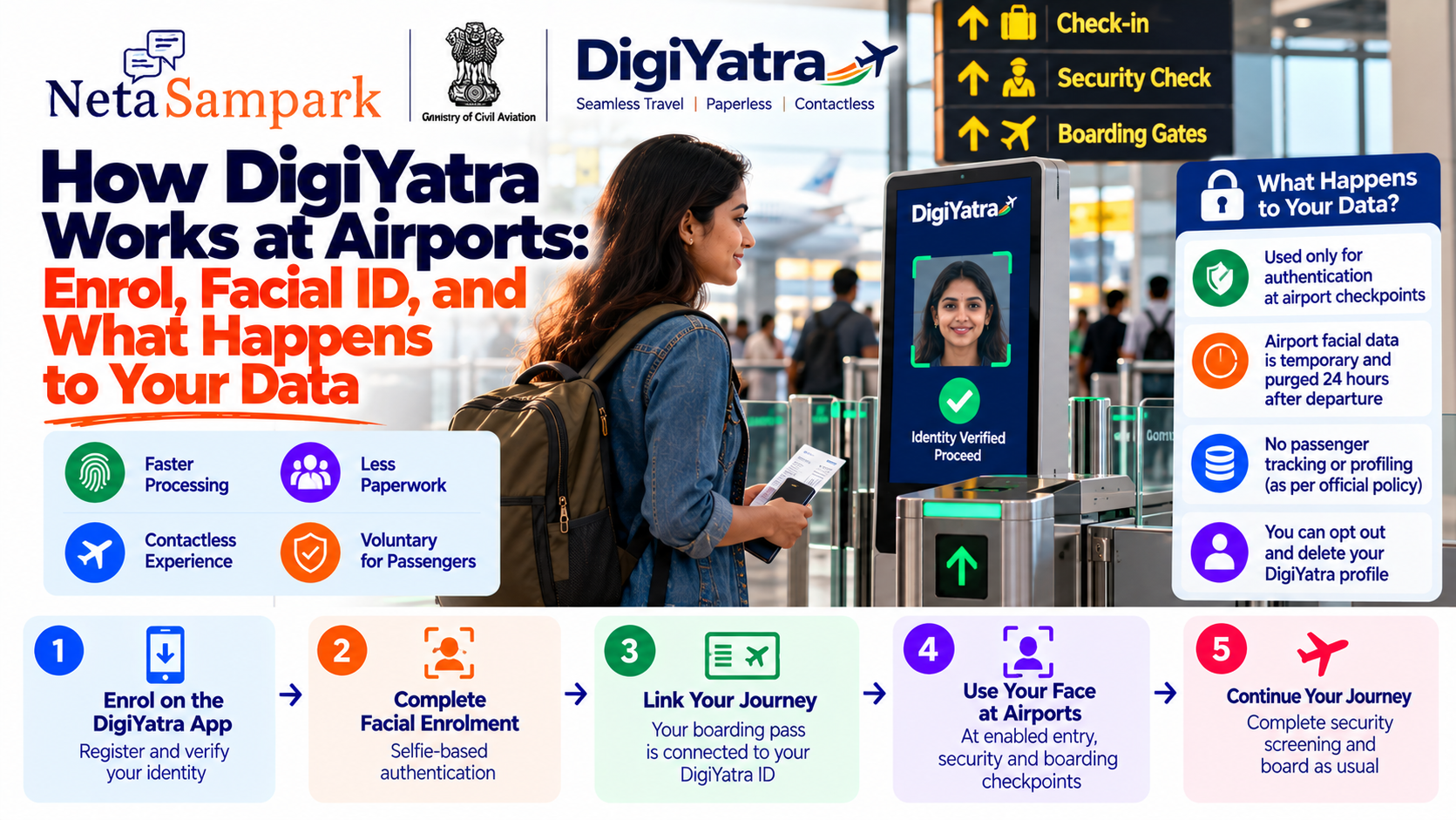
DigiYatra lets eligible passengers use facial authentication at participating airports instead of repeatedly showing a physical ID and boarding pass at supported checkpoints.
The basic idea is simple:
Enrol once → link your journey → use your face at enabled checkpoints.
But there is an important part many passengers want to understand: what happens to your facial data and travel information?
DigiYatra is officially described as voluntary, and the Ministry of Civil Aviation says passengers can choose whether to use it. (Ministry of Civil Aviation)
What is DigiYatra?
DigiYatra is India's biometric-based airport processing system that uses facial recognition technology to authenticate passengers at participating airports.
Instead of repeatedly presenting your identity document and boarding pass at every supported checkpoint, your face can be matched against the biometric credential associated with your DigiYatra identity.
The system is designed to support paperless and contactless passenger processing at enabled airports. (Ministry of Civil Aviation)
It is important to remember:
DigiYatra does not replace airport security screening.
You still go through the required security process and other airport procedures.
Is DigiYatra mandatory?No.
The Ministry of Civil Aviation explicitly states that DigiYatra is voluntary and that passengers are not required to enrol. (Ministry of Civil Aviation)
You can therefore choose between using DigiYatra and following the conventional airport process available at the airport.
Who can use DigiYatra?The current DigiYatra app is operated by the Digi Yatra Foundation. Its Google Play listing identifies the developer and shows the app was updated in August 2026. (Google Play)
The current enrolment process is primarily based on government ID verification and facial biometric enrolment. The Ministry's guidelines describe online verification using government ID information such as Aadhaar, with a manual airport process available when online verification cannot be completed. (Ministry of Civil Aviation)
The precise supported passenger categories and ID options can change as the system is expanded, so check the current app and airport instructions before travelling.
How DigiYatra enrolment worksThe general process is:
1. Install the official DigiYatra app
Use the official DigiYatra application published by Digi Yatra Foundation.
The Google Play listing currently identifies the developer as Digi Yatra Foundation and the package as org.digiyatra.org. (Google Play)
2. Register your mobile number
Complete the account-registration process in the app.
3. Verify your identity
The DigiYatra guidelines describe online verification using government ID information, including Aadhaar-based verification. (Ministry of Civil Aviation)
4. Complete facial enrolment
The app uses a selfie-based biometric enrolment process and facial matching against the image associated with the verified identity document. (Ministry of Civil Aviation)
5. Create your DigiYatra credential
After successful verification, your DigiYatra identity/credential can be used for supported airport journeys.
What happens when you book a flight?DigiYatra isn't simply a permanent airport pass.
For a particular journey, your boarding-pass information needs to be associated with your DigiYatra identity so the airport system can verify that you have a valid journey.
The DigiYatra policy describes the travel credential being shared with the relevant airport for temporary use. (Ministry of Civil Aviation)
The exact workflow can vary depending on the airline, airport and implementation.
What happens when you reach the airport?At a DigiYatra-enabled entry point, the system can use your face to authenticate you.
The simplified flow is:
Approach DigiYatra gate
↓
Camera captures your face
↓
Facial biometric is matched
↓
Journey/boarding information is validated
↓
Gate permits the passenger through
↓
Continue to security/check-in/boarding
The Ministry describes DigiYatra as using facial recognition across airport checkpoints, including entry and other supported passenger-processing points. (Ministry of Civil Aviation)
Do I still need my boarding pass?You should always keep your boarding pass accessible, even when using DigiYatra.
DigiYatra is intended to make supported airport processing easier; it doesn't mean you should travel without access to your flight information.
Airport procedures can also vary by terminal, airline and checkpoint.
A practical rule:
DigiYatra enabled ≠ leave your boarding pass and ID at home.
Keep them available as a backup.
What happens at security?DigiYatra can help authenticate your identity at supported checkpoints, but it does not eliminate the requirement for airport security screening.
You still need to comply with security procedures and instructions from airport/security personnel.
The system is about identity and passenger processing, not about replacing aviation security screening.
What happens at the boarding gate?At a supported DigiYatra boarding point, facial authentication can be used to identify the passenger and validate the journey.
The Ministry's policy describes the system as performing multiple checks, including boarding-pass validation and biometric identity validation. (Ministry of Civil Aviation)
The exact equipment and workflow can differ between airports.
The important question: What happens to your face data?This is where DigiYatra's design is particularly important.
The official guidelines state that enrolled passengers share a DigiYatra ID travel credential with a single token of face biometrics with the local airport for temporary use.
The guidelines say that airports should not retain this facial data beyond the passenger's transit and that it should be purged 24 hours after the flight's take-off/departure. (Ministry of Civil Aviation)
So the official framework distinguishes between:
Your DigiYatra profile/credential
and
Temporary biometric data sent to the airport
They are not necessarily the same storage location or retention period.
Is your face stored permanently at the airport?According to the Ministry's DigiYatra guidelines, airport facial data is intended to be temporary.
The guidelines specify that the facial data shared with the airport is for temporary use and should be purged 24 hours after take-off/departure. (Ministry of Civil Aviation)
That is different from saying that all information associated with your DigiYatra account disappears immediately after every flight.
The DigiYatra profile itself can remain until you choose to opt out and delete it, according to the guidelines. (Ministry of Civil Aviation)
Can you delete your DigiYatra profile?Yes.
The Ministry's guidelines state that creating and using a DigiYatra ID is voluntary and that users have the option to opt out and delete their profile. (Ministry of Civil Aviation)
This is an important distinction:
Deleting airport travel data
is not necessarily the same operation as
deleting your DigiYatra profile.
The applicable deletion controls should be checked in the current app.
Does DigiYatra track where you travel?The Ministry has publicly stated that DigiYatra is designed without passenger tracking or profiling. (Ministry of Civil Aviation)
The official guidelines also state that facial data shared with airports is intended for authentication at airport checkpoints rather than permanent airport storage. (Ministry of Civil Aviation)
However, passengers should distinguish between the official policy/design claims and the broader question of what information an individual app or connected service may process.
The current Google Play data-safety disclosure for the DigiYatra app says the app may collect personal information and app information/performance data, may share personal information with third parties, encrypts data in transit, and allows users to request deletion. (Google Play)
That disclosure is worth checking alongside the government guidelines when considering the complete data picture.
What data does the app itself handle?The current Google Play listing provides a developer-declared data-safety disclosure.
It says the app:
- May collect personal information
- May collect app information and performance data
- May share certain personal information with third parties
- Encrypts data in transit
- Allows users to request deletion of data (Google Play)
This is useful context because "DigiYatra airport biometric data" and "everything the mobile application can process" are not necessarily identical categories.
Does the airport keep your face forever?The official guidelines say no for the facial data shared with the airport for the journey.
The stated rule is that this facial data is for temporary use and is to be purged from the airport system 24 hours after take-off/departure. (Ministry of Civil Aviation)
So the intended model is:
DigiYatra credential
→ temporary sharing with airport
→ facial authentication during journey
→ airport-side facial data purged after the specified period.
What about Aadhaar?Aadhaar can be used during the enrolment/identity-verification process described by the DigiYatra guidelines.
The guidelines describe online verification of biographic information and facial matching against an image received from an ID database such as Aadhaar. (Ministry of Civil Aviation)
The earlier DigiYatra policy also describes Aadhaar/UID-token-based validation rather than simply handing an unrestricted Aadhaar database to an airport. (Ministry of Civil Aviation)
In other words, DigiYatra's stated design is not that the airport receives unrestricted access to the Aadhaar database.
What if online verification doesn't work?The Ministry's guidelines provide for a second-stage/manual authentication process.
This can apply when:
- Online verification fails
- The passenger's ID isn't supported for online verification
- The automated process cannot authenticate the passenger
In such cases, manual verification involving CISF at the airport registration kiosk is envisaged. (Ministry of Civil Aviation)
So a failed facial enrolment doesn't necessarily mean you cannot fly.
Can you enrol at the airport?The DigiYatra policy describes a day-of-travel enrolment process at airport registration kiosks.
The process includes:
- Scan boarding-pass barcode/QR code
- Validate the boarding pass with the airline system
- Capture facial biometrics
- CISF verifies the government-issued identity document
- Registration is accepted for that journey
- Passenger proceeds to the entry e-gates
The policy states that this day-of-travel enrolment is valid only for that journey and that the biometric data is purged from the local airport system after the defined storage period. (Ministry of Civil Aviation)
Can families use DigiYatra?The original DigiYatra policy envisaged a family enrolment facility where a head of family could enrol a spouse, minor children, dependent parents or other close relatives through the same mobile application, subject to the applicable identity-verification process. (Ministry of Civil Aviation)
Because app functionality can change, check the current version of the app before relying on a particular family-enrolment workflow.
What if your face doesn't match?Facial recognition isn't guaranteed to work every time.
Possible causes include:
- Poor lighting
- Camera positioning
- Changes in appearance
- Incorrect enrolment
- Technical issues
- Connectivity/system issues
If DigiYatra doesn't authenticate you, follow the airport's conventional verification process or ask airport staff for assistance.
A DigiYatra failure should not be treated as a failure of your ticket or identity itself.
Do you still need a physical ID?It is sensible to carry your government-issued ID when travelling.
Even if you normally use DigiYatra, airport procedures can vary and you may need conventional identity verification if:
- DigiYatra isn't working
- A particular checkpoint doesn't support it
- You need assistance
- Your journey or passenger category isn't supported by the relevant implementation
DigiYatra is an optional convenience layer, not a reason to stop carrying essential travel documents.
What if you don't want facial recognition?You don't have to use DigiYatra.
The Ministry explicitly states that DigiYatra is voluntary. (Ministry of Civil Aviation)
You can use the conventional airport process available to passengers.
DigiYatra data: a simple pictureThink of the system in three layers:
1. Your DigiYatra account
Your profile and travel credential.
2. Your facial biometric
Used to authenticate you.
3. Airport-side temporary data
The guidelines say facial data shared with the airport is temporary and should be purged 24 hours after departure. (Ministry of Civil Aviation)
The official framework also gives users the ability to opt out and delete their DigiYatra profile. (Ministry of Civil Aviation)
What should passengers check before enrolling?Before signing up, understand:
☐ DigiYatra is voluntary
☐ The app is published by Digi Yatra Foundation
☐ Identity verification is part of enrolment
☐ Facial biometric enrolment is required for the biometric experience
☐ Your journey needs to be associated with your DigiYatra credential
☐ Airport facial data is intended to be temporary
☐ The guidelines specify airport-side purge after 24 hours of departure
☐ You can opt out/delete your DigiYatra profile
☐ Conventional airport processing remains available
Is DigiYatra safe?There are two different questions here.
Security design
The official DigiYatra framework includes measures such as temporary airport-side biometric storage, consent for sharing facial biometric data and the ability to opt out. (Ministry of Civil Aviation)
Privacy/data handling
Passengers should also review the current app's privacy disclosures. The Google Play listing currently states that the app may collect personal information and app information/performance data, may share personal information with third parties, encrypts data in transit and supports data-deletion requests. (Google Play)
Therefore, a sensible approach is not to reduce the question to simply "Is DigiYatra safe?"
Instead ask:
What data is collected, why is it used, who receives it, how long is it retained, and can I delete my profile?
The official guidelines provide specific answers for several of these questions.
DigiYatra vs conventional airport entryDigiYatraConventional processEnrolmentRequired if you choose to use itNot requiredFacial authenticationYesGenerally noBoarding passLinked digitally/validatedPhysical or digitalID verificationDigital biometric workflowPhysical/document verificationAirport biometric dataTemporary under stated guidelinesDepends on airport processMandatory?NoAvailable alternativeProfile deletionOption to opt out/deleteNot applicableBefore your first DigiYatra tripOn your phone
☐ Install the official DigiYatra app
☐ Complete registration
☐ Complete identity verification
☐ Complete facial enrolment
☐ Check that your journey/boarding pass is available
At the airport
☐ Look for DigiYatra signage
☐ Follow the designated entry process
☐ Keep your boarding pass and ID available as backup
☐ Follow CISF/security instructions
☐ Use conventional processing if biometric authentication fails
A practical privacy checklistIf you're particularly concerned about biometric data, check these five things:
1. Consent
Read what you are consenting to when enabling facial authentication.
The official guidelines say consent should be taken for sharing facial biometric data for airport checkpoints. (Ministry of Civil Aviation)
2. Retention
The guidelines state that airport facial data should be purged 24 hours after take-off/departure. (Ministry of Civil Aviation)
3. Optional services
The guidelines distinguish airport authentication consent from optional consent for value-added services.
Marketing/profile creation is described as requiring separate consent, with an opt-out mechanism. (Ministry of Civil Aviation)
4. Profile deletion
The guidelines state that users can opt out and delete their profile. (Ministry of Civil Aviation)
5. App disclosures
Check the current app-store privacy/data-safety disclosure because app-level data practices can be broader than the airport biometric workflow. (Google Play)
What DigiYatra does — and doesn't doIt does
Authenticate you using facial recognition
Link your identity to your journey
Reduce repeated document checks at supported checkpoints
Enable contactless airport processing
It doesn't
Make DigiYatra mandatory
Replace airport security screening
Mean airport staff permanently retain your facial data under the stated framework
Guarantee that every airport checkpoint will work identically
Frequently asked questionsIs DigiYatra compulsory?
No. The Ministry of Civil Aviation says DigiYatra is voluntary. (Ministry of Civil Aviation)
Does DigiYatra use facial recognition?
Yes. Facial recognition is central to the biometric authentication system. (Ministry of Civil Aviation)
Does the airport permanently store my facial data?
The official guidelines state that facial data shared with the airport is temporary and should be purged 24 hours after take-off/departure. (Ministry of Civil Aviation)
Can I delete my DigiYatra profile?
The guidelines state that users can opt out and delete their profile. (Ministry of Civil Aviation)
Do I still need airport security?
Yes. DigiYatra authenticates the passenger; it does not eliminate mandatory aviation-security procedures.
What if DigiYatra doesn't recognise me?
Use the airport's conventional verification process and ask airport staff for assistance.
Should I still carry my ID?
Yes. Keeping your government ID and boarding-pass information available is a sensible backup even when using DigiYatra.
Final checklistBefore your next flight:
1. Download the official DigiYatra app
↓
2. Complete identity verification
↓
3. Complete facial enrolment
↓
4. Link your journey/boarding information
↓
5. Use DigiYatra at supported airport checkpoints
↓
6. Complete normal security procedures
↓
7. Board normally
And for privacy:
Airport facial data → temporary use → stated purge after 24 hours
while your DigiYatra profile remains until you choose to opt out/delete it, according to the Ministry's current guidelines. (Ministry of Civil Aviation)
The current DigiYatra app's store disclosure should also be checked because it provides the app-level data-safety information separately from the Ministry's airport-system guidelines. (Google Play)
Airport facilities, supported passenger categories and app workflows can change. Check the current DigiYatra app and your airport's instructions before travelling.