
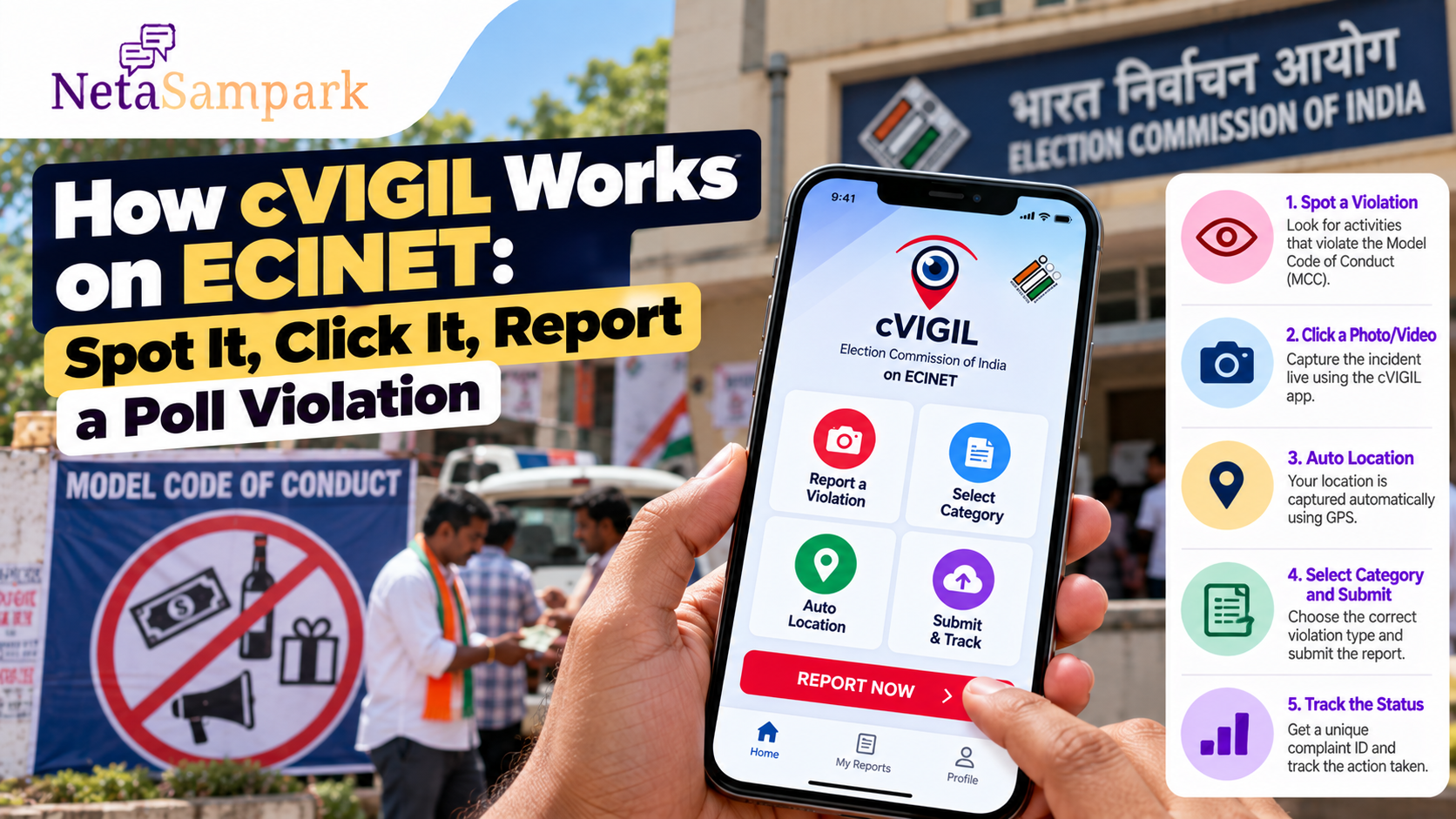
How cVIGIL Works on ECINET: Spot It, Click It, Report a Poll Violation
During an election, citizens may see activities that appear to violate the Model Code of Conduct (MCC) — from distribution of cash, liquor or gifts to unauthorised campaigning or other election-related violations.
You do not necessarily have to wait for an election official to notice it.
The Election Commission of India’s cVIGIL system allows citizens to report MCC and expenditure-related violations using a smartphone. In 2026, the Election Commission has described cVIGIL as a module on ECINET, with citizens able to submit time-stamped photo or video evidence and location information. Election Commission of India
Here is how the system works and what you should know before submitting a complaint.
What Is cVIGIL?
cVIGIL is the Election Commission of India's citizen-reporting application for election-related violations.
The system is designed around a simple process:
Spot a suspected violation → Capture it → Submit it → Authorities verify it → Track the complaint
The ECI says cVIGIL can be used to report Model Code of Conduct violations such as bribery, distribution of free gifts or liquor, and campaigning using loudspeakers beyond permitted hours. Election Commission of India
The app is available for both Android and iOS devices. Election Commission of India
What Can You Report?
cVIGIL is primarily for MCC and election-expenditure violations during an election period.
Examples can include:
- Distribution of cash to influence voters
- Distribution of liquor
- Distribution of gifts or other inducements
- Certain unauthorised campaign activities
- Campaigning beyond permitted time
- Defacement or other election-related violations
- Other activities falling within the categories available in the cVIGIL reporting system
The exact categories available can depend on the election and the reporting system in operation.
The ECI's MCC guidance separately covers restrictions on activities such as bribery, intimidation, canvassing within 100 metres of polling stations and public meetings during the 48-hour period before the close of poll. Election Commission of India
Important: Seeing something you personally dislike is not automatically an MCC violation. The report should relate to an actual election-related violation covered by the available complaint categories.
Why Does cVIGIL Ask You to Capture It Live?
One of the distinctive features of cVIGIL is that it is designed for live photo or video capture through the app.
The ECI says the application captures the incident along with location information using GIS technology. This allows the election enforcement team to identify where the reported activity is taking place. Election Commission of India
This also means cVIGIL is not simply a general-purpose facility for uploading any old photograph from your phone gallery.
If you see something happening, open the reporting function and capture the incident as it occurs.
Step 1: Open cVIGIL on ECINET
The ECI now identifies cVIGIL as the Model Code of Conduct Complaint module on ECINET.
The Commission's 2026 election material specifically states that citizens, political parties and candidates can report MCC violations through the C-Vigil Module on ECINET. Election Commission of India
The ECI also maintains a dedicated cVIGIL Citizen App page with Android and iOS download links. Election Commission of India
Use the official ECI app or official ECINET route rather than downloading an app from an unverified website.
Step 2: Select the Type of Violation
Once you open the reporting facility, select the category that best describes what you have observed.
Read the available categories carefully.
For example, a report concerning alleged distribution of liquor should not simply be submitted as a generic complaint if the relevant category is available.
Choosing the closest correct category helps the complaint reach the appropriate election-enforcement workflow.
Step 3: Capture the Photo or Video
This is the most important part.
If you are witnessing suspected cash distribution, an alleged campaign violation or another reportable incident, capture clear live evidence.
Try to show:
- What is happening
- Where it is happening
- People or vehicles involved, where safely possible
- Relevant banners, posters or campaign material
- Any visible identifying details
- The surrounding location
You should not put yourself in danger to obtain evidence.
Do not confront the people involved, attempt to seize anything, or create a confrontation just to obtain a better photograph.
The purpose of cVIGIL is to allow citizens to report what they observe, not to turn citizens into enforcement personnel.
Step 4: Let the App Capture the Location
cVIGIL uses GPS/GIS functionality to capture the location associated with the report.
The ECI says its location feature provides information that allows flying squads to navigate to the reported spot. Election Commission of India
So make sure:
- Location services are enabled
- You are actually at or near the incident
- You are reporting the correct location
- You don't deliberately submit a different location
The location information is an important part of why cVIGIL can operate as a rapid field-verification system.
Step 5: Add a Short, Factual Description
Don't write a long political argument.
Describe what you actually observed.
For example:
“At approximately 6:15 PM, cash envelopes were being distributed near the entrance of the market at [location].”
This is more useful than:
“This candidate is definitely bribing everyone.”
Stick to observable facts.
If you know the approximate time, location or identifying details, include them.
Step 6: Submit the Complaint
Once the evidence and details are ready, submit the report.
The system generates a unique complaint/reference ID, which can be used to track the complaint. The ECI says cVIGIL allows citizens to track the progress of their complaints. Election Commission of India
Save the ID.
Take a screenshot if necessary.
It is your reference for any subsequent status check.
What Happens After You Click “Submit”?
The complaint does not simply sit in an online database.
The ECI's cVIGIL workflow connects the report with election officials and field-verification teams.
A simplified version is:
Citizen
↓
cVIGIL complaint
↓
District Control Room
↓
Flying Squad / Field Verification Team
↓
On-ground verification
↓
Returning Officer / election authority
↓
Decision and disposal
The ECI says the cVIGIL portal allows officials to assign cases to the nearest Flying Squad Team (FST), track field units and review the field report before the Returning Officer takes the final decision. Election Commission of India
What Is the “100-Minute” System?
One of cVIGIL's best-known features is its 100-minute response timeline.
The ECI describes the system as being designed to provide a status response within 100 minutes. Election Commission of India
That does not mean every case will necessarily be completely resolved in exactly 100 minutes.
The 100-minute framework is the ECI's time-bound complaint-response mechanism.
For example, during the 2026 elections covered in one ECI update, the Commission reported that 96.01% of 3,23,099 complaints lodged between 15 March and 19 April were resolved within the stipulated 100 minutes. Election Commission of India
What Does the Flying Squad Do?
After receiving a complaint, the relevant field team can be directed to the reported location.
The cVIGIL system provides officials with location information to help them reach the spot.
The team then verifies the allegation and submits its findings through the official system.
This distinction is important:
Your photograph or video is a report, not a final finding of an election violation.
The election authorities have to verify the circumstances and take the appropriate decision.
Can I Track My Complaint?
Yes.
The ECI says cVIGIL provides complaint tracking and that citizens receive a unique ID/reference for following the case. Election Commission of India
Keep the reference number until the case has been disposed of.
If the status changes, save the updated information if the matter is important to you.
Can You Report Anonymously?
The ECI's current cVIGIL citizen-app page lists anonymous reporting as one of the app's features. Election Commission of India
However, anonymity does not mean that the report can be careless.
The strongest complaint is still one containing:
- A clear incident
- Correct location
- Useful visual evidence
- Accurate description
- Appropriate complaint category
Do not use the system to make knowingly false allegations against individuals or organisations.
Don't Edit or Stage Evidence
A major advantage of cVIGIL is that the evidence is intended to be tied to a live incident and location.
Don't:
- Stage an incident
- Provoke somebody to create a reportable scene
- Edit footage to change its meaning
- Add misleading descriptions
- Submit unrelated old photographs
- Report something simply because you dislike a candidate or party
The objective is fact-based reporting of a suspected election violation.
What If the Violation Is Happening on Social Media?
Not every online election issue is best handled through cVIGIL.
The ECI has separate mechanisms for monitoring and acting on election-related social-media content. In its 2026 election updates, the Commission said social-media content involving MCC violations or other election-related issues was being monitored by designated State IT Nodal Officers. Election Commission of India
If the issue is an online post, advertisement or social-media communication, check the relevant ECI complaint mechanism rather than assuming cVIGIL is the correct channel.
What If You Have a General Election Complaint?
cVIGIL is specifically designed for MCC/expenditure violations.
The ECI also operates the National Grievance Service Portal (NGSP) for election-related and non-election-related grievances.
The ECI says citizens can register complaints through the grievance system, receive a reference ID and have complaints assigned to the appropriate election official. Election Commission of India
So think of the distinction this way:
| Situation | Possible ECI channel |
|---|---|
| Suspected MCC violation happening now | cVIGIL |
| Suspected election-expenditure violation | cVIGIL |
| General election-related grievance | ECI grievance system |
| Voter registration/correction issue | Voter services/appropriate ECI channel |
| Emergency or crime requiring immediate police intervention | Police/emergency services |
What If You See Cash or Liquor Being Distributed?
Don't attempt to intervene yourself.
If it appears to be an election-related inducement and the circumstances fall within cVIGIL's reporting categories:
- Move to a safe position.
- Open cVIGIL.
- Capture the incident live.
- Allow the app to record the location.
- Select the appropriate category.
- Add factual details.
- Submit.
- Save the complaint ID.
If there is an immediate threat to life or safety, use the appropriate emergency/police channel instead of relying only on an election complaint.
What Happens If the Complaint Is Found to Be Incorrect?
A complaint is not automatically proof that a violation occurred.
The field team verifies the reported incident and the Returning Officer or appropriate election authority takes the decision based on the available information.
The ECI's official cVIGIL portal describes final decisions by the Returning Officer as including drop, dispose or escalate, following verification. Election Commission of India
This is why citizens should report what they genuinely observe rather than making assumptions about guilt.
Five Things to Remember Before You Report
1. Capture it live
cVIGIL is designed around live photo/video evidence. Election Commission of India
2. Keep the location accurate
GPS/location data helps enforcement teams find the reported spot. Election Commission of India
3. Describe facts, not conclusions
Tell the authorities what you saw.
4. Don't put yourself at risk
You are reporting a suspected violation, not investigating it personally.
5. Save your complaint ID
You may need it to check the status later.
cVIGIL Quick Checklist
Before submitting:
☐ Is this actually an election/MCC-related issue?
☐ Is the incident happening now?
☐ Can I safely capture it?
☐ Is my phone's location enabled?
☐ Did I select the appropriate category?
☐ Did I describe what I actually observed?
☐ Did I submit the complaint successfully?
☐ Did I save the complaint/reference ID?
The Bottom Line
cVIGIL turns a citizen's smartphone into a reporting tool for election enforcement.
The process is straightforward:
Spot → Click → Locate → Report → Track.
The Election Commission says the system provides time-stamped evidence, location information and a time-bound workflow connecting citizen reports with election control rooms and field-verification teams. Election Commission of India
If you see a genuine, observable election-related violation, report the facts through the official cVIGIL/ECINET channel rather than confronting the people involved or relying only on social-media posts.