
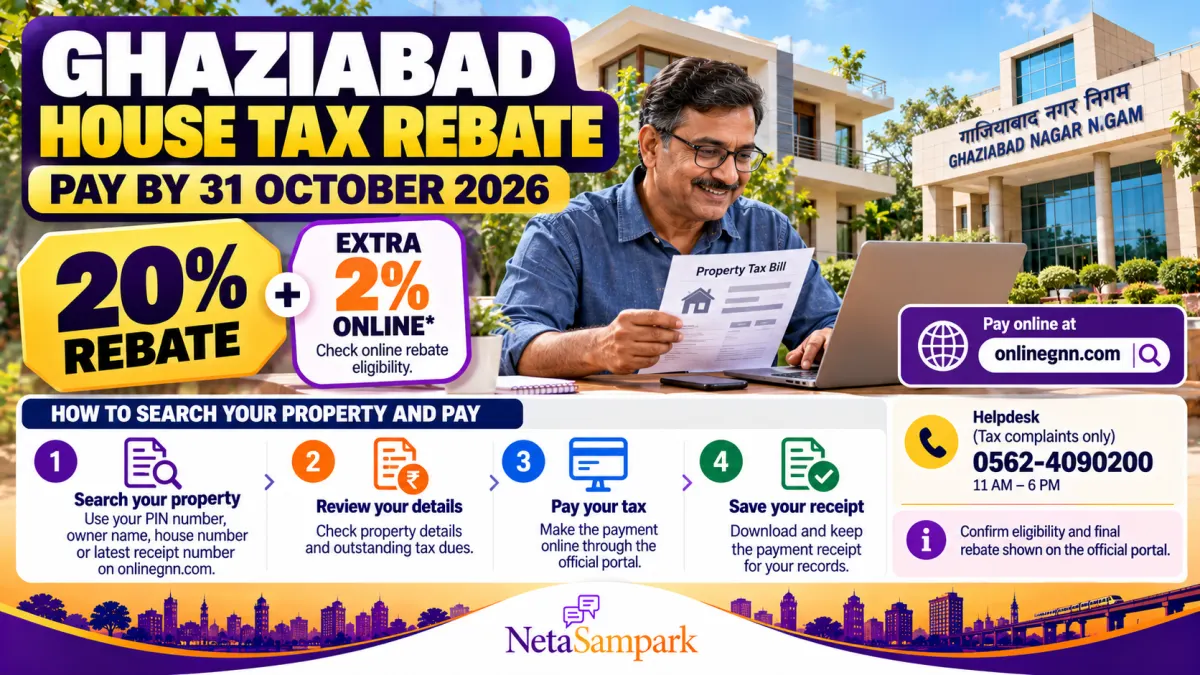
Property owners in Ghaziabad have until 31 October 2026 to pay their house tax and take advantage of the extended rebate window announced by Ghaziabad Nagar Nigam. The reported offer includes a 20% rebate and an additional 2% discount for eligible online payments, subject to the municipal body's applicable conditions.
If you own a house, flat or other taxable property within the municipal corporation area, this is a good time to check your outstanding dues, verify your property details and complete payment through the official portal.
You do not necessarily need your latest tax bill to start. The municipal website allows property searches using details such as your property PIN, owner's name, house number or latest receipt number.
This guide explains how to find your property, verify the amount due, understand the rebate and pay safely online.
1 What Is the Ghaziabad House Tax Rebate?
Ghaziabad Nagar Nigam collects property-related taxes from properties within its jurisdiction. The municipal corporation periodically offers rebates to encourage property owners to pay within the specified period.
According to a recent report by Navbharat Times, the deadline for the current house-tax rebate window has been extended to 31 October 2026. The report states that the extension is intended to give more property owners an opportunity to pay their dues and benefit from the available discount.
The reported offer includes:
- 20% house-tax rebate under the applicable municipal scheme.
- An additional 2% discount for eligible online payments, subject to the portal's terms and the rebate displayed for your property.
The exact amount payable can depend on the property's assessment, outstanding arrears, interest and eligibility under the applicable scheme. Check the final amount displayed on the official portal before making payment.
Sources: Ghaziabad Nagar Nigam's official tax portal and Navbharat Times — Ghaziabad property-tax rebate deadline.
Important: Do not assume that every component of a property-tax bill receives the same percentage discount. Verify the rebate and final payable amount shown for your property.
2 Who Can Benefit From the Rebate?
The offer is relevant to property owners who have outstanding house-tax dues payable to Ghaziabad Nagar Nigam and whose properties qualify under the applicable rebate conditions.
Before paying, check:
- Whether your property falls within Ghaziabad Nagar Nigam's jurisdiction.
- Whether the portal shows an outstanding amount for your property.
- Whether the 20% rebate is reflected in the applicable calculation.
- Whether the additional online-payment discount is available for your assessment.
- Whether arrears, interest or other charges are included in the total.
If your property falls under a different local body, such as Loni Nagar Palika Parishad, do not assume that the Ghaziabad Nagar Nigam offer applies to you. Confirm the responsible authority before paying.
The official Ghaziabad district website links property-tax users to the Nagar Nigam's portal: Ghaziabad District — Property Tax.
3 How to Search Your Property on onlinegnn.com
You can search for your property through the official Ghaziabad Nagar Nigam tax portal.
Step 1: Open the official property-search page
Visit:
https://onlinegnn.com/SearchHouseDetailsF.aspx
This is the municipal portal's View House Detail page.
Step 2: Choose a search method
The portal allows property searches using available details such as:
- PIN number: The property PIN shown on your tax bill.
- Owner's name: Search using the registered owner's name.
- House number: Enter the relevant house number.
- Latest receipt number: Use the reference from a previous property-tax receipt.
The available search fields and combinations are displayed on the portal.
Step 3: Enter the details carefully
Use the spelling and property details recorded in your municipal documents. If the owner's name is common, a PIN number or receipt reference may help identify the correct property.
Step 4: Complete any verification shown
Follow the portal's instructions, including any captcha or verification requirement.
Step 5: Open the matching property record
Check the displayed owner, house number, ward, zone and locality before proceeding. If more than one result appears, verify the details rather than selecting the first result automatically.
What if you cannot find your property?
Try the following:
- Check whether the PIN number has been entered correctly.
- Search using the house number or latest receipt number.
- Try the owner's name as recorded in municipal documents.
- Contact the tax helpdesk if the property still does not appear.
- Ask the relevant zonal office to verify the property record if the details are incorrect.
Do not create a duplicate property record simply because a search returns no result. First confirm whether the existing assessment is registered under another name, number or ward.
4 How to Check Your Outstanding Property-Tax Dues
After locating your property, review the assessment and payment information carefully.
Depending on the record and portal screen, you may need to examine:
- Property identification details
- House-tax amount
- Water-tax amount
- Sewer-tax amount
- Outstanding arrears
- Interest or other applicable charges
- Rebate or discount
- Total amount payable
The portal's self-assessment facility also displays categories such as house tax, water tax, sewer tax, arrears and interest. These amounts should be checked separately rather than treating the entire bill as one charge.
Official facility: Ghaziabad Nagar Nigam — Property Self-Assessment.
Why should you verify the bill before paying?
A property-tax record may contain outdated ownership information, a wrong house number, an incorrect area or a discrepancy in the assessment.
If you notice an error:
- Save a copy of the displayed assessment.
- Keep your earlier tax receipts and relevant property documents ready.
- Contact the municipal tax office or the appropriate zonal office.
- Ask how the discrepancy can be corrected and whether payment should be made before or after the correction.
If you are close to the deadline, ask the tax office how the correction process affects eligibility for the rebate. Do not assume that a pending correction automatically extends the payment deadline.
5 How to Pay Ghaziabad House Tax Online
Once you have confirmed the correct property and amount due, follow the payment instructions on the official portal.
Step 1: Open the official portal
Go to onlinegnn.com.
Use the property-tax payment option shown on the website.
Step 2: Locate your property
If you have not already done so, use the property-search page to find your property record.
Step 3: Review the amount payable
Check the assessment, outstanding dues and rebate shown by the portal. Make sure the property details are correct.
If the displayed amount differs from your earlier bill, confirm the reason with the tax office before proceeding.
Step 4: Proceed to the payment gateway
Follow the portal's payment instructions and review the amount before authorising the transaction.
The portal lists online payment options through its payment gateway. The methods available to you will be shown during the payment process.
Step 5: Complete the transaction
Use your preferred supported payment method and follow the payment provider's authentication steps.
Never share your banking password, card PIN or OTP with another person claiming to help you pay property tax.
Step 6: Download your receipt
After a successful transaction, save the payment receipt and transaction reference.
Ghaziabad Nagar Nigam's published online-payment terms state that payment confirmation receipts are generated automatically upon successful transactions. The terms also advise users to retain a copy for their records.
Official reference: Ghaziabad Nagar Nigam — Online-payment terms.
6 How to Confirm That Your Payment Has Been Recorded
Do not stop after seeing a payment-success message from your bank or payment app. Confirm that the transaction has been recorded in the municipal system.
You can use the portal's receipt and payment facilities:
- View Deposit Amount — search using your property PIN or Ghaziabad Nagar Nigam receipt number.
- Official Ghaziabad Nagar Nigam portal — access the available receipt and payment-ledger facilities.
Keep the following information:
- Property PIN
- Payment date
- Amount paid
- Bank or payment reference number
- Municipal receipt number
- Downloaded receipt
What if money was deducted but the receipt was not generated?
Do not immediately pay a second time.
First check your payment status and the municipal deposit record. If the payment is still unclear, contact the helpdesk with your property PIN, transaction reference and payment date.
The portal's published terms state that online payments are final and that cancellation or refunds are generally not available, subject to the stated policy and any applicable exceptions. Check the current refund policy and seek clarification before repeating a transaction.
7 What If Your Property Details Are Wrong?
If the property record contains an error, you may need to contact the tax office or use the relevant service available through the portal.
Examples include:
- Incorrect owner name
- Incorrect house number or locality
- Incorrect ward or zone
- Disputed property area
- Missing previous payment
- Incorrect arrears or interest
- Ownership change not reflected in the municipal record
Ghaziabad Nagar Nigam provides an online mutation facility for eligible ownership-related changes. However, mutation and property-tax payment are different processes.
You can access the official portal to find the relevant service: Ghaziabad Nagar Nigam.
If you need help, the municipal tax helpdesk is listed as:
Phone: 0562-4090200
Office hours: 11:00 AM–6:00 PM
Purpose: Tax complaints only
The municipal corporation's address is Navyug Market, opposite the Old Bus Stand, Ghaziabad, Uttar Pradesh 201001.
8 Common Mistakes to Avoid Before 31 October
Waiting until the last day: Website traffic or payment-gateway problems may delay completion. Pay early enough to resolve any issue.
Using an unofficial payment link: Start from the official onlinegnn.com website rather than a link received through an unknown message.
Paying against the wrong property: Confirm the owner, house number, ward and locality before making payment.
Assuming every charge receives the rebate: Check the calculation and eligibility shown on the portal.
Ignoring old arrears: Review the full outstanding amount, including interest and other applicable charges.
Failing to save the receipt: Keep a downloaded copy and the transaction reference for future verification.
Paying twice after a failed screen: First check whether the transaction was completed and recorded.
Frequently Asked Questions
What is the last date to pay Ghaziabad house tax under the extended rebate window?
The reported extended deadline is 31 October 2026. Check the official municipal portal for the current eligibility conditions and any subsequent notice.
Is the rebate 20% plus an extra 2% for online payment?
Recent reporting describes a 20% rebate and an additional 2% online-payment discount. Your actual benefit depends on the applicable scheme and the calculation displayed for your property. Verify the final amount on the official portal.
Can I search for my property without a PIN number?
Yes. The official property-search page says that searches can also be made using the owner's name, house number or latest receipt number, subject to the fields available on the portal.
What if my property is not listed?
Check the details again and contact the municipal tax helpdesk or relevant zonal office. Avoid creating a duplicate assessment without first verifying the existing record.
Can I download the payment receipt?
The municipal portal provides receipt and payment-record facilities. Save the receipt generated after successful payment and use the deposit-search facility if you need to verify the recorded amount.
Does this offer apply to every property in Ghaziabad district?
Not necessarily. The offer relates to Ghaziabad Nagar Nigam's tax scheme. Properties under another municipal authority may have different rules and deadlines.
Final Checklist Before Paying
- Open the official portal: onlinegnn.com.
- Search using your property PIN, owner's name, house number or latest receipt number.
- Verify the property details and assessment.
- Check outstanding tax, arrears and interest.
- Confirm the applicable rebate and final amount.
- Complete payment through the official gateway.
- Download the receipt and save the transaction reference.
- Verify that the payment appears in the municipal record.
- Contact the tax helpdesk if the property record or payment status is incorrect.
Conclusion
Ghaziabad property owners have a reported extension until 31 October 2026 to pay house tax under the current rebate window. The offer includes a reported 20% rebate and an additional 2% online-payment discount for eligible taxpayers.
The easiest starting point is the official Ghaziabad Nagar Nigam property-search page. Locate your property, check the full assessment, confirm the discount and complete payment through the official portal.
Most importantly, save your receipt and verify that the payment has been recorded. If your property is missing, the amount looks incorrect or the payment does not appear, contact the municipal tax helpdesk before making another payment.
Official resources:
- Ghaziabad Nagar Nigam tax portal
- Search property details
- Check deposited amount
- Ghaziabad district property-tax information
Rebate information and the deadline are based on reporting available in October 2026. Confirm the applicable discount and final payment amount on the official portal before completing your transaction.