
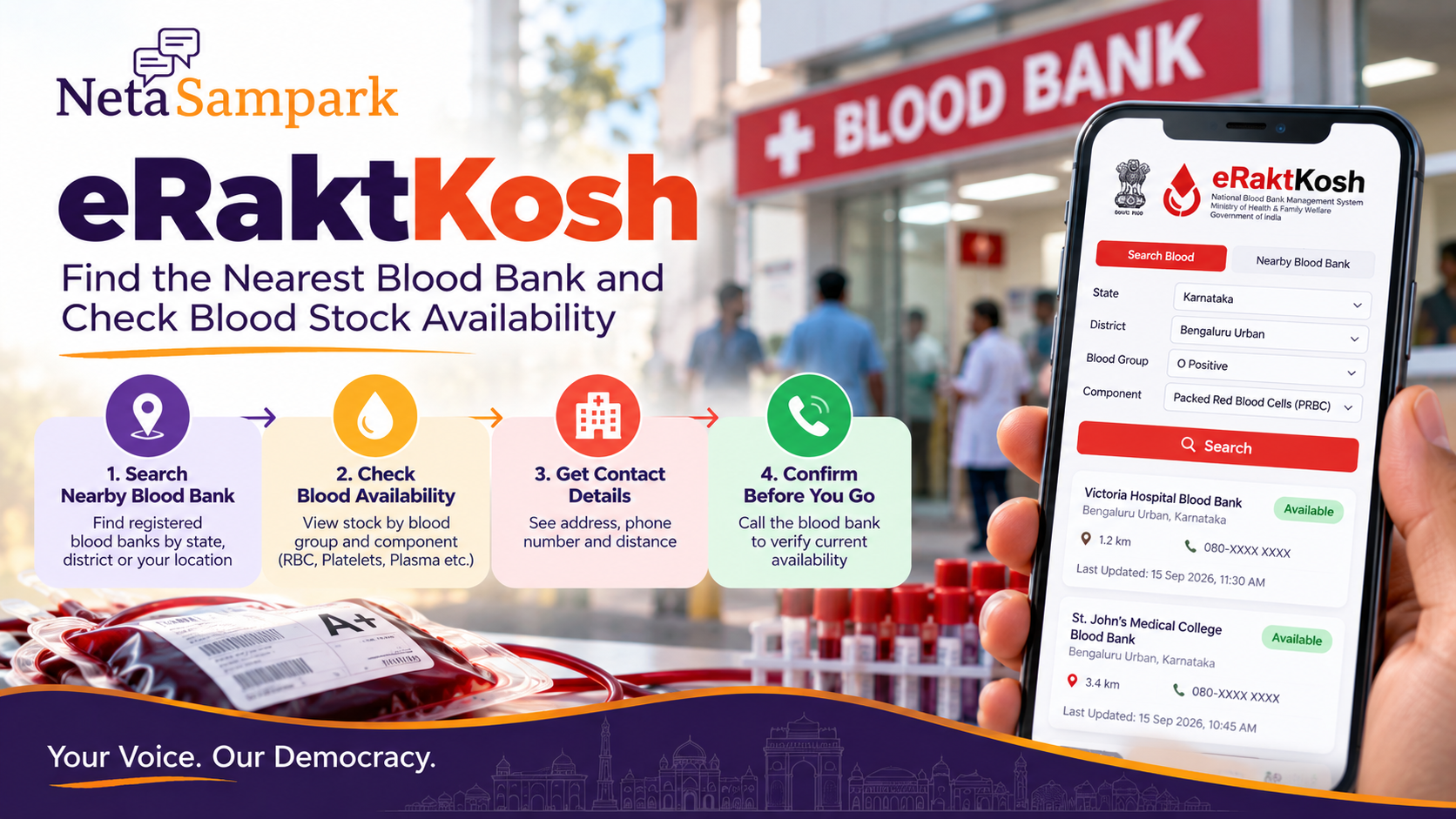
Quick take: eRaktKosh, the Government of India’s centralized blood-bank management platform, lets citizens search for nearby blood banks and check reported blood/component availability by location and blood group. The official portal supports searches by state, district, blood group, component and location, while its nearby-blood-bank service can show addresses, phone numbers and distance. (e-Raktkosh)
This is a find-and-verify blood availability guide — not a blood-donation eligibility guide and not a hospital-admission guide.
Why check before leaving home
In an urgent situation, don't drive to five blood banks asking the same question.
Use eRaktKosh to:
- identify nearby blood banks
- check the required blood group
- check the required component
- note the reported availability
- record the blood bank's phone number
- call before travelling
The portal itself warns that availability information is supplied by blood banks and should be verified with the relevant department/source. (e-Raktkosh)
Step 1 — Open the official eRaktKosh service
Use the official eRaktKosh portal:
eRaktKosh — Government of India
Look for Blood Availability or Nearby Blood Bank.
eRaktKosh also provides these services through UMANG.
Step 2 — Search blood availability
Open Blood Availability.
The current service allows filtering by:
- State
- District
- Blood group
- Component
- Location
The results can show the blood bank, category, availability and last-updated information. (e-Raktkosh)
For example:
Karnataka → Bengaluru Urban → O Positive → Packed Red Blood Cells
Don't search only for "blood." Select the component your hospital has actually requested.
Whole blood vs component
This distinction matters.
A hospital may ask for:
- Whole Blood
- Packed Red Blood Cells
- Platelets
- Fresh Frozen Plasma
- Cryoprecipitate
eRaktKosh's FAQ specifically notes that the stock search defaults to Whole Blood, and that users can change the component to Platelet or another relevant component before searching. (e-Raktkosh)
Ask the treating hospital exactly what component and quantity are required.
Don't substitute a different component based on a WhatsApp message.
Step 3 — Find the nearest blood bank
Use Nearby Blood Bank if you don't already know where to go.
The official search can provide:
- Blood-bank name
- Address
- Phone
- Category
- Distance
- Type
The results can also be displayed on a map. (e-Raktkosh)
If you're using the eRaktKosh mobile app, its FAQ says location access can be used to produce a distance-wise list of nearby blood banks. (e-Raktkosh)
Don't confuse "nearest" with "has stock"
These are two different searches.
Nearest blood bank:
Where can I go?
Blood availability:
Which registered blood centre is reporting the required blood/component?
Your nearest centre may not have the required stock.
So use both searches.
Step 4 — Check the last-updated time
This is one of the most important details on the result.
A result saying available is not the same as a guarantee that a unit is physically waiting for you.
eRaktKosh displays the last updated information, and its FAQ also refers to checking the last-updated date or LIVE status. (e-Raktkosh)
Before travelling:
Screenshot the result → call the blood bank → confirm availability.
What to say on the phone
Keep it simple:
“I'm looking for [blood group], [component], for a patient at [hospital]. eRaktKosh shows availability. Could you please confirm the current stock and tell me what documents or replacement-donor requirements apply?”
Ask:
- Is the stock currently available?
- Is it the required component?
- How many units are available?
- Is there any patient-specific reservation?
- Do I need a hospital requisition?
- Is a replacement donor required under the blood bank's procedure?
- What should the attendant bring?
Write down the person's name or counter number if useful.
Hospital requisition comes first
If a patient is already admitted, follow the hospital blood-bank/transfusion desk's instructions.
The hospital may tell you:
- exact blood group/component required
- number of units
- whether a requisition is needed
- whether replacement donation is required
- where the family should report
Don't independently decide that a different blood group or component is "close enough."
Blood transfusion decisions belong to qualified medical professionals and the blood bank.
A positive, O negative, platelets — don't guess
Blood groups are not interchangeable simply because someone online says a particular group is "universal."
For a specific patient, follow the hospital/blood-bank requirement.
If the doctor says:
“2 units packed red blood cells”
don't search only for:
“2 units blood.”
The component matters.
Emergency situation?
If someone has severe bleeding, collapse, major trauma, breathing difficulty or another medical emergency:
Get emergency medical care first.
Don't delay emergency treatment while trying to solve the eRaktKosh search.
For an already-admitted patient, ask the hospital's emergency/transfusion desk to coordinate the requirement while a family member checks availability.
What eRaktKosh can and cannot tell you
eRaktKosh can help withIt does not guaranteeNearby blood-bank locationsA unit will be reserved for youReported blood availabilityStock will remain available when you arriveBlood group/component searchPatient-specific transfusion suitabilityBlood-bank contact informationThat the hospital will accept an independently sourced unitLast-updated informationThat every centre has updated its stock instantly
The platform describes its availability data as information received from blood banks and advises users to verify it. (e-Raktkosh)
If the website shows no stock
Don't immediately assume there is no blood anywhere.
Try:
1. Expand the district/location search.
2. Check the exact component.
3. Search nearby blood banks separately.
4. Call relevant blood banks directly.
5. Ask the treating hospital's blood bank/transfusion desk for alternatives.
The official eRaktKosh site has separate Blood Availability, Blood Bank Directory, Nearby Blood Bank, and Thalassemia Request services. (e-Raktkosh)
Save these details before leaving
Take a screenshot containing:
- Blood group
- Component
- Blood-bank name
- Availability
- Last updated
- Phone number
- Address
Then call the centre.
A screenshot is useful for navigation, but don't treat an old screenshot as proof of current stock.
Privacy and location
The eRaktKosh privacy policy says the mobile app uses location to find nearby blood banks and that users can turn location services off if they prefer. (e-Raktkosh)
Use the official app/site rather than giving your Aadhaar, OTP or other unnecessary information to somebody claiming they can "unlock blood availability."
Family emergency drill
Save this mini checklist in your family's phone:
Patient: ______
Hospital: ______
Blood group: ______
Component: ______
Units required: ______
Doctor/blood-bank contact: ______
eRaktKosh result: ______
Blood-bank confirmation: ______
One person handles the hospital.
One person checks eRaktKosh.
One person handles travel/donor coordination if the blood bank requires it.
That is much better than six relatives simultaneously calling random numbers.
If you are looking to donate instead
eRaktKosh also provides blood-donation camp information, donor registration and blood-bank appointment services. (e-Raktkosh)
For donor registration, use the official eligibility and screening process rather than assuming you're eligible from an internet checklist.
The platform's current donor-registration page, for example, requires age and other donor information and directs prospective donors through the blood-bank process. (e-Raktkosh)
The 5-minute blood-stock routine
1. Ask the hospital: group + component + units.
2. Open eRaktKosh.
3. Search availability.
4. Find nearby centres.
5. Call and confirm before travelling.
Then follow the blood bank's instructions.
How NetaSampark helps
Blood availability is a national digital-service problem with a very local last mile.
Use NetaSampark to explore citizen-service guides, while using eRaktKosh and the hospital/blood bank for the actual medical coordination.
Be Informed. Be Heard.