
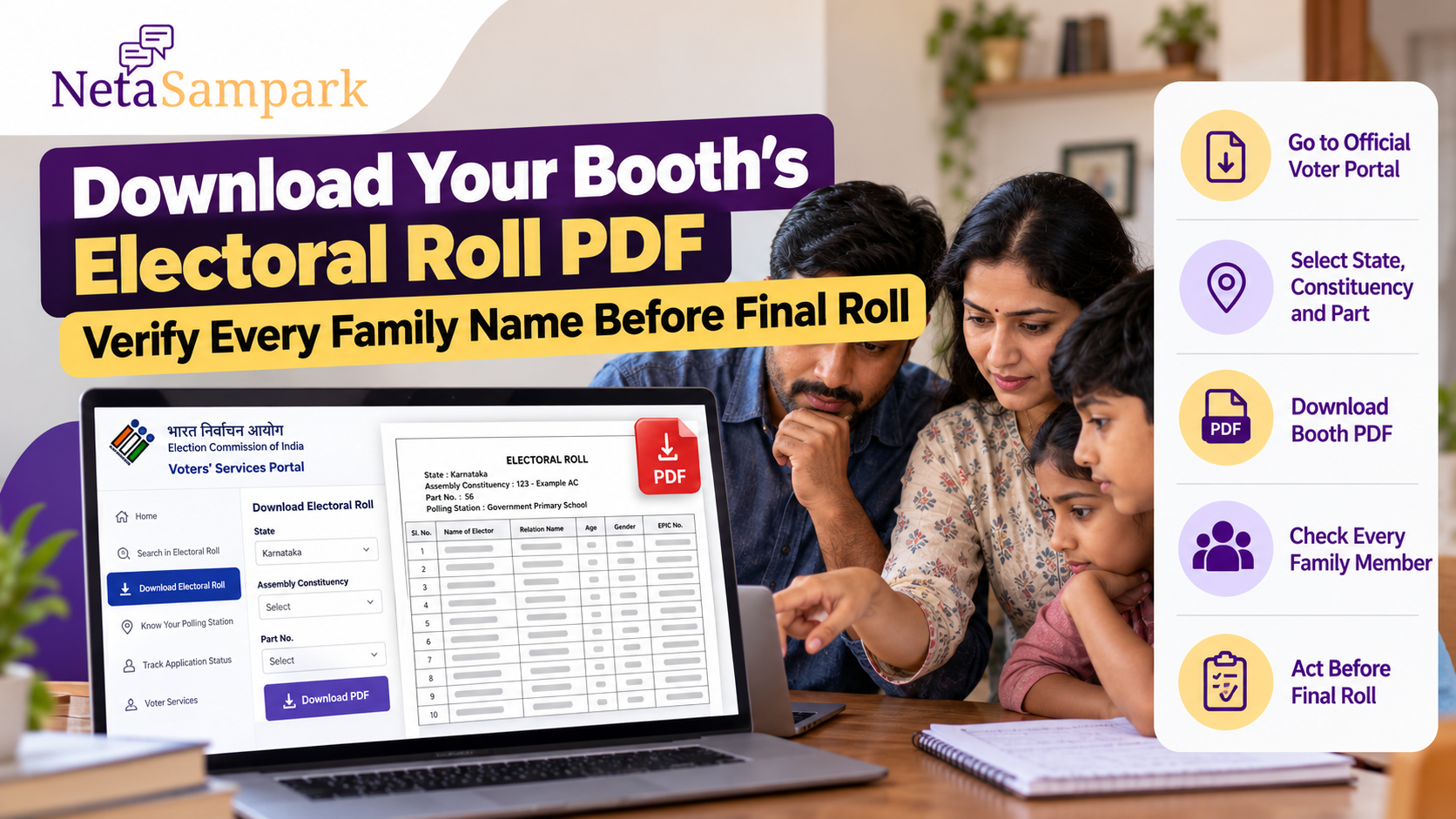
If your area is going through the Special Intensive Revision (SIR) of electoral rolls, checking the electoral-roll PDF for your polling booth is a useful way to verify that every eligible member of your family is correctly listed.
The Election Commission of India’s Voters’ Services Portal provides a “Download Electoral Roll” facility, including electoral-roll PDFs and SIR draft-roll downloads for states covered by the exercise. (Voter Services)
A booth-level PDF can be particularly useful because you can check the names of other members of your household, not just your own entry.
Why Check the Booth PDF?
Searching for your own name online is useful, but it may not reveal problems affecting other family members.
For example, while checking the roll you may notice:
- Age or other details appear incorrect
- A family member has been assigned to a different part or polling station
- A deceased person's name is still present
- A person who has shifted permanently is still listed at the old address
The ECI advises voters to verify their names in the electoral roll. Its voter guidance states that you can vote only if your name appears in the voter list/electoral roll. (Election Commission of India)
What Is a Booth or Part PDF?
An electoral roll is organised into Parts, which generally correspond to a particular polling area and polling station.
A published electoral-roll PDF identifies the relevant Part No., polling station and polling area, followed by the elector entries. An ECI-hosted 2026 SIR final-roll PDF, for example, identifies the Part number, polling station and the elector serial-number range for that part. (Voter Services)
This is why knowing your Part Number and Polling Station makes the PDF much easier to locate.
How to Download Your Electoral-Roll PDF
Step 1: Open the official ECI voter portal
Go to the Election Commission's Voters' Services Portal.
The portal currently provides a dedicated Download Electoral Roll service. (Voter Services)
Avoid downloading voter-list PDFs from random websites, Telegram channels or forwarded WhatsApp links when the official source is available.
Step 2: Select “Download Electoral Roll”
Choose the electoral-roll download option.
The ECI's current download page provides fields for selecting the State and Year of Revision, along with options to download the SIR draft roll for an entire Assembly Constituency or selected PDFs. (Voter Services)
Step 3: Select your state
Choose the state where you are registered as an elector.
The available roll and SIR options can differ according to the state's revision schedule.
Step 4: Select the relevant revision/year
Choose the electoral-roll revision that you need to check.
For SIR, make sure you distinguish between the draft roll and the final electoral roll. They are different stages of the revision process.
Step 5: Identify your Assembly Constituency and Part
Use your existing voter information to identify:
If you do not know your polling station or Part details, the ECI voter-services system provides a facility to search for polling-station information. (Election Commission of India)
Step 6: Download the PDF
Select the relevant Part and download the electoral-roll PDF.
Depending on the state and revision stage, the PDF may contain multiple pages covering the electors in that polling area.
Save the file on your phone or computer so that you can check it carefully.
How to Check Every Family Member
Do not stop after finding your own name.
Make a simple household checklist:
Family memberName present?Details correct?EPIC checked?Self☐☐☐Spouse☐☐☐Parent 1☐☐☐Parent 2☐☐☐Adult child☐☐☐Other eligible family member☐☐☐
Compare the names against the electoral-roll PDF one by one.
Pay particular attention to elderly family members, first-time voters and people whose address or personal details have changed.
Don't Search Only by Exact Spelling
Names in electoral rolls can contain spelling or transliteration differences.
The ECI's SIR search facility specifically warns that spelling can vary between older and current electoral-roll records and recommends trying different name variations when a search does not return the expected result. (Voter Services)
For example, if a family member's name is commonly written in two different ways in English, try both versions.
Also check the relative's name, age and other identifying details rather than relying on the spelling alone.
Check the EPIC Number Too
If the name appears in the PDF, compare the EPIC/Voter ID number with the family member's existing voter record.
This can help distinguish between:
The ECI's electoral-roll search service allows electors to search by EPIC number, elector details or mobile number. (Electoral Search)
What If a Family Member's Name Is Missing?
Do not assume that the person has permanently lost their place on the electoral roll simply because the name is absent from one PDF.
- Whether you downloaded the correct Part.
- Whether the person has been assigned to another polling station or Part.
- Whether the name appears under a different spelling.
- Whether the relevant roll is a draft roll or final roll.
The ECI's voter-services system also provides application-status and electoral-roll services that can help establish what happened to an entry. (Election Commission of India)
What If the Name Is in the Draft Roll but Something Is Wrong?
Act during the applicable claims and objections period.
SIR is conducted in stages: house-to-house work, publication of the draft electoral roll, a period for claims and objections, disposal of those cases and publication of the final roll.
The dates are state-specific. For example, the ECI's current 2026 schedule lists different draft-roll, claims/objections and final-roll dates for different states. (Election Commission of India)
Therefore, don't rely on a deadline mentioned in an old social-media post. Check the schedule applicable to your state and constituency.
What If a Deceased Person's Name Is Still Listed?
If someone has died, their name should not remain on the electoral roll merely because the family has not checked the record.
If you find a deceased person's entry, use the prescribed electoral-roll correction/deletion process rather than attempting to alter the PDF yourself.
The ECI provides an official deletion application facility for objections to proposed inclusion/deletion of names in the electoral roll. (Election Commission of India)
Keep the relevant details of the entry ready when submitting a request.
What If Someone Has Moved House?
A person who has permanently shifted residence should check whether their electoral registration needs to be updated.
Don't assume that having an Aadhaar card or other address document automatically changes the electoral roll.
The ECI provides an online service for shifting of residence and correction of entries in the existing electoral roll. (Election Commission of India)
Draft Roll vs Final Roll: Know What You Are Looking At
This distinction is important.
Draft Electoral Roll
The draft is published before the claims-and-objections process is completed.
If you find an error or missing eligible elector at this stage, the prescribed correction, inclusion or objection process can still be used during the applicable period.
Final Electoral Roll
The final roll is published after the relevant revision process and disposal of claims and objections.
The ECI's published SIR schedule explicitly separates draft-roll publication, claims and objections, notice/disposal and final-roll publication. (Election Commission of India)
So when downloading a PDF, check its title and revision details rather than assuming every PDF represents the final voter list.
Keep a Copy of the PDF
Once you have downloaded the correct booth/Part PDF, save it.
This can make it easier to compare the draft and final rolls later.
What Details Should You Compare?
For each family member, check as many of these as applicable:
Do not assume that a small spelling or age difference is harmless. If the information appears incorrect, check the prescribed correction procedure.
You Can Also Search Your Name Online
The PDF is not the only way to check your registration.
The ECI's electoral-roll search allows voters to search by EPIC number or elector details, while the Voters' Services Portal also provides polling-station information and other voter services. (Election Commission of India)
Using both the online search and the booth PDF can provide a more complete check.
A Simple 5-Minute Family Verification
You can complete a household check in five steps:
Confirm your Assembly Constituency and polling station.
Use the official ECI electoral-roll download facility.
Write down every eligible family member who should appear.
Compare name, EPIC number, relative's name and other available details.
If something is missing or incorrect, use the applicable claims, objections or correction process before the state-specific deadline.
Don't Wait for Election Day
The purpose of checking the electoral roll now is to identify problems before the revision process is complete.
The ECI's own voter guidance says that a person can vote only if their name appears in the electoral roll. (Election Commission of India)
If you find an issue, don't wait until polling day to discover it.
Download the correct booth PDF, check every eligible family member, keep a record of any discrepancy and use the official ECI process applicable to your case.
One household check today can help you catch a missing or incorrect entry before the final electoral roll is published.